

Every tool call your agent makes carries someone’s authority. When it searches documents, the document server has to decide whose documents it may return. When it sends an email, the mail server has to decide whether this send is allowed and for whom. If the answer at every server is “the agent’s service account”, each server sees one caller doing everything, and the employee who asked has dropped out of the picture.
Part 2 got the employee as far as the agent: the backend checks their Entra token, binds the session to tid:oid (the tenant and object IDs from that token), and calls Agent Runtime as itself. This part follows the agent’s calls out to its four MCP servers from Part 1 and decides, one server at a time, whose authority each call runs on. The answer isn’t the same for all four, and getting that mix right matters more than any single choice. Five of the checks at the end should hold a release.
Four servers, four decisions
| Server | Runs as | How the token gets there | Why |
|---|---|---|---|
| Documents (company) | The employee | The backend gets an on-behalf-of token for this server and passes it to the agent with the query | Results should be what the employee could read themselves |
| Email (company) | The employee who approved the send | The agent only proposes a send. After approval, the backend gets an on-behalf-of token from the approver’s sign-in and sends the message itself | The agent never holds a mail token, and the mail server knows who approved |
| BigQuery (Google) | The agent | The agent’s Agent Identity, Google’s per-agent workload identity | The tasks read a fixed set of tables, and making rows follow an Entra-only employee needs plumbing this design avoids |
| Ticketing (vendor) | The employee | Google’s Agent Identity auth manager holds the employee’s vendor token after they consent at the vendor | Only the employee can grant access to their vendor account |
Table 1. Whose authority each MCP server sees, and why.
The documents and mail servers then apply their own rules to a named employee and log that employee. An injected agent can’t read documents its user couldn’t, as long as the documents server enforces the store’s access rules, and it has no mail token to send with. Some exposure remains (Table 2).
| What remains | How long it lasts | Where it’s covered |
|---|---|---|
| Whoever controls the backend, or can add a credential to its registration, can act as recently active employees at the company’s servers | Until revoked. Each refresh token lasts about 90 days, and using one returns a fresh one (Microsoft, 2025e) | The backend |
| The documents token goes to the agent, against Microsoft’s rule that a middle tier’s token goes only to its audience, so the documents server can’t send its own claims challenge mid-query (Conditional Access policies on its enterprise app still apply when the backend mints the token) | For every triage query | Documents |
| BigQuery’s logs show only the agent | For every query | BigQuery |
| Code in the agent’s process can use the documents and vendor tokens it holds, including posting ticket comments as the employee, in both triage and ticket reply sessions | For each token’s lifetime | Documents, Ticketing |
| One Agent Identity principal reaches the model, sessions, BigQuery, and the vendor tokens | Until the agent is contained | BigQuery |
| The agent, and anyone else who can retrieve credentials or reconfigure the auth provider, can get any consented employee’s vendor token | Until the employee’s authorization is revoked | Ticketing |
| A compromised agent can finish a vendor consent without the backend, and an employee can consent with a personal vendor account | Until found | Ticketing |
| A documents token the agent used stays valid | 60 to 90 minutes by default (Microsoft, 2026b) | Dropping a token doesn’t revoke it |
Table 2. What this design leaves, and for how long.
Some of this rests on things we haven’t tested on a deployed agent: that Agent Runtime passes the extra tool_tokens argument through, that Agent Platform Sessions trims temp: state the way the in-memory service does, that ADK’s mTLS path reaches BigQuery as the agent, and the Workforce Identity Federation route for per-employee rows. The first two are release-blocking checks.
Three ways a call can carry authority
| The agent’s own identity | The employee, delegated | The backend’s app identity | |
|---|---|---|---|
| What the server sees | One principal per agent | The employee, and the app that obtained the token | One principal for every employee |
| What limits the call | Grants to the agent | The employee’s own access, narrowed by scope | Grants to the backend |
| Who did it, in the server’s logs | The agent | The employee, through the backend | The backend |
| What it costs | The agent can read everything the task allows, whoever asked | A token per employee that someone has to obtain, carry, and drop | The server can’t tell employees apart |
| Used here for | BigQuery | Documents, email, and ticketing | Nothing |
Table 3. Three sources of authority for a tool call.
OAuth’s token exchange RFC distinguishes impersonation from delegation. With impersonation, “[f]or all intents and purposes, when A is impersonating B, A is B within the context of the rights authorized by the token” (Jones et al., 2020). With delegation, A keeps its own identity and the token carries both parties, and the RFC defines an act claim naming the acting party, nested for chains. Entra’s on-behalf-of flow is a JWT bearer grant with a Microsoft parameter, so the comparison is only an analogy. Microsoft refers to it as delegation (Microsoft, 2025c), and the token does name two parties: the employee as subject, and the backend in azp, “[t]he application ID of the client using the token” (Microsoft, 2026a). Microsoft’s access token claims reference lists no act claim (Microsoft, 2026a), so nothing documented in the token records a chain. The front end that first got the employee’s token has dropped out, and the agent never appears. The documents and mail servers see “the employee, through the backend”, and a token the backend got for some other feature would look the same. That’s why the Entra setup below gives the agent feature its own registration if the backend does anything else.
The third column is a reasonable default for many integrations, since it needs no per-user plumbing. For this agent it’s the wrong trade. A mail server that only ever sees the backend can’t apply a rule about who may email a customer, and its log can’t say who asked. OWASP’s agentic Top 10 covers that kind of gap under ASI03, Identity and Privilege Abuse (OWASP, 2025).
What MCP’s authorization spec asks of each side
MCP’s authorization spec, version 2026-07-28, is optional, and stdio servers are told to take credentials from the environment instead (Model Context Protocol, 2026a). For HTTP servers, three of its rules matter here. A server publishes where to get a token, using protected resource metadata (RFC 9728). A client names the server it wants a token for, using resource indicators (RFC 8707), and “MCP servers MUST validate that access tokens were issued specifically for them as the intended audience” (Model Context Protocol, 2026a). And a server that calls an upstream API gets its own token for it, and “MUST NOT pass through the token it received from the MCP client” (Model Context Protocol, 2026b). The audience rule is the one to check first in any server you inherit.
The core spec doesn’t say how a server, or an agent, gets a token for a user it isn’t talking to directly. MCP has an optional Enterprise-Managed Authorization extension, in which the MCP client exchanges the identity assertion it got at single sign-on for an “Identity Assertion JWT Authorization Grant” from the company’s identity provider, then trades that for an access token from the MCP server’s authorization server (Model Context Protocol, 2026d). It assumes the MCP client signed the user in. Here the MCP client is the agent, which never sees the employee’s sign-in, and the extension’s launch post names Okta as “the first supported identity provider” (Carleton, 2026). This part uses Entra’s on-behalf-of flow instead.
Google says its remote MCP servers “implement the MCP authorization specification 2026-07-28”, but they “don’t support Dynamic Client Registration or OAuth Client ID Metadata Documents” (Google Cloud, n.d.d). A client needs a pre-registered OAuth client or a token it already holds. The spec puts pre-registration first in its client priority order and now deprecates Dynamic Client Registration (Model Context Protocol, 2026c), so that isn’t unusual.
The company’s own servers use Entra, which doesn’t take the resource indicator. Microsoft’s error reference lists “AADSTS901002: The ‘resource’ request parameter isn’t supported” (Microsoft, 2025b), and a v2.0 token request names its audience through the scope instead. The spec says clients must send resource whether or not the authorization server supports it (Model Context Protocol, 2026a). Here the token request comes from the backend’s on-behalf-of call, which sits outside the MCP client’s authorization flow. Listing 1 leaves resource out deliberately and lets the server’s aud check bind the audience. A generic MCP client pointed at an Entra-protected server may hit the same error.
Setting up Entra for the company servers
Seven token claims do most of the work below. aud is the API a token is for, which in v2.0 tokens is that API’s client ID. azp is the client that obtained the token. azpacr says how that client authenticated, with 0 for a public client, 1 for a secret, and 2 for a certificate. scp lists the delegated scopes and roles the app roles assigned to the user (Microsoft, 2026a). idtyp marks app-only tokens, and acct is 1 for guests and 0 for members of the tenant (Microsoft, 2026d).
Most of the later checks fail unless the app registrations match. For the documents and mail APIs:
- Set
requestedAccessTokenVersionto2. “If the value is null, this defaults to 1” (Microsoft, 2025g), and a v1.0 token has a different issuer and audience format, so every token would fail the checks. - Expose one delegated scope each,
Docs.ReadandMail.SendFromSupport. Make them admin-consent only, so employees can’t consent to them for some other app, and leavepreAuthorizedApplicationsempty, since “[u]sers aren’t required to consent to any preauthorized application” (Microsoft, 2025g). - On the mail API, define an app role,
Mail.SendExternal, and assign it to the people allowed to email customers. The scope says what the backend may do with the mail API, and the role says what this employee may do. - Configure
acctandidtypas optional claims on access tokens, as Part 2 did for the agent API.
For the backend, which is also the API the front end’s tokens are for:
- Use the same app registration for the API and the on-behalf-of client. The employee’s token “must have an audience (
aud) claim of the app making this OBO request” (Microsoft, 2025c). - Grant it the delegated permissions
Docs.ReadandMail.SendFromSupportwith admin consent. The backend can’t show the employee a consent prompt, which is why Microsoft points tenants at admin consent for the middle tier (Microsoft, 2025c). It also getsoffline_accesswhether you grant it or not: “[i]f any delegated permission is granted, offline_access is implicitly granted” (Microsoft, 2026f). - If the backend serves other features, give the agent feature a registration of its own, which the front end requests tokens for, so
azpnames it. - Don’t make it capable of Continuous Access Evaluation, which a client opts into by declaring the
cp1client capability (Microsoft, 2024). CAE-capable clients “may receive long-lived tokens (up to 28 hours)” where the resource supports it too (Microsoft, 2026b), and Listing 1 would refuse those anyway. - Grant it Microsoft Graph’s
profilepermission with admin consent as well. Listing 1 asks forprofile, and in on-behalf-of the middle tier “has no user interaction to get the user’s consent” (Microsoft, 2025c), so that consent has to be in place before the first request. - Give it exactly one credential, a certificate, with no secrets and no federated credentials. Microsoft’s client assertion is a short-lived JWT signed with the certificate’s key (Microsoft, 2025d), and it shows up downstream as
azpacrof2. Listing 1 signs the assertion with a key in memory. Keeping the key non-exportable means signing in something like Cloud KMS instead, which changes one function. - Give the registration no owners beyond the deployment pipeline. Owners aren’t the only way in, since directory roles and apps with permission to manage applications can add credentials too, on the application or its service principal. Check who holds those, and alert on any change to keys, secrets, or federated credentials on both objects. Anyone who can add a certificate gets tokens with the same
azpandazpacr, and a federated credential may produce the sameazpacr, so test that before treating the two as equivalent. - Turn off public client flows and leave out SPA and native redirect URIs.
- Don’t give it custom signing keys, since Microsoft says such apps “can’t be used as middle-tier APIs in the OBO flow” (Microsoft, 2025c).
Documents: the employee, with a token minted per query
The documents server sits in front of a store where access already follows the employee. If the agent searched it with its own identity, it would need read access to everything, and a triage session for one team could return another team’s runbooks. So the documents server should see the employee.
At the start of each triage query, the backend sends the employee’s token, the one Part 2 checked, to Entra’s token endpoint with grant_type=urn:ietf:params:oauth:grant-type:jwt-bearer and requested_token_use=on_behalf_of, and asks for the Docs.Read scope (Figure 1). What comes back is an access token for the documents API. Microsoft’s page says a refresh token comes only if offline_access was requested (Microsoft, 2025c), but since that permission is implicit, and MSAL’s source notes that Entra “currently still issues an RT” (Microsoft, 2026c), Listing 1 expects one and throws it away. The backend passes the access token to the agent with the query, and the agent sends it on every documents call in that query. In ADK, keys with the temp: prefix are visible for one invocation and are meant to be trimmed before the session is saved, which makes them the natural place for it.
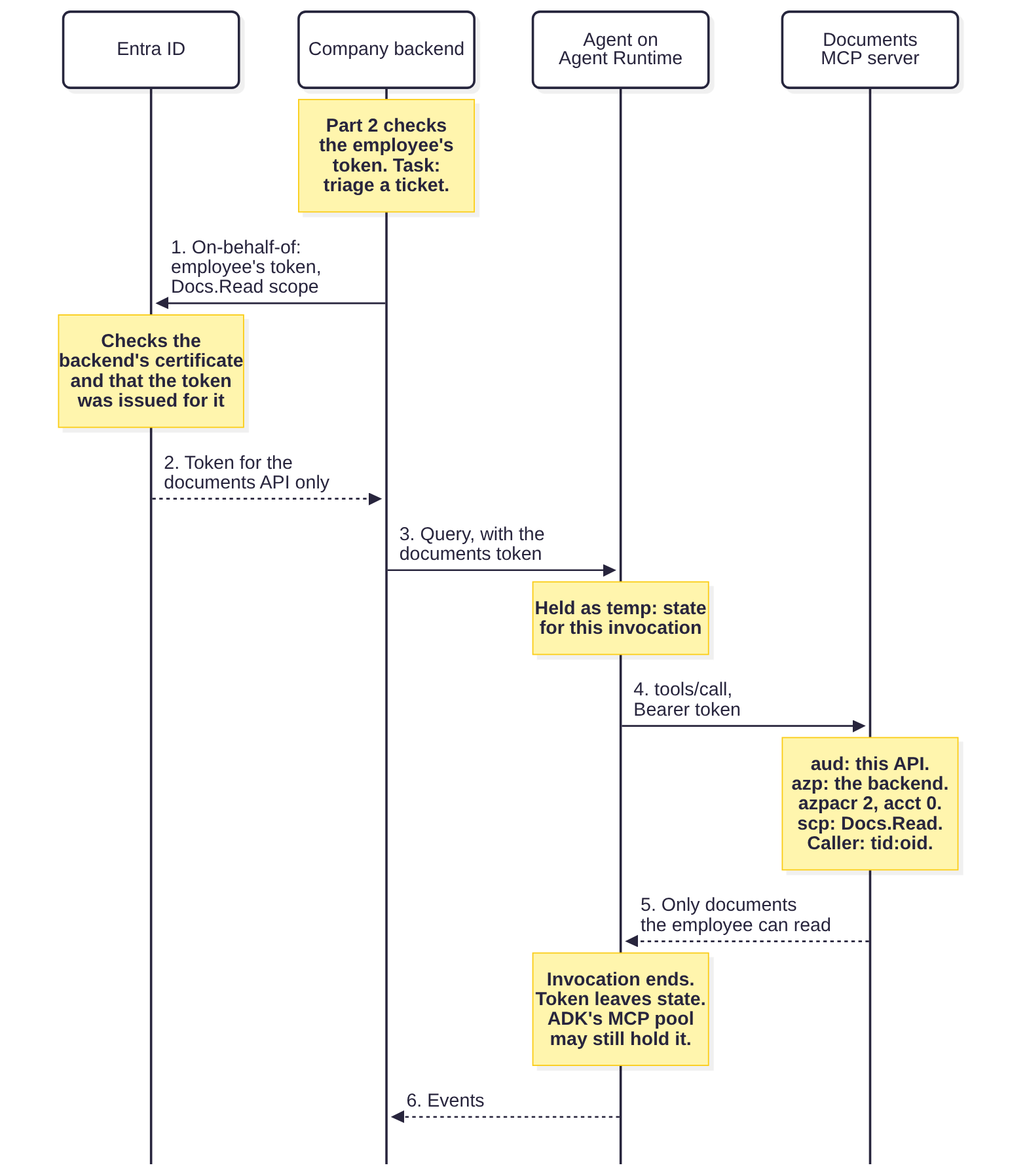
Microsoft is explicit: “DO NOT send access tokens that were issued to the middle tier to anywhere except the intended audience for the token” (Microsoft, 2025c). The rule is about the middle tier, and the agent is a separate workload the backend hands the token to, even though the token only ever goes on to the documents server. That’s the risk Microsoft warns about, and this design accepts it on purpose. One consequence Microsoft names is that the agent can’t complete a Conditional Access step-up challenge, so the documents server can’t send its own claims challenge in the middle of a query. Policies on the documents API’s enterprise app still apply when the backend mints the token, and Listing 1 passes any claims challenge from that request back to the front end. The alternative is for the backend to make the documents calls itself, as a proxy for the agent’s tool calls. That keeps employee tokens out of the agent and lets the documents server issue its own claims challenge again, at the cost of the backend seeing all tool traffic and holding more code. It’s the better choice if your documents store is more sensitive than this one, or if Conditional Access on it matters to you.
The documents server has its own hop to make. It can’t forward the employee’s token to the store behind it, so it either enforces the store’s access rules itself, with a service identity, or makes its own on-behalf-of request for the store, in which case the store sees the documents server as azp. Either way, the promise that the agent reads no more than the employee could holds only if that hop is right. None of this stops the agent leaking what it does read, which is what Part 1’s policy check and Parts 4 and 6 are about.
Email: the employee who approved, from the support mailbox
If email is giving you trouble, start with whose token the mail server sees.
Don’t give the mail server the backend’s app-only token, even though a customer reply is the company speaking. The company does speak through the mailbox: replies go out from a shared support mailbox, never from the employee’s own. But the mail server needs to know who asked, so that a send that leaks data can be traced to an employee at the mail server itself, without joining it against the backend’s and the agent’s logs.
The mail server also needs the employee’s identity to decide whether the approver may email customers. Part 2 made sure the person approving a held send owns the session and signed in recently, but neither check covers that. Entra puts app roles assigned to a user into the roles claim of their delegated tokens (Microsoft, 2026a), so a mail server that sees the employee can refuse an external send for anyone without Mail.SendExternal, approved or not. As long as the server enforces that role, an approval can’t push an external send past what the approver could have sent without the agent.
Don’t mint a mail token at the start of every query that might send, either. Part 1’s policy check runs in the agent’s process, so anything that gets past it could send with that token, as the employee. Withholding the token until release narrows the window but doesn’t close it if the token still goes to the agent, where any code running there could reuse it for its lifetime.
So the agent never gets a mail token. Its send_email tool is a local function that reaches nothing, and the proposal is the function call itself, in the session’s history. Part 2 starts every session with the untrusted-content flag set, so under Part 1’s decision table every email the agent proposes is either denied or held for approval. When an employee approves, the backend records the exact arguments the approver saw, gets a mail token from the approver’s step-up sign-in, and sends that message itself, without re-reading it from session state the agent can write to. Part 4 builds that release path.
Add two checks at the mail server. It should refuse a second send for the same approval ID, and a second send carrying the same token, identified by its uti claim, which Microsoft describes as a unique per-token identifier (Microsoft, 2026a). It has to count sends, meaning calls to the send tool, rather than requests, because the MCP spec puts the token on every request, and one send takes several. Those limit what a double release or a replayed mail token can do. They don’t protect against a compromised backend, which can mint a new token and write its own approval record. A Conditional Access policy on the mail API’s enterprise app could go further, since Microsoft documents that the on-behalf-of request fails when the downstream API’s policy isn’t met (Microsoft, 2025c). Paired with a sign-in frequency policy, that could stop a backend holding only an ordinary front-end token from minting a mail token, so test it before relying on it.
BigQuery: the agent, with grants sized to the task
BigQuery is the case Part 2 left open: should the data question run as the employee, so that row-level security applies to them, or as the agent?
Running as the agent is the path Google documents best. Agent Identity has been generally available since 22 April 2026 (Google Cloud, n.d.k). It gives each agent a SPIFFE-based principal, such as principal://agents.global.org-ORG_ID.system.id.goog/resources/aiplatform/projects/PROJECT_NUMBER/locations/LOCATION/reasoningEngines/ENGINE_ID (or agents.global.proj-PROJECT_NUMBER... for a project with no organization), and Google says agent identities “can’t be impersonated, and don’t allow developers to generate long-lived service account keys” (Google Cloud, n.d.c). Client libraries on Agent Runtime pick the agent’s token up through Application Default Credentials (Google Cloud, n.d.e). To use the BigQuery MCP server, the agent needs MCP Tool User and BigQuery Job User on the project, and BigQuery Data Viewer (Google Cloud, n.d.x). Google’s page grants Data Viewer on the project, but for this design it belongs on the datasets the tasks need and nowhere else.
Agent Identity gives each agent one principal, so Part 2’s question about per-tool service accounts no longer applies. The same principal calls the model, writes the agent’s sessions, and can fetch any consented employee’s vendor tokens. It also comes with two default roles, roles/aiplatform.agentContextEditor and roles/aiplatform.agentDefaultAccess (Google Cloud, n.d.v). A compromise of the agent’s runtime compromises all of those together. Google describes it as “a secure, per-agent identity” and documents no per-tool option (Google Cloud, n.d.v), so per agent is the finest split it offers. Separate auth providers, each with its own IAM grant, narrow which vendor tokens the agent can reach, but not which of its tools uses them.
Moving to Agent Identity changes Part 2’s deny policy.
- Rule 3 (sessions and memory) let only the agent’s service account and a break-glass group read and write sessions. Its exception has to name the agent’s new principal, which deny policies accept (Google Cloud, n.d.q), or the agent is denied its own sessions.
- Rule 4 (changing the agent or its access) stopped anyone but the pipeline impersonating service accounts. An agent identity can’t be impersonated, so outside the runtime itself, the way to act as the agent is to update it, with new code or new environment variables, including the one that turns off token binding. Keeping
reasoningEngines.updateandreasoningEngines.createwith the pipeline becomes rule 4’s main job. Grant to the agent’s ownprincipal://rather than to Google’s principal sets for every agent in a project (Google Cloud, n.d.q), or a newly deployed agent inherits the grants. - If you delete an agent and deploy a replacement, Google says it “receives a new resource ID and therefore a new principal identifier” (Google Cloud, n.d.c). Dataset grants, the auth manager grant, and the deny exceptions all have to follow, and the old bindings stay behind “as inactive grants” until someone removes them (Google Cloud, n.d.c).
The cost of running as the agent is that the agent can read every row its grants allow, whichever employee asked. That makes its grants the access of every employee who may run the task. My rule for this agent is that its BigQuery grants never exceed what the least-entitled employee allowed to run data_question or ticket_reply may see, with Part 2’s backend restricting who may run each task by app role. In practice that can mean splitting a task by entitlement tier, or accepting a less useful data question. With Data Viewer only on the datasets those tasks need, and Part 1’s deny on read-write MCP tools through mcp.googleapis.com/tool.isReadOnly (Google Cloud, n.d.i), the agent’s identity is acceptable here. It stops being acceptable when different employees should see different rows. And because ticket_reply reads BigQuery and can propose a customer email, the decision also leans on Part 1’s policy check and the approval release holding that email after a sensitive read.
It costs attribution too. BigQuery’s records will show the agent’s principal. Have deterministic agent code, not the model, log the session’s tid:oid and session ID with every BigQuery tool call. That log is still self-reported by the component most likely to be compromised, so the backend should also record which employee’s session was active and when, as a cross-check against the job times. Google’s sample prompts identify jobs run through the MCP server by a goog-mcp-server:true tag (Google Cloud, n.d.x). Any other labels come from the model’s tool arguments, so don’t rely on them for attribution.
If rows must follow the employee
None of the routes is simple.
- An on-behalf-of token, exchanged with Workforce Identity Federation. Part 2 promised to say how a server-side component gets an Entra ID token for the federation app. Microsoft’s page documents no ID token in the on-behalf-of response (Microsoft, 2025c). MSAL’s source asks for one with
openid(Microsoft, 2026c), but an ID token’s audience “is your app’s Application ID” (Microsoft, 2025a), which here would be the backend’s, so it doesn’t fit. But Google’s token exchange doesn’t strictly need an ID token. For an OIDC JWT, it accepts asubjectTokenTypeofurn:ietf:params:oauth:token-type:jwt(Google Cloud, n.d.p), and the workforce provider’s client ID “must match the aud claim of the JWT” (Google Cloud, n.d.h). An on-behalf-of access token for a dedicated federation API, issued as v2.0 so itsaudis that API’s client ID, looks like it would fit, withgoogle.subjectmapped toassertion.oidas Google’s Entra guide does. The provider would also need an attribute condition requiringazpto be the backend, or any client that can get a token for that API could swap it for Google credentials. We haven’t tested this with a workforce pool, and it’s the route to try first. - The front end’s own ID token. If the federation provider trusts the front end’s client ID, the front end already holds a fresh ID token and can send it with each data question. Part 2 argued against this, because every sign-in to the front end could then be swapped for Google credentials.
- The auth manager’s three-legged OAuth, pointed at Google. Google’s worked example uses the BigQuery MCP server with the
https://www.googleapis.com/auth/bigqueryscope (Google Cloud, n.d.f). That signs in a Google account. Neither that guide nor the auth manager overview mentions Workforce Identity Federation (Google Cloud, n.d.b; n.d.f), so for employees who exist only in Entra, don’t plan on it without testing it.
Row-level security has problems of its own on any route. The usage guide shows workforce principals in a policy’s GRANT TO list as principal://iam.googleapis.com/locations/global/workforcePools/POOL_ID/subject/... (Google Cloud, n.d.w), while the DDL reference lists only user:, serviceAccount:, group:, domain:, and the all-users forms (Google Cloud, n.d.j), and the guide’s own example for workforce groups uses principal://.../subject/ with a group’s email rather than principalSet://. For third-party users, SESSION_USER() “returns the principal identifier of the user that’s running the query” (Google Cloud, n.d.t), so a filter written as email = SESSION_USER() won’t match a federated employee unless the column holds that identifier.
The agent’s own identity has a related problem. Principals outside a policy’s grantees “cannot see any rows” (Google Cloud, n.d.l), so if your tables already have row access policies, the agent sees nothing until one names it. Google’s row-level security guide covers Google Account and Workforce Identity Federation principals as grantees and doesn’t mention agent identities (Google Cloud, n.d.w). Google’s BigQuery MCP guide doesn’t say whether row-level security applies to queries made through MCP (Google Cloud, n.d.x). Since execute_sql_readonly looks like an ordinary query job run as the caller, it probably does, but that’s an inference, so test it.
Ticketing: the employee, through the auth manager
The ticketing vendor’s server is the one where the company has no say over the authorization server. Only the employee can grant access to their account at the vendor, so this call has to run as the employee, and someone has to look after the token the vendor issues.
That’s what Google’s Agent Identity auth manager is for. It went GA on 22 August 2026 (Google Cloud, n.d.k), and it “[s]tores API keys, OAuth client secrets, and user tokens in a Google-managed vault” and “[h]andles multi-step OAuth 2.0 flows, such as user consent, authorization code exchange, and token refreshes” (Google Cloud, n.d.b). Figure 2 is the consent flow from Google’s three-legged OAuth guide (Google Cloud, n.d.f), applied to the ticketing vendor.
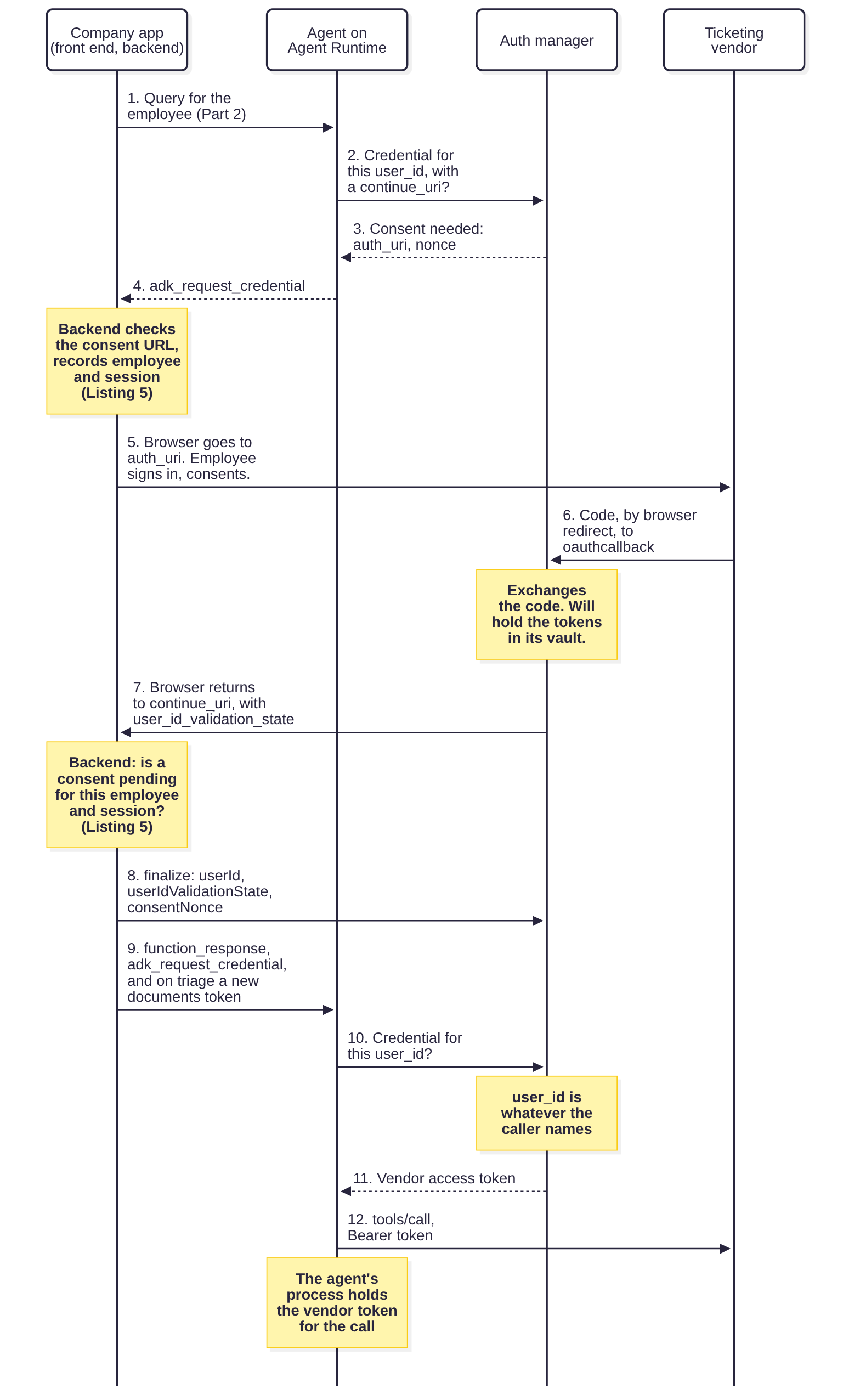
Google says “[a]ccess to Agent Identity auth manager is governed by IAM” (Google Cloud, n.d.c), and the agent is inside that boundary. A credential request names the auth provider and a user_id. ADK 2.12.0 passes the session’s own user_id (Google, 2026a), which Part 2’s backend sets to tid:oid, but the API takes “[t]he identity of the end user” as an input (Google Cloud, n.d.n), so a compromised agent calling it directly can name anyone. Google’s API reference describes the stored user ID as “[n]ot verified by Google” (Google Cloud, n.d.s). Google’s guide grants roles/agentidentity.user to the agent’s principal, and also to a developer’s own account for local testing (Google Cloud, n.d.f). That role carries four permissions that release vendor tokens, retrieveCredentials and exchangeCredentials on both auth providers and authorizations, and the legacy Connector User role carries them too (Google Cloud, n.d.a). Whoever holds any of them, directly or through an inherited or custom role, can fetch any consented employee’s vendor token by naming them, and anyone who can set IAM policy on the provider or its authorizations can grant themselves the same.
Reconfiguring the provider is another way in. Its token and authorize URLs, client ID, and client secret can all be changed with authProviders.update (Google Cloud, n.d.r), which the basic Editor role carries, among others, as does the Discovery Engine Service Agent role, roles/discoveryengine.serviceAgent (Google Cloud, n.d.a). Pointing the token URL elsewhere would likely send the stored refresh tokens there on the next refresh, though we haven’t tested it.
On a production provider, allow the agent’s principal to retrieve credentials and nobody else, keep updating or recreating the provider with the pipeline, alert on any change to it, and use a provider for this agent alone, since revoking a user’s authorization works “across all agents” (Google Cloud, n.d.o). The provider can also limit what any agent may ask the vendor for, through its allowedScopes, and turn on PKCE (Google Cloud, n.d.r). Alert on retrievals for a user_id with no active session, after confirming which audit log records credential retrievals and that it’s turned on. Google supports adding the Agent Identity APIs to a VPC Service Controls perimeter (Google Cloud, n.d.k), but clients then have to come through the restricted VIP (Google Cloud, n.d.c), and the vendor’s redirect reaches the auth manager from the employee’s browser. A perimeter is likely to break consent unless its ingress rules allow for that, so test it end to end.
Inside the agent, how the tools are grouped matters here. ADK resolves credentials for every toolset on the running agent before each model call (Google, 2026a), so an agent that carries the ticketing toolset fetches the employee’s vendor token on every step, whatever it’s doing. Giving each task its own agent, with only that task’s tools, should keep the vendor token out of data questions. Confirm it on a deployed agent.
Step 7 is the check Google’s guide leaves to the app. The guide has the continue_uri endpoint take the user_id and consent nonce “from your session storage” and call finalize with them (Google Cloud, n.d.f). Listing 5 keys the pending consent to the employee and the session, so for consents that come back through the company app, only the employee who started one can finish it.
That holds only while the agent behaves. The agent supplies the continue_uri when it asks for a credential, it already has the nonce, and Google’s reference for finalize lists no IAM permission (Google Cloud, n.d.m), so a compromised agent could send the browser somewhere else and finish the consent itself. Google’s own sample calls finalize without credentials, so check whether the audit log records who called it before you plan an alert on calls that don’t come from the backend. The same listing checks the consent URL before the front end redirects to it, since that URL comes out of the agent, and Part 1 treats the agent’s output as untrusted.
Nothing checks which vendor account the employee chose, so an employee who consents with a personal account at the vendor attaches that one. In this design only the agent’s principal retrieves the vendor token, so a check against the vendor’s “who am I” endpoint would have to run in the agent’s own code, outside the model’s tool choices.
Ticket comments need the same caution as email. The triage agent holds the employee’s vendor token and the add_ticket_comment tool, and since both tasks share one provider and its scopes, a ticket reply session’s token can write comments too, even though its agent lacks the tool. The triage agent’s comments are held for confirmation by Part 1’s policy check, inside the agent’s process. Code that gets past it can post what the agent read, documents included, into a vendor ticket as the employee, with no backend release step. If the vendor offers internal-only notes, limit the scope to those. A second, read-only provider for ticket reply should keep its token from writing, if the vendor enforces its scopes (Listings 3 and 5 show a single shared provider). Otherwise treat comments as one of the ways data leaves, which Part 6 covers, or route them through the backend’s release path, which means the backend retrieving the vendor token too.
And the agent does see the vendor token. The auth manager returns the credential to the agent, and ADK attaches it to the request (Google Cloud, n.d.b). Only with Agent Gateway and Gemini Enterprise connectors does Google say credentials are decrypted at the gateway so “the agent can never access the raw credential” (Google Cloud, n.d.c). On the path in Figure 2, code in the agent’s process holds a working vendor token for the length of the call, the same as Part 1 assumed for every credential.
Getting a token to the agent for one query
On the backend (Listing 1), each query starts with an on-behalf-of request for each company server the task may reach, which means the documents server on triage queries. The mail token comes only from tokens_for_release, for the backend’s own use. The backend authenticates with its certificate, drops any refresh token, refuses an unexpected lifetime, and passes a Conditional Access claims challenge back to the front end rather than failing. It also asks for the profile scope, since Microsoft documents tid and oid as needing it (Microsoft, 2026a). Microsoft gives the default access token lifetime as “a random value ranging between 60-90 minutes” (Microsoft, 2026b). Listing 1 sets the ceiling at two hours, which allows any default token. A token lifetime policy in your tenant can set something longer, and then every request fails the check, so find that out before you deploy.
Python
"""Per-invocation tool credentials, minted by the company backend.

The agent holds no long-lived credentials for the company's MCP servers.
For each query, the backend gets short-lived on-behalf-of tokens whose
audience is one MCP server, and passes them to the agent for that
invocation only. The mail token is minted only to release an approved send.
"""

from __future__ import annotations

import base64
import hashlib
import json
import time
import uuid
import urllib.error
import urllib.parse
import urllib.request
from dataclasses import dataclass
from enum import Enum

import jwt


class Authority(Enum):
    EMPLOYEE = "employee"          # Entra on-behalf-of token for the employee
    AGENT_IDENTITY = "agent"       # the agent's Agent Identity, no token passed
    AUTH_MANAGER = "auth_manager"  # vendor OAuth held in Agent Identity auth manager


@dataclass(frozen=True)
class Server:
    authority: Authority
    scope: str | None = None       # one explicit Entra scope, never .default


DOCS_API = "dddddddd-dddd-dddd-dddd-dddddddddddd"   # client IDs of the two
MAIL_API = "eeeeeeee-eeee-eeee-eeee-eeeeeeeeeeee"   # company APIs (placeholders)

SERVERS = {
    "documents": Server(Authority.EMPLOYEE, f"api://{DOCS_API}/Docs.Read"),
    "email": Server(Authority.EMPLOYEE, f"api://{MAIL_API}/Mail.SendFromSupport"),
    "bigquery": Server(Authority.AGENT_IDENTITY),
    "ticketing": Server(Authority.AUTH_MANAGER),
}

# Company servers each of Part 1's tasks may reach during an ordinary query.
# Email is absent: the agent only proposes a send, and the backend's
# release path gets a mail token (tokens_for_release).
TASK_SERVERS = {
    "triage_ticket": {"ticketing", "documents"},
    "data_question": {"bigquery"},
    "ticket_reply": {"ticketing", "bigquery"},
}

# Entra's default access token lifetime is 60 to 90 minutes. A tenant token
# lifetime policy can make it much longer; refuse those rather than hand
# them to the agent.
MAX_LIFETIME = 2 * 3600


class TokenError(Exception):
    pass


class ClaimsChallenge(TokenError):
    """Conditional Access needs the employee back at the front end."""

    def __init__(self, claims: str):
        super().__init__("interaction_required")
        self.claims = claims


class EntraTokens:
    """On-behalf-of calls to the Entra v2.0 token endpoint, authenticating
    with a certificate, which company servers see as azpacr 2."""

    def __init__(self, tenant_id: str, client_id: str, private_key,
                 cert_der: bytes,
                 authority: str = "https://login.microsoftonline.com"):
        self.url = f"{authority}/{tenant_id}/oauth2/v2.0/token"
        self.aud = self.url   # the client assertion's audience is the endpoint
        self.client_id, self.key = client_id, private_key
        self.x5t = base64.urlsafe_b64encode(
            hashlib.sha256(cert_der).digest()).rstrip(b"=").decode()

    def _client_assertion(self) -> str:
        now = int(time.time())
        return jwt.encode(
            {"aud": self.aud, "iss": self.client_id, "sub": self.client_id,
             "jti": str(uuid.uuid4()),
             "nbf": now, "iat": now, "exp": now + 300},
            self.key, algorithm="PS256", headers={"x5t#S256": self.x5t})

    def on_behalf_of(self, employee_token: str, scope: str) -> dict:
        # The employee's token must have been issued for this backend's own
        # API (Part 2 checked that); Entra won't redeem anything else.
        form = {
            "grant_type": "urn:ietf:params:oauth:grant-type:jwt-bearer",
            "client_id": self.client_id,
            "client_assertion_type":
                "urn:ietf:params:oauth:client-assertion-type:jwt-bearer",
            "client_assertion": self._client_assertion(),
            "assertion": employee_token,
            "scope": f"{scope} profile",   # profile: Microsoft documents tid
            "requested_token_use": "on_behalf_of",   # and oid as needing it
        }
        req = urllib.request.Request(
            self.url, data=urllib.parse.urlencode(form).encode(), method="POST")
        try:
            with urllib.request.urlopen(req, timeout=10) as r:
                return json.load(r)
        except urllib.error.HTTPError as e:
            try:
                body = json.load(e)
            except ValueError:
                body = {}
            if body.get("error") == "interaction_required" and body.get("claims"):
                raise ClaimsChallenge(body["claims"]) from e
            raise TokenError(f"token endpoint returned {e.code} "
                             f"{body.get('error', '')}") from e


def _mint(names: set[str], employee_token: str, entra: EntraTokens) -> dict[str, str]:
    out = {}
    for name in sorted(names):
        server = SERVERS[name]
        if server.authority is not Authority.EMPLOYEE:
            continue   # Google and the vendor are handled inside the agent
        resp = entra.on_behalf_of(employee_token, server.scope)
        if resp.get("token_type", "").lower() != "bearer" or "access_token" not in resp:
            raise TokenError(f"no bearer token for {name}")
        resp.pop("refresh_token", None)   # Entra may send one anyway; keep nothing
        if not 0 < int(resp.get("expires_in", 0)) <= MAX_LIFETIME:
            raise TokenError(f"unexpected lifetime for {name}")
        out[name] = resp["access_token"]
    return out


def tokens_for_invocation(task: str, employee_token: str,
                          entra: EntraTokens) -> dict[str, str]:
    """Tokens for the company servers this task may reach, and no others."""
    return _mint(TASK_SERVERS[task], employee_token, entra)


def tokens_for_release(approver_token: str, entra: EntraTokens) -> dict[str, str]:
    """The mail token, minted from the approver's step-up token (Part 2)
    only after an approval is recorded. The backend sends the approved
    message itself; this token never goes to the agent. Part 4 builds the
    release path."""
    return _mint({"email"}, approver_token, entra)
Listing 1. tool_credentials.py: the backend mints one token per company server for each query, and the mail token only for its own release step. It uses plain HTTP so each field is visible. MSAL's acquire_token_on_behalf_of does the same, but its token cache would keep any refresh token Entra returns, so use a cache per request or clear it.
TASK_SERVERS does for tokens what Part 1’s task allowlist does for tools, but only for the company’s own servers. BigQuery and the vendor aren’t scoped by it, which is why Listing 3 builds an agent per task. We ran the backend against a fake Entra endpoint. Each request carried the form fields and certificate assertion we expected, each task got tokens only for its own servers, and ordinary queries made no mail request. A day-long token and a missing lifetime were refused, a refresh token was dropped, and a claims challenge reached the caller.
Inside the agent, the documents token arrives as temp: state. ADK applies temp: keys to the session for the current invocation and trims them before the session is saved, and in ADK 2.12.0 VertexAiSessionService does the trimming before its remote write (Google, 2026a). The Agent Platform SDK’s streaming_agent_run_with_events, the entry point meant for AgentSpace, passes per-request OAuth tokens to the agent the same way (Google, 2026b), and Listing 2 follows that pattern. We tested it with the in-memory session service: the token was in state during the invocation, reached the documents toolset’s request headers through ADK’s own tool listing, was absent from the stored state and every event afterwards, and was missing from the next invocation. We haven’t run the same test against Agent Platform Sessions, or confirmed that a deployed agent receives the extra tool_tokens argument, so do both before you rely on this.
Listing 2 extends Part 2’s narrowed app template in two ways. It takes one new argument, tool_tokens, which may only carry a documents token. And it accepts one structured message, the adk_request_credential reply that resumes a query after vendor consent, in the shape Google’s guide sends (Google Cloud, n.d.f). Part 2’s app took only text, so without this the ticketing flow could never finish. The auth manager’s provider is registered in set_up(), because Google’s guide warns that registering at import time doesn’t carry over to a container deployed with the SDK, and the agent then fails with “No auth provider registered” (Google Cloud, n.d.f). AdkApp comes from the agentplatform package, which google-cloud-aiplatform provides.
Python
"""Inside the agent: per-invocation tokens arrive as temp: state.

ADK applies temp: keys to the session for the current invocation and trims
them before the session is stored, so the tokens never reach Agent Platform
Sessions or the event history. We checked that with the in-memory session
service; test it against your deployment.
"""

import re

from agentplatform.frameworks import AdkApp
from google.adk.auth.credential_manager import CredentialManager
from google.adk.integrations.agent_identity import GcpAuthProvider

# Part 2, Listing 3
from backend_only_app import MAX_MESSAGE, USER_ID, BackendOnlyAdkApp

TOKEN_KEY = "temp:tool_token:{}"
COMPANY_SERVERS = {"documents"}   # the mail token never comes to the agent
TOKEN = re.compile(r"[!-~]{1,16384}")   # opaque: printable, no spaces
RESUME = "adk_request_credential"


def _is_consent_resume(message) -> bool:
    """The one structured message allowed: the reply to a consent request."""
    try:
        (part,) = message["parts"]
        fr = part["function_response"]
        return (set(message) == {"role", "parts"} and message["role"] == "user"
                and set(part) == {"function_response"}
                and set(fr) == {"id", "name", "response"}
                and fr["name"] == RESUME and isinstance(fr["id"], str)
                and isinstance(fr["response"], dict))
    except (KeyError, TypeError, ValueError):
        return False


class ToolTokenAdkApp(BackendOnlyAdkApp):
    def set_up(self):
        # Runs in the deployed container; module-level registration doesn't
        # carry over when the SDK serializes the app (Google's 3LO guide).
        CredentialManager.register_auth_provider(GcpAuthProvider())
        super().set_up()

    async def async_stream_query(self, *, message, user_id, session_id,
                                 tool_tokens=None, **extra):
        # Part 2's checks, plus a consent reply and a documents token.
        if extra:
            raise ValueError(f"unexpected arguments: {sorted(extra)}")
        if not session_id:
            raise ValueError("session_id is required")
        if not isinstance(user_id, str) or not USER_ID.fullmatch(user_id):
            raise ValueError("unexpected user_id")
        if not ((isinstance(message, str) and len(message) <= MAX_MESSAGE)
                or _is_consent_resume(message)):
            raise ValueError("message must be text or a consent reply")
        tokens = tool_tokens or {}
        if (not isinstance(tokens, dict) or not set(tokens) <= COMPANY_SERVERS
                or not all(isinstance(v, str) and TOKEN.fullmatch(v)
                           for v in tokens.values())):
            raise ValueError("unexpected tool_tokens")
        # The only state a query can carry: temp: token keys.
        delta = {TOKEN_KEY.format(k): v for k, v in tokens.items()}
        async for event in AdkApp.async_stream_query(
                self, message=message, user_id=user_id,
                session_id=session_id, state_delta=delta):
            yield event


def bearer_for(server: str):
    """McpToolset header_provider: this server's token, or no call at all."""
    key = TOKEN_KEY.format(server)

    def provider(context) -> dict[str, str]:
        token = context.state.get(key)
        if not token:
            raise PermissionError(f"no {server} token for this invocation")
        return {"Authorization": f"Bearer {token}"}
    return provider
Listing 2. agent_tool_tokens.py: the agent accepts a documents token as temp: state, and a consent reply as its only structured message. BackendOnlyAdkApp is Part 2's Listing 3.
Listing 2 calls AdkApp’s method directly, because Part 2’s method would refuse the token argument. That leaves two copies of Part 2’s checks to keep in step. We tested that a caller’s state_delta is still refused, a consent reply passes through unchanged, and any other structured message is refused, including one with a second part or another function name.
Listing 3 builds the agent. Each task gets its own LlmAgent with only that task’s tools, and a small router runs the one named in the session’s policy_task, which Part 2’s backend sets when it creates the session. The task agents can’t hand the conversation to each other, so a data question has no path to the triage agent’s tools short of a bug in the router or in ADK.
Each toolset gets its authority differently. Documents reads its token through ADK’s header_provider, which builds headers on each call (Google, n.d.a). Ticketing uses the auth manager’s scheme. BigQuery carries nothing and relies on ADK 2.12.0, which by default opens an mTLS channel from Application Default Credentials for every HTTP MCP server, when its setup probe succeeds, and attaches the token only for googleapis.com hosts (Google, 2026a). On Agent Runtime that should be the agent’s Agent Identity. The same channel presents the agent’s certificate to the vendor’s server, if it asks for one, which shows the vendor the agent’s identity. BigQuery is the weak point. If the mTLS setup fails, ADK sends BigQuery requests with no token, tools/list still answers because it needs no authentication, and only the queries fail. We haven’t tested this on Agent Runtime.
Python
"""The agent's tools, one sub-agent per task, one authority per server.

documents: the employee's on-behalf-of token for this invocation only.
ticketing: the employee's vendor token, held by the auth manager.
bigquery:  the agent's own Agent Identity, through ADC (untested on Runtime).
send_email: a local tool that reaches nothing. The function call itself is
            the proposal; the backend sends the approved message.
"""

from google.adk.agents import BaseAgent, LlmAgent
from google.adk.integrations.agent_identity import GcpAuthProviderScheme
from google.adk.tools.mcp_tool import McpToolset, StreamableHTTPConnectionParams
from google.adk.utils.context_utils import Aclosing

from agent_tool_tokens import bearer_for

PROJECT, LOCATION = "ops-agent-prod", "europe-west1"
CONTINUE_URI = "https://ops.example.com/agent/consent-done"   # the company app

# Part 1's tool allowlist per task, grouped by server.
TASK_TOOLS = {
    "triage_ticket": {"ticketing": ["get_ticket", "add_ticket_comment"],
                      "documents": ["search_documents"]},
    "data_question": {"bigquery": ["execute_sql_readonly"],
                      "email": ["send_email"]},
    "ticket_reply": {"ticketing": ["get_ticket"],
                     "bigquery": ["execute_sql_readonly"],
                     "email": ["send_email"]},
}


def send_email(to: list[str], cc: list[str], bcc: list[str],
               subject: str, body: str) -> dict:
    """Proposes an email. It is sent only if an employee approves it."""
    return {"status": "held for approval"}   # the policy check holds it first


def _toolset(server: str, tools: list[str]):
    if server == "documents":
        return McpToolset(
            connection_params=StreamableHTTPConnectionParams(
                url="https://docs-mcp.example.com/mcp"),
            header_provider=bearer_for("documents"),   # no token, no call
            tool_filter=tools)
    if server == "ticketing":
        # ToolTokenAdkApp.set_up() registers the auth provider (Listing 2).
        return McpToolset(
            connection_params=StreamableHTTPConnectionParams(
                url="https://mcp.ticketing.example.net/mcp"),
            auth_scheme=GcpAuthProviderScheme(
                name=(f"projects/{PROJECT}/locations/{LOCATION}"
                      "/authProviders/ticketing-3lo"),
                scopes=["tickets.read", "comments.write"],   # the vendor's
                continue_uri=CONTINUE_URI),
            tool_filter=tools)
    if server == "bigquery":
        # ADK sends the agent's ADC token to *.googleapis.com over mTLS.
        return McpToolset(
            connection_params=StreamableHTTPConnectionParams(
                url="https://bigquery.googleapis.com/mcp"),
            tool_filter=tools)
    if server == "email":
        return send_email
    raise ValueError(server)


class TaskRouter(BaseAgent):
    """Runs the session's task agent, and no other.

    ADK resolves auth for every toolset on the running agent before each
    model call, so an agent per task keeps the vendor token out of tasks
    that never use ticketing.
    """

    async def _run_async_impl(self, ctx):
        task = ctx.session.state.get("policy_task")
        agent = next((a for a in self.sub_agents if a.name == task), None)
        if agent is None:
            raise PermissionError(f"no agent for task {task!r}")
        async with Aclosing(agent.run_async(ctx)) as events:
            async for event in events:
                yield event


def build_agent(model, **llm_kwargs) -> TaskRouter:
    return TaskRouter(name="ops", sub_agents=[
        LlmAgent(name=task, model=model,
                 tools=[_toolset(s, t) for s, t in servers.items()],
                 # No handing the conversation to another task's agent.
                 disallow_transfer_to_parent=True,
                 disallow_transfer_to_peers=True,
                 **llm_kwargs)
        for task, servers in TASK_TOOLS.items()])
Listing 3. agent_tools.py: one agent per task, each with only its own tools. The scopes and URLs are placeholders, and the vendor's real scope names will differ.
With no token in state, the documents toolset raises before it sends anything, including tools/list. We tested that against McpToolset itself with the network blocked. Reading ADK’s source, a full run logs the error and carries on without that toolset, so the model doesn’t see a documents tool in a query with no documents token. That fails closed, but gives no sign. A triage answer written without documents looks like any other, so turn that log line into an alert. We also checked that the router runs only the session’s task agent, that the data question agent has no toolset with vendor credentials, and that no task agent can transfer to another.
What a company server checks
The documents and mail servers are where the spec’s audience rule gets enforced. Listing 4 accepts a token only if it was issued for this server’s API by the right tenant, obtained by the backend with a certificate, for a member of the tenant rather than a guest, and with the scope this server needs. Microsoft defines acct only as whether the user is a member or a guest of the tenant (Microsoft, 2026d), so an external user added with the Member user type is likely to pass it. If “employee” has to mean someone from your own directory, also check the idp claim or require user assignment on the API. Its checks are Part 2’s, applied to a different audience. It returns the employee and their app roles, so the mail server’s own send rule can look for Mail.SendExternal, and it can refuse tokens issued before a cutoff, for use in an incident. Wiring it into an MCP server means answering a bad token with HTTP 401 and a valid token that may not do this with 403, each with a WWW-Authenticate header naming the resource_metadata URL, plus error="insufficient_scope" when the scope is missing, as the spec recommends (Model Context Protocol, 2026a). Each refusal carries its status. The cutoff compares against iat, which Microsoft describes as when authentication occurred (Microsoft, 2026a), so set it to the time containment finished and test that a newer token passes.
Microsoft says “[a] client application that’s acting on behalf of a user (referred to as the actor), must also be authorized” and points to scp for that (Microsoft, 2025f), which Listing 4 checks. The azp and azpacr checks add a restriction on which client that is, and azp “may be used in authorization decisions” (Microsoft, 2026a), though Microsoft’s claims validation page has a note against using it to authorize the subject of a delegated token, because such tokens “can potentially be obtained by entities other than the application” (Microsoft, 2025f), and Listing 4 keeps the employee as the subject. The remaining risk is another client getting a token for these APIs, and the setup narrows it. The scopes are admin-consent only, so another app can’t get one unless an admin consents for it. The backend’s registration has no public client path. And the azpacr check refuses a token obtained without a certificate. That shows some certificate registered on the app was used. It can’t show the certificate was yours, so the registration’s owners and credentials carry the risk.
Python
"""What a company MCP server checks on each request.

The server accepts only an employee's delegated token that was issued for
its own API and obtained by the company backend, with the scope it needs.
"""

from __future__ import annotations

from dataclasses import dataclass
from typing import Callable

import jwt


class Refused(Exception):
    """status: 401 for a bad token, 403 for a valid one that may not do this."""

    def __init__(self, reason: str, status: int = 401):
        super().__init__(reason)
        self.status = status


@dataclass(frozen=True)
class Caller:
    employee: str            # tid:oid
    roles: frozenset[str]    # the employee's app roles on this server's API


@dataclass(frozen=True)
class ServerConfig:
    tenant_id: str
    api_client_id: str       # this server's client ID (aud in v2 tokens)
    backend_client_id: str   # the only client allowed to get tokens for it
    scope: str               # e.g. Docs.Read or Mail.SendFromSupport
    client_auth: frozenset[str] = frozenset({"2"})   # azpacr: 2 = certificate
    issued_after: int = 0    # after an incident: when containment finished


def check_server_token(token: str, cfg: ServerConfig,
                       key_for: Callable[[str], object]) -> Caller:
    try:
        if jwt.get_unverified_header(token).get("alg") != "RS256":
            raise Refused("unexpected alg")
        c = jwt.decode(
            token, key_for(token), algorithms=["RS256"],
            audience=cfg.api_client_id,   # a token for any other API fails
            issuer=f"https://login.microsoftonline.com/{cfg.tenant_id}/v2.0",
            leeway=60,
            options={"require": ["exp", "nbf", "iat", "aud", "iss", "tid",
                                 "ver", "oid"]})
    except jwt.PyJWTError as e:
        raise Refused(f"token rejected: {e}") from e

    if c["iat"] < cfg.issued_after:
        raise Refused("issued before the cutoff")
    if c["ver"] != "2.0" or c["tid"] != cfg.tenant_id:
        raise Refused("wrong token version or tenant")
    if c.get("azp") != cfg.backend_client_id:
        raise Refused("token not obtained by the backend", 403)
    if str(c.get("azpacr")) not in cfg.client_auth:
        raise Refused("backend didn't authenticate as expected", 403)  # 0 = public
    # A missing scp catches app-only tokens even if idtyp isn't configured.
    if c.get("idtyp") == "app" or "scp" not in c:
        raise Refused("expected an employee's delegated token", 403)
    if str(c.get("acct")) != "0":
        raise Refused("guest account, or acct claim not configured", 403)
    if cfg.scope not in str(c["scp"]).split():
        raise Refused("missing scope", 403)   # with error="insufficient_scope"
    return Caller(f"{c['tid']}:{c['oid']}", frozenset(c.get("roles") or []))
Rust
//! What a company MCP server checks on each request: an employee's delegated
//! token, issued for this server's API, obtained by the company backend.

use jsonwebtoken::{Algorithm, DecodingKey, Validation, decode, decode_header};
use serde::Deserialize;
use serde_json::Value;

pub struct ServerConfig {
    pub tenant_id: String,
    pub api_client_id: String,     // this server's client ID (aud in v2 tokens)
    pub backend_client_id: String, // the only client allowed (azp)
    pub scope: String,             // e.g. Docs.Read or Mail.SendFromSupport
    pub client_auth: Vec<String>,  // allowed azpacr values: "2" = certificate
    pub issued_after: u64,         // after an incident: when containment finished
}

#[derive(Deserialize)]
struct Claims {
    tid: String,
    ver: String,
    oid: String,
    azp: Option<String>,
    azpacr: Option<Value>, // documented as a string; accept a number too
    acct: Option<Value>, // 0 or "0"; Microsoft doesn't give the type
    scp: Option<String>,
    idtyp: Option<String>,
    #[serde(default)]
    roles: Vec<String>,
    iat: u64, // required: a token without it fails to deserialize
}

#[derive(Debug, PartialEq)]
pub struct Caller {
    pub employee: String,   // tid:oid
    pub roles: Vec<String>, // the employee's app roles on this server's API
}

#[derive(Debug, PartialEq)]
pub enum Refused {
    Token(String),
    BeforeCutoff,
    WrongVersionOrTenant,
    NotFromBackend,
    WeakClientAuth,
    NotDelegated,
    Guest,
    MissingScope,
}

impl Refused {
    /// 401 for a bad token; 403 (insufficient_scope for MissingScope) for a
    /// valid token that may not do this.
    pub fn status(&self) -> u16 {
        match self {
            Refused::Token(_) | Refused::BeforeCutoff | Refused::WrongVersionOrTenant => 401,
            _ => 403,
        }
    }
}

pub fn check(token: &str, key: &DecodingKey, cfg: &ServerConfig) -> Result<Caller, Refused> {
    let bad = |e: jsonwebtoken::errors::Error| Refused::Token(e.to_string());
    if decode_header(token).map_err(bad)?.alg != Algorithm::RS256 {
        return Err(Refused::Token("unexpected alg".into()));
    }
    let mut v = Validation::new(Algorithm::RS256);
    v.set_audience(&[&cfg.api_client_id]); // a token for any other API fails
    v.set_issuer(&[format!("https://login.microsoftonline.com/{}/v2.0", cfg.tenant_id)]);
    v.set_required_spec_claims(&["exp", "nbf", "aud", "iss"]);
    v.validate_nbf = true;
    let c = decode::<Claims>(token, key, &v).map_err(bad)?.claims;

    if c.iat < cfg.issued_after {
        return Err(Refused::BeforeCutoff);
    }
    if c.ver != "2.0" || c.tid != cfg.tenant_id {
        return Err(Refused::WrongVersionOrTenant);
    }
    if c.azp.as_deref() != Some(cfg.backend_client_id.as_str()) {
        return Err(Refused::NotFromBackend);
    }
    let azpacr = match &c.azpacr {
        Some(Value::String(s)) => Some(s.clone()),
        Some(Value::Number(n)) => Some(n.to_string()),
        _ => None,
    };
    if !azpacr.is_some_and(|a| cfg.client_auth.contains(&a)) {
        return Err(Refused::WeakClientAuth); // "0" is a public client
    }
    // A missing scp catches app-only tokens even if idtyp isn't configured.
    let Some(scp) = c.scp.filter(|_| c.idtyp.as_deref() != Some("app")) else {
        return Err(Refused::NotDelegated);
    };
    let member = match &c.acct {
        Some(Value::Number(n)) => n.as_u64() == Some(0),
        Some(Value::String(s)) => s == "0",
        _ => false,
    };
    if !member {
        return Err(Refused::Guest); // a guest, or acct not configured
    }
    if !scp.split_whitespace().any(|s| s == cfg.scope) {
        return Err(Refused::MissingScope);
    }
    Ok(Caller { employee: format!("{}:{}", c.tid, c.oid), roles: c.roles })
}
Listing 4. mcp_server_auth: the documents and mail servers' token check, in Python with PyJWT and Rust with jsonwebtoken. Key fetching is left to the caller, as in Part 2.
We signed tokens with local keys and tried the ones a server is most likely to be handed, by mistake or on purpose: the employee’s original token passed straight through, a token for the other company server, one obtained by the front end, one obtained by a public client or with a secret, the backend’s app-only token, a guest’s token, one without acct, one with the wrong scope or algorithm, expired, wrong-tenant, and wrong-key tokens, and a token issued before the cutoff. Both languages refused all of them, each for the reason and with the status expected. As with Part 2, that shows the code does what it says. Only a real on-behalf-of token from your tenant shows that Entra issues the claims the code expects.
Finishing vendor consent
Listing 5 is the backend’s side of Figure 2. When the agent asks for consent, the backend checks that the consent URL goes to the vendor’s own authorize endpoint and sends the code back to the auth manager’s callback, then records the pending consent under the employee and the session. When the browser comes back to continue_uri, the front end calls the backend with the employee’s current Entra token and the session, and the backend finishes only the pending consent for that pair. It works once, expires after ten minutes, and refuses a second consent while one is pending in the same session. Finishing returns the finalize request and the consent reply that Listing 2 accepts.
The backend then calls finalize. Google’s reference lists only the cloud-platform OAuth scope for it, and no IAM permission (Google Cloud, n.d.m). The consent nonce is stored in the session’s events, so treat the validation state as the only secret, keep the continue_uri query string out of access logs, and strip the auth config from events the backend relays to the front end. The reference describes the validation state only as “[t]he encrypted state passed back from the consent flow” and doesn’t say how finalize checks it against the userId it’s given (Google Cloud, n.d.m), so test that a finalize naming another employee fails. A resumed triage query also needs a fresh documents token, or the agent runs without its documents tool. If the backend has more than one instance, keep the store somewhere shared.
Python
"""The backend's side of vendor consent (Figure 2, steps 4 to 9).

When the agent asks for consent, the backend checks the consent URL and
records who the consent is for, keyed by employee and session. When the
browser comes back to continue_uri, the front end calls the backend with the
employee's current Entra token, and the backend finishes only the pending
consent for that employee and that session. Use a shared store with expiry
when the backend runs on more than one instance.
"""

from __future__ import annotations

import time
import urllib.parse
from dataclasses import dataclass

from google.adk.auth.auth_tool import AuthToolArguments

PROVIDER = "projects/ops-agent-prod/locations/europe-west1/authProviders/ticketing-3lo"
CALLBACK = f"https://agentidentitycredentials.googleapis.com/v1/{PROVIDER}/oauthcallback"
VENDOR_AUTHORIZE = "https://auth.ticketing.example.net/oauth/authorize"
VENDOR_CLIENT_ID = "ops-agent"                      # the auth provider's client
VENDOR_SCOPES = {"tickets.read", "comments.write"}  # also the provider's allowedScopes
# The provider has PKCE on, so a real consent URL carries a code challenge.
TTL = 600   # seconds a consent may take


@dataclass(frozen=True)
class Pending:
    call_id: str           # the adk_request_credential function call id
    auth_config: dict      # echoed back to the agent on resume
    consent_nonce: str
    expires: float


class ConsentRefused(Exception):
    pass


class ConsentStore:
    def __init__(self, clock=time.time):
        self._pending: dict[tuple[str, str], Pending] = {}
        self._clock = clock

    def start(self, employee: str, session_id: str, call_id: str,
              args: dict) -> str:
        """employee is the session owner (Part 2). args are the agent's
        adk_request_credential arguments. Returns the URL to send the
        browser to, once it's been checked."""
        auth = AuthToolArguments.model_validate(args).auth_config
        oauth2 = auth.exchanged_auth_credential.oauth2
        url = urllib.parse.urlsplit(oauth2.auth_uri)
        query = urllib.parse.parse_qs(url.query)
        # The agent's output is untrusted (Part 1): only the vendor's own
        # authorize endpoint, returning to the auth manager's callback.
        if (f"{url.scheme}://{url.netloc}{url.path}" != VENDOR_AUTHORIZE
                or query.get("redirect_uri") != [CALLBACK]
                or query.get("client_id") != [VENDOR_CLIENT_ID]
                or not query.get("code_challenge")
                or query.get("code_challenge_method") != ["S256"]
                or not query.get("state")
                or query.get("response_type") != ["code"]
                or not 0 < len(scopes := set(" ".join(query.get("scope", [])).split()))
                or not scopes <= VENDOR_SCOPES
                or not oauth2.nonce):
            raise ConsentRefused("unexpected consent URL")
        held = self._pending.get((employee, session_id))
        if held and self._clock() <= held.expires:
            raise ConsentRefused("a consent is already pending for this session")
        # Echo ADK's own camelCase arguments back unchanged: re-serializing
        # through AuthConfig drops the custom scheme's fields.
        self._pending[(employee, session_id)] = Pending(
            call_id, args["authConfig"], oauth2.nonce, self._clock() + TTL)
        return oauth2.auth_uri

    def finish(self, signed_in: str, session_id: str, provider: str,
               validation_state: str):
        """signed_in is tid:oid from Part 2's checks on this request."""
        if provider != PROVIDER:
            raise ConsentRefused("unexpected auth provider")
        p = self._pending.pop((signed_in, session_id), None)   # single use
        if p is None or self._clock() > p.expires:
            raise ConsentRefused("no pending consent for this employee")
        finalize = {"userId": signed_in,
                    "userIdValidationState": validation_state,
                    "consentNonce": p.consent_nonce}
        resume = {"role": "user", "parts": [{"function_response": {
            "id": p.call_id, "name": "adk_request_credential",
            "response": p.auth_config}}]}
        return finalize, resume
Listing 5. consent.py: the backend checks the consent URL, including its client ID, scopes, state, and S256 PKCE challenge, and binds the consent to the employee and session that started it.
In our tests, a second employee couldn’t finish the first one’s consent, and neither could the same employee from another session. A consent couldn’t be finished twice or after it expired, an abandoned one stopped blocking the session once it expired, and an unexpected provider name was refused. So was a consent URL that pointed anywhere but the vendor, returned anywhere but the callback, named another client, asked for broader or unspecified scopes, lacked a state, lacked an S256 PKCE challenge, or asked for a response type other than code. We fed it arguments serialized the way ADK puts them in the function call, but the URLs were ones we built, so check the real provider’s consent URL against these rules before release.
Where tokens sit between queries
Credentials sit in four places between queries.
- ADK’s MCP session pool.
McpToolsetkeeps MCP sessions open and pools them by a hash of the request headers, which include the bearer token. In ADK 2.12.0 an idle session is evicted after 900 seconds, checked the next time the toolset opens or reuses a session (Google, 2026a). The pool also holds the vendor token, since the auth manager’s credential goes into the same headers. A token therefore leaves session state when the invocation ends but can stay in the agent’s memory for at least fifteen minutes after, and on an idle instance until it expires. The pool belongs to the toolset, so it holds recent tokens for every employee that agent instance has served. - The invocation’s credential map. The vendor token from the auth manager is held in the invocation’s context and fetched again before each model call in the tasks that use ticketing. The auth manager’s scheme doesn’t use ADK’s credential service (Google, 2026a), so the default
InMemoryCredentialServicethatAdkAppcreates (Google, 2026b) doesn’t hold it. - The session-state credential service.
SessionStateCredentialServiceis marked experimental, and its docstring in ADK 2.12.0 says the end user’s access and refresh tokens “are kept in clear text” in session state, which “is returned verbatim by the session-read endpoints” (Google, 2026a). ADK’s authentication guide also warns that keeping tokens in session state carries risk, depending on the session backend (Google, n.d.b). It isn’t suited to real user tokens. - The auth manager’s vault. This is where the vendor’s tokens live between queries, behind the IAM grant described above. Google describes it as “a Google-managed vault” (Google Cloud, n.d.b), and the auth manager pages don’t cover customer-managed keys or who at Google can read it.
The design never stores the documents token. The backend gets a new one for each query that needs it, which costs one token request per query. That’s cheap compared with keeping delegated tokens around.
Cutting off one employee
Disabling an account in Entra stops new tokens, but Microsoft says that “[f]or applications using access tokens, the user loses access when the access token expires” (Microsoft, 2026e). Part 2’s checks validate the token itself, so an employee’s current front-end token keeps passing them until it expires. The first offboarding step should therefore be a deny list in the backend, keyed by tid:oid and checked on every request.
| Server | What its logs show | How to cut the employee off | When it takes effect |
|---|---|---|---|
| All, through the backend | The backend’s own records | Add tid:oid to the backend’s deny list, end their agent sessions, and cancel pending approvals and consents | On the next request |
| Documents | The employee, via the backend | Disable the account in Entra, then revoke sessions. Whether revoking sessions alone stops on-behalf-of requests made with an unexpired token is something to test | When on-behalf-of requests start failing. Tokens already issued work until they expire, 60 to 90 minutes by default and, for tokens minted by Listing 1, never more than its two-hour ceiling |
| The approver, via the backend | The same, and remove Mail.SendExternal | The same | |
| BigQuery | The agent only | Nothing per employee beyond the deny list | On the next request, through the backend’s deny list. Past queries are attributable only through the agent’s and backend’s logs |
| Ticketing | The employee, at the vendor | Call the auth provider’s revokeAuthorization with their user_id, and remove their access at the vendor | Depends on the vendor. A token already fetched works until it expires there |
Table 4. What it takes to cut off one employee at each server.
Google’s revokeAuthorization method “[r]evokes all authorizations for a specific user on an auth provider” (Google Cloud, n.d.o), and disabling the provider is the blunt fallback. Write the steps into the offboarding runbook and test them, the vendor step included, before release.
Containing the agent or the backend is a different job. For a suspected agent compromise, disable the ticketing provider, remove the agent’s BigQuery grants, stop the backend minting documents tokens, and treat every consented employee’s vendor token as exposed, since a compromised agent can name any user_id. Revoking at the vendor, or rotating the provider’s OAuth client there, depends on the vendor.
If the backend is the suspect, disable its service principal first, then remove all of its registration’s credentials and have an admin revoke the sessions of the employees whose tokens passed through it. Microsoft’s revocation table shows an admin revoke ending confidential clients’ refresh tokens, where a user’s own password change doesn’t (Microsoft, 2025e). Then set the cutoff in Listing 4 to the time containment finished, so each company server with the cutoff set refuses every token minted before it, including the attacker’s. The same check could be scoped to one employee’s oid to cut off a single person at once. Entra’s sign-in logs for the backend’s application ID show whose tokens those were. Part 8 builds detection on top of these records.
What this design doesn’t settle
Dropping a token doesn’t revoke it
Once the documents token has left state and the session pool, it’s still valid until it expires, usually 60 to 90 minutes after issue. Anything that copied it in the meantime has it for that long: a log line, a trace span with content capture on, a debug dump, or code in the agent’s process. Whoever holds a copy can use it. The backend’s ceiling stops it passing on an unusually long-lived token. A token lifetime policy can make tokens shorter, down to ten minutes, and can be set for specific service principals, though “an organization-level policy takes precedence over an application-level policy” (Microsoft, 2026b). A short policy on the documents and mail APIs is worth testing.
The backend can act as recently active employees
Part 2 noted that whoever controls the backend can be any employee as far as the agent is concerned. With on-behalf-of, they can also be that employee at the documents and mail servers, using any employee token that passes through. The window isn’t limited to token lifetimes either. Because offline_access comes with any delegated permission (Microsoft, 2026f), whoever holds the backend’s certificate can get refresh tokens. Each “is typically valid for 90 days” (Microsoft, 2026f), and since “[r]efresh tokens replace themselves with a fresh token upon every use” (Microsoft, 2025e), a holder who keeps redeeming them keeps access until they’re revoked. Listing 1 drops them, but an attacker holding the certificate wouldn’t be running Listing 1. That puts the weight on the registration controls from the Entra section, plus one more alert: the backend redeeming a refresh token, which this code never does.
BigQuery’s wiring is untested on Agent Runtime
Agent Identity’s tokens for Google APIs are bound to the agent’s certificate, and replaying one elsewhere fails with “Context-Aware Access requirements are not met” (Google Cloud, n.d.v). ADK 2.12.0’s mTLS path for MCP looks designed for exactly this, but we haven’t run it on Agent Runtime. Google’s pages name two different environment variables for turning the binding off, GOOGLE_API_ENABLE_RUNTIME_BOUND_TOKEN (Google Cloud, n.d.e) and GOOGLE_API_PREVENT_AGENT_TOKEN_SHARING_FOR_GCP_SERVICES (Google Cloud, n.d.v), and both discourage it. Turning it off wouldn’t help in any case if the mTLS setup fails, since ADK then sends no token at all.
The same identity offers a way to let the company’s servers see the agent as well as the employee. ADK already presents the agent’s certificate to any MCP server that asks for one over mTLS (Google, 2026a). An agent can get OIDC ID tokens of its own, and Google’s client libraries bind them to its certificate “by including the certificate fingerprint in the token’s cnf (x5t#S256) claim” (Google Cloud, n.d.e). A company server that required one of those alongside the on-behalf-of token, over mTLS, should refuse a copied employee token used on its own, which is worth testing for the most sensitive servers.
The auth manager’s ADK support is still marked experimental
The auth manager service is GA, but in ADK 2.12.0 the pluggable auth feature that GcpAuthProvider builds on is marked experimental and switched on by default (Google, 2026a). Pin the ADK version.
The query carries a token through Agent Runtime’s API
The documents token travels to the agent as an argument of a query request to Agent Runtime. Google’s Agent Runtime logging guide treats logging a query’s input as something the agent does itself, through stdout or its own logger (Google Cloud, n.d.u), and doesn’t say whether the platform records request arguments. Content capture in traces should be off, as Part 2 said, and sending a marked test token and searching the logs for it is a cheap check to repeat.
Anyone can list BigQuery’s MCP tools
The BigQuery MCP server’s tools/list “doesn’t require authentication” (Google Cloud, n.d.x), and deny policies don’t hide tools from the list (Google Cloud, n.d.i). Tool names and descriptions are untrusted input either way, as Part 1 said, and Part 5 covers servers you didn’t write.
Where GATE fits
GATE, the open agent governance framework I maintain, lists “[s]hared service accounts across agents” as a failure mode of C01, Workload Identity and Attestation, because they collapse attribution (Stevens, 2026). Agent Identity removes the shared account for BigQuery. C01 doesn’t cover the employee behind a call. Part 2 proposed adding that in GATE v1.5, and Table 1 is a candidate for the same proposal, since it records whose identity each server sees.
Versions and platform facts
| Item | Version or stage | Checked |
|---|---|---|
| ADK for Python | Tested with 2.12.0, with the agent-identity and mcp extras | 22 October 2026 |
Agent Platform SDK (google-cloud-aiplatform) | Tested with 2.5.0 | 22 October 2026 |
| PyJWT | Tested with 2.15.1 | 22 October 2026 |
cryptography | Tested with 50.0.2 | 22 October 2026 |
jsonwebtoken (Rust) | Tested with 11.1.0, rust_crypto feature | 22 October 2026 |
| Agent Identity | GA since 22 April 2026 | 22 October 2026 (Google Cloud, n.d.k) |
| Agent Identity auth manager | GA since 22 August 2026 | 22 October 2026 (Google Cloud, n.d.k) |
ADK pluggable auth (GcpAuthProvider) | Experimental, on by default, in ADK 2.12.0 | 22 October 2026 (Google, 2026a) |
| BigQuery MCP server | GA since 20 April 2026 | 22 October 2026 (Google Cloud, n.d.g) |
| MCP specification | 2026-07-28 | 22 October 2026 (Model Context Protocol, 2026a) |
Table 5. Versions tested and launch stages relied on in this part.
What I’d check in your own deployment
As with Part 2, these depend on your tenant, projects, and servers, so treat each as something to confirm. Five should stop a release, and they’re marked.
Entra and the company servers
- Release-blocking. With Graph
profileadmin-consented for the backend, a real on-behalf-of token from your tenant, for each company server, hasver2.0,audset to that server’s client ID,azpset to the backend’s client ID,azpacr2,acct0, the employee’stidandoid, and the expected scope, and a real on-behalf-of response passes Listing 1’s checks. - Release-blocking. Each company server refuses the employee’s original token, a token for the other server, a token from any other client, a token obtained by a public client, an app-only token, and a guest’s token, tested with real tokens.
- The backend’s registration has one certificate and no other credentials, no owners outside the pipeline, no public client flows, and no SPA or native redirect URIs. You know which directory roles and apps can add credentials to it, and a change to keys, secrets, or federated credentials on the application or its service principal raises an alert.
- Neither company API lists anything in
preAuthorizedApplications, and a new consent grant to either raises an alert. - A claims challenge from Conditional Access reaches the front end and can be completed.
- The mail server refuses an external send for an employee without
Mail.SendExternal, approved or not, and refuses a second send for the same approval or carrying the same token’suti, while a single send’s several requests succeed. - A token minted after the Listing 4 cutoff passes, and one minted before it is refused.
Tokens inside the agent
- Release-blocking. No mail token ever reaches the agent, and the only path to the mail server is the backend’s release of an approved message.
- Release-blocking. Against the deployed agent and Agent Platform Sessions, a
temp:token arrives throughtool_tokens, is in state during the invocation, and is absent from the stored session and its events afterwards. - A query that runs without its documents toolset raises an alert.
- A data question session makes no call to retrieve vendor credentials, and a BigQuery tool call succeeds on the deployed agent with no “Failed to configure mTLS” line in its logs.
AdkAppisn’t givenSessionStateCredentialService, trace content capture is off, and a marked test token doesn’t appear in Agent Runtime’s request logs or the agent’s telemetry.
The vendor and the auth manager
- Release-blocking. On the production ticketing auth provider, no principal other than the agent holds
retrieveCredentialsorexchangeCredentialson the provider or its authorizations, including through inherited, legacy, or custom roles. If your project has a Discovery Engine service agent, know that its role can update auth providers, and confirm it has no reason to touch this one. Apart from that service agent, only the pipeline can set IAM policy on either, update, create, or delete the provider and its authorizations, or revoke authorizations. A test with two employees shows one can’t finish the other’s consent, and a finalize naming a different employee fails. - Retrievals of vendor credentials are logged, and one for a
user_idwith no active session raises an alert, as does any change to the provider. If the audit log records who calls finalize, a call that doesn’t come from the backend raises one too. - The provider’s
allowedScopeslists only the vendor scopes the agent needs, PKCE is on, and the backend accepts the real provider’s consent URL but refuses one that points elsewhere. - Ticket comments are limited to internal notes, or go through the release path, and ticket reply sessions get a read-only vendor token.
- Consent completes end to end with any VPC Service Controls perimeter enforced.
- Revoking one employee’s vendor authorization is tested and in the offboarding runbook.
BigQuery and Part 2’s deny policy
- The agent’s BigQuery grants don’t exceed what the least-entitled employee allowed to run
data_questionorticket_replymay see, and the backend restricts who may run each task. - If any of those tables have row access policies, a query through MCP as the agent returns what you expect.
- The agent logs
tid:oidand the session ID with every BigQuery tool call, and the backend’s own records can be joined to BigQuery’s job times. - Part 2’s session and memory deny rule names the agent’s Agent Identity principal, grants name that principal rather than a project-wide principal set, only the pipeline can create or update agents, and recreating the agent is a pipeline step that also updates its grants and removes the old ones.
The rest of the series
Part 4 takes on indirect injection through tickets, documents, and query results, and builds the approval release path, which now ends with the backend sending the approved message. Part 5 covers MCP servers you didn’t write, including the vendor’s. Part 6 covers the ways data leaves, Part 7 memory, Part 8 detection and containment, and Part 9 red-teaming before release.
If you asked each of your agent’s tool servers who made the last call it served, how many could name the person who asked?
Disclosure: The author is a lifetime member of the OWASP Foundation. This article reflects an independent reading of public OWASP material and does not represent the views of the Foundation.
Disclosure: GATE is authored and maintained by me personally rather than by Sakura Sky, and there is no paid tier, hosted version, or commercial product built on it. Agent governance is also my day job at Sakura Sky, which is a commercial interest worth stating.
References
Carleton, P., 2026. Enterprise-Managed Authorization: Zero-touch OAuth for MCP. Model Context Protocol Blog, 18 June. Available at: https://blog.modelcontextprotocol.io/posts/enterprise-managed-auth/ [Accessed 26 October 2026].
Google, 2026a. google-adk 2.12.0: Agent Development Kit [source code]. PyPI. Available at: https://pypi.org/project/google-adk/2.12.0/ [Accessed 22 October 2026].
Google, 2026b. google-cloud-aiplatform 2.5.0: Vertex AI API client library [source code]. PyPI. Available at: https://pypi.org/project/google-cloud-aiplatform/2.5.0/ [Accessed 22 October 2026].
Google, n.d.a. Advanced MCP configuration. Agent Development Kit documentation. Available at: https://adk.dev/tools-custom/mcp-tools/advanced/ [Accessed 22 October 2026].
Google, n.d.b. Authenticating with tools. Agent Development Kit documentation. Available at: https://adk.dev/tools-custom/authentication/ [Accessed 22 October 2026].
Google Cloud, n.d.a. Agent Identity API roles and permissions. IAM documentation. Available at: https://docs.cloud.google.com/iam/docs/roles-permissions/agentidentity [Accessed 22 October 2026].
Google Cloud, n.d.b. Agent Identity auth manager overview. IAM documentation. Available at: https://docs.cloud.google.com/iam/docs/auth-manager-overview [Accessed 22 October 2026].
Google Cloud, n.d.c. Agent Identity overview. IAM documentation. Available at: https://docs.cloud.google.com/iam/docs/agent-identity-overview [Accessed 22 October 2026].
Google Cloud, n.d.d. Authenticate to Google and Google Cloud MCP servers. Google Cloud MCP servers documentation. Available at: https://docs.cloud.google.com/mcp/authenticate-mcp [Accessed 22 October 2026].
Google Cloud, n.d.e. Authenticate to Google Cloud using an agent’s own identity. IAM documentation. Available at: https://docs.cloud.google.com/iam/docs/auth-agent-own-identity [Accessed 22 October 2026].
Google Cloud, n.d.f. Authenticate using 3-legged OAuth with auth manager. IAM documentation. Available at: https://docs.cloud.google.com/iam/docs/auth-with-3lo-v2 [Accessed 22 October 2026].
Google Cloud, n.d.g. BigQuery release notes. BigQuery documentation. Available at: https://docs.cloud.google.com/bigquery/docs/release-notes [Accessed 22 October 2026].
Google Cloud, n.d.h. Configure Workforce Identity Federation with Microsoft Entra ID and sign in users. IAM documentation. Available at: https://docs.cloud.google.com/iam/docs/workforce-sign-in-microsoft-entra-id [Accessed 22 October 2026].
Google Cloud, n.d.i. Control MCP use with Identity and Access Management. Google Cloud MCP servers documentation. Available at: https://docs.cloud.google.com/mcp/control-mcp-use-iam [Accessed 22 October 2026].
Google Cloud, n.d.j. Data definition language (DDL) statements in GoogleSQL. BigQuery documentation. Available at: https://docs.cloud.google.com/bigquery/docs/reference/standard-sql/data-definition-language [Accessed 22 October 2026].
Google Cloud, n.d.k. IAM release notes. IAM documentation. Available at: https://docs.cloud.google.com/iam/docs/release-notes [Accessed 22 October 2026].
Google Cloud, n.d.l. Introduction to BigQuery row-level security. BigQuery documentation. Available at: https://docs.cloud.google.com/bigquery/docs/row-level-security-intro [Accessed 22 October 2026].
Google Cloud, n.d.m. Method: projects.locations.authProviders.credentials.finalize. Agent Identity Credentials API reference. Available at: https://docs.cloud.google.com/iam/docs/reference/agentidentitycredentials/rest/v1/projects.locations.authProviders.credentials/finalize [Accessed 23 October 2026].
Google Cloud, n.d.n. Method: projects.locations.authProviders.credentials.retrieve. Agent Identity Credentials API reference. Available at: https://docs.cloud.google.com/iam/docs/reference/agentidentitycredentials/rest/v1/projects.locations.authProviders.credentials/retrieve [Accessed 23 October 2026].
Google Cloud, n.d.o. Method: projects.locations.authProviders.revokeAuthorization. Agent Identity API reference. Available at: https://docs.cloud.google.com/iam/docs/reference/agentidentity/rest/v1/projects.locations.authProviders/revokeAuthorization [Accessed 22 October 2026].
Google Cloud, n.d.p. Method: token. Security Token Service API reference. Available at: https://docs.cloud.google.com/iam/docs/reference/sts/rest/v1/TopLevel/token [Accessed 22 October 2026].
Google Cloud, n.d.q. Principal identifiers. IAM documentation. Available at: https://docs.cloud.google.com/iam/docs/principal-identifiers [Accessed 22 October 2026].
Google Cloud, n.d.r. REST Resource: projects.locations.authProviders. Agent Identity API reference. Available at: https://docs.cloud.google.com/iam/docs/reference/agentidentity/rest/v1/projects.locations.authProviders [Accessed 22 October 2026].
Google Cloud, n.d.s. REST Resource: projects.locations.authProviders.authorizations. Agent Identity API reference. Available at: https://docs.cloud.google.com/iam/docs/reference/agentidentity/rest/v1/projects.locations.authProviders.authorizations [Accessed 22 October 2026].
Google Cloud, n.d.t. Security functions. BigQuery GoogleSQL reference. Available at: https://docs.cloud.google.com/bigquery/docs/reference/standard-sql/security_functions [Accessed 22 October 2026].
Google Cloud, n.d.u. Set up logging. Gemini Enterprise Agent Platform documentation. Available at: https://docs.cloud.google.com/gemini-enterprise-agent-platform/scale/runtime/logging [Accessed 26 October 2026].
Google Cloud, n.d.v. Use Agent Identity with Agent Runtime. Gemini Enterprise Agent Platform documentation. Available at: https://docs.cloud.google.com/gemini-enterprise-agent-platform/scale/runtime/agent-identity [Accessed 22 October 2026].
Google Cloud, n.d.w. Use row-level security. BigQuery documentation. Available at: https://docs.cloud.google.com/bigquery/docs/managing-row-level-security [Accessed 22 October 2026].
Google Cloud, n.d.x. Use the BigQuery MCP server. BigQuery documentation. Available at: https://docs.cloud.google.com/bigquery/docs/use-bigquery-mcp [Accessed 22 October 2026].
Jones, M., Nadalin, A., Campbell, B., Bradley, J. and Mortimore, C., 2020. OAuth 2.0 Token Exchange. RFC 8693. IETF. Available at: https://datatracker.ietf.org/doc/html/rfc8693 [Accessed 22 October 2026].
Microsoft, 2024. Claims challenges, claims requests and client capabilities. Microsoft identity platform documentation, Microsoft Learn. Available at: https://learn.microsoft.com/en-us/entra/identity-platform/claims-challenge [Accessed 23 October 2026].
Microsoft, 2025a. ID token claims reference. Microsoft identity platform documentation, Microsoft Learn. Available at: https://learn.microsoft.com/en-us/entra/identity-platform/id-token-claims-reference [Accessed 22 October 2026].
Microsoft, 2025b. Microsoft Entra authentication and authorization error codes. Microsoft identity platform documentation, Microsoft Learn. Available at: https://learn.microsoft.com/en-us/entra/identity-platform/reference-error-codes [Accessed 22 October 2026].
Microsoft, 2025c. Microsoft identity platform and OAuth 2.0 On-Behalf-Of flow. Microsoft identity platform documentation, Microsoft Learn. Available at: https://learn.microsoft.com/en-us/entra/identity-platform/v2-oauth2-on-behalf-of-flow [Accessed 22 October 2026].
Microsoft, 2025d. Microsoft identity platform application authentication certificate credentials. Microsoft identity platform documentation, Microsoft Learn. Available at: https://learn.microsoft.com/en-us/entra/identity-platform/certificate-credentials [Accessed 22 October 2026].
Microsoft, 2025e. Refresh tokens in the Microsoft identity platform. Microsoft identity platform documentation, Microsoft Learn. Available at: https://learn.microsoft.com/en-us/entra/identity-platform/refresh-tokens [Accessed 23 October 2026].
Microsoft, 2025f. Secure applications and APIs by validating claims. Microsoft identity platform documentation, Microsoft Learn. Available at: https://learn.microsoft.com/en-us/entra/identity-platform/claims-validation [Accessed 22 October 2026].
Microsoft, 2025g. Understand the app manifest (Microsoft Graph format). Microsoft identity platform documentation, Microsoft Learn. Available at: https://learn.microsoft.com/en-us/entra/identity-platform/reference-microsoft-graph-app-manifest [Accessed 22 October 2026].
Microsoft, 2026a. Access token claims reference. Microsoft identity platform documentation, Microsoft Learn. Available at: https://learn.microsoft.com/en-us/entra/identity-platform/access-token-claims-reference [Accessed 22 October 2026].
Microsoft, 2026b. Configurable token lifetimes in the Microsoft identity platform. Microsoft identity platform documentation, Microsoft Learn. Available at: https://learn.microsoft.com/en-us/entra/identity-platform/configurable-token-lifetimes [Accessed 22 October 2026].
Microsoft, 2026c. msal 1.39.0: The Microsoft Authentication Library (MSAL) for Python [source code]. PyPI. Available at: https://pypi.org/project/msal/1.39.0/ [Accessed 22 October 2026].
Microsoft, 2026d. Optional claims reference. Microsoft identity platform documentation, Microsoft Learn. Available at: https://learn.microsoft.com/en-us/entra/identity-platform/optional-claims-reference [Accessed 22 October 2026].
Microsoft, 2026e. Revoke user access in Microsoft Entra ID. Microsoft Entra ID documentation, Microsoft Learn. Available at: https://learn.microsoft.com/en-us/entra/identity/users/users-revoke-access [Accessed 22 October 2026].
Microsoft, 2026f. Scopes and permissions in the Microsoft identity platform. Microsoft identity platform documentation, Microsoft Learn. Available at: https://learn.microsoft.com/en-us/entra/identity-platform/scopes-oidc [Accessed 22 October 2026].
Model Context Protocol, 2026a. Authorization. Specification, version 2026-07-28. Available at: https://modelcontextprotocol.io/specification/2026-07-28/basic/authorization [Accessed 22 October 2026].
Model Context Protocol, 2026b. Authorization Security Considerations. Specification, version 2026-07-28. Available at: https://modelcontextprotocol.io/specification/2026-07-28/basic/authorization/security-considerations [Accessed 22 October 2026].
Model Context Protocol, 2026c. Client Registration. Specification, version 2026-07-28. Available at: https://modelcontextprotocol.io/specification/2026-07-28/basic/authorization/client-registration [Accessed 22 October 2026].
Model Context Protocol, 2026d. Enterprise-Managed Authorization. MCP extensions documentation. Available at: https://modelcontextprotocol.io/extensions/auth/enterprise-managed-authorization [Accessed 22 October 2026].
OWASP, 2025. OWASP Top 10 for Agentic Applications for 2026 [PDF]. OWASP GenAI Security Project. Available at: https://genai.owasp.org/resource/owasp-top-10-for-agentic-applications-for-2026/ [Accessed 22 October 2026].
Stevens, A., 2026. C01 - Workload Identity and Attestation. GATE v1.4 knowledge bundle. GitHub. Available at: https://github.com/deterministic-agents/gate-knowledge/blob/main/controls/C01.md [Accessed 22 October 2026].