

An agent that reads tickets, queries BigQuery, and sends email usually gets reviewed one tool at a time, and each tool has an owner and an access review. What often has no owner is the chain between them: text a customer writes in a ticket can steer what the agent queries and where it sends the result. Much of the agent-specific risk sits in that chain.
This series takes one working agent from threat model to release. Each part picks one way to attack it, shows the attack in a generic form, and then adds controls, along with what each one costs and where it stops helping. Our Missing Primitives series covered the building blocks of trustworthy agents in general. Here I apply them, plus the platform features that have shipped since, to one system you could run.
This first part describes the agent, maps where data and instructions get in, lines the threats up against current OWASP and MITRE ATLAS material, and adds a first control: a policy check on every tool call the agent makes through ADK.
The agent this series attacks
The reference agent is an internal operations agent, a composite of a setup we often see in client work: Microsoft Entra ID for workforce identity, Google Cloud for data and agents. An employee signs in through Entra and uses the agent for three kinds of task:
- Triage a ticket: read it, search internal documents for the relevant runbook, and add an internal comment.
- Answer a data question: query BigQuery and email the answer to colleagues.
- Reply to a ticket: read a customer’s ticket, look up the facts in BigQuery, and send the customer a reply.
The agent is built with Google’s Agent Development Kit (ADK) and runs on Agent Runtime (formerly Agent Engine), part of Gemini Enterprise Agent Platform (Google Cloud, n.d.c). Teams also run ADK agents on Cloud Run, and where that changes the answer, a short Cloud Run note says so. The agent reaches its tools over the Model Context Protocol (MCP):
- BigQuery, through Google’s remote MCP server at
bigquery.googleapis.com/mcp. As of October 2026 its documentation names six tools, and “[t]he only MCP tool that isn’t read-only isexecute_sql”. The agent is meant to useexecute_sql_readonly, which doesn’t support DML, DDL, or Python UDFs (Google Cloud, n.d.o). - Tickets, through an MCP server that the ticketing vendor operates.
- Documents, through an MCP server the company runs in front of its document store.
- Email, through an MCP server the company runs in front of its mail relay.
Keeping the agent off execute_sql is an IAM job, since the in-process controls later in this post only govern a misled model; the checks at the end of the post cover it.
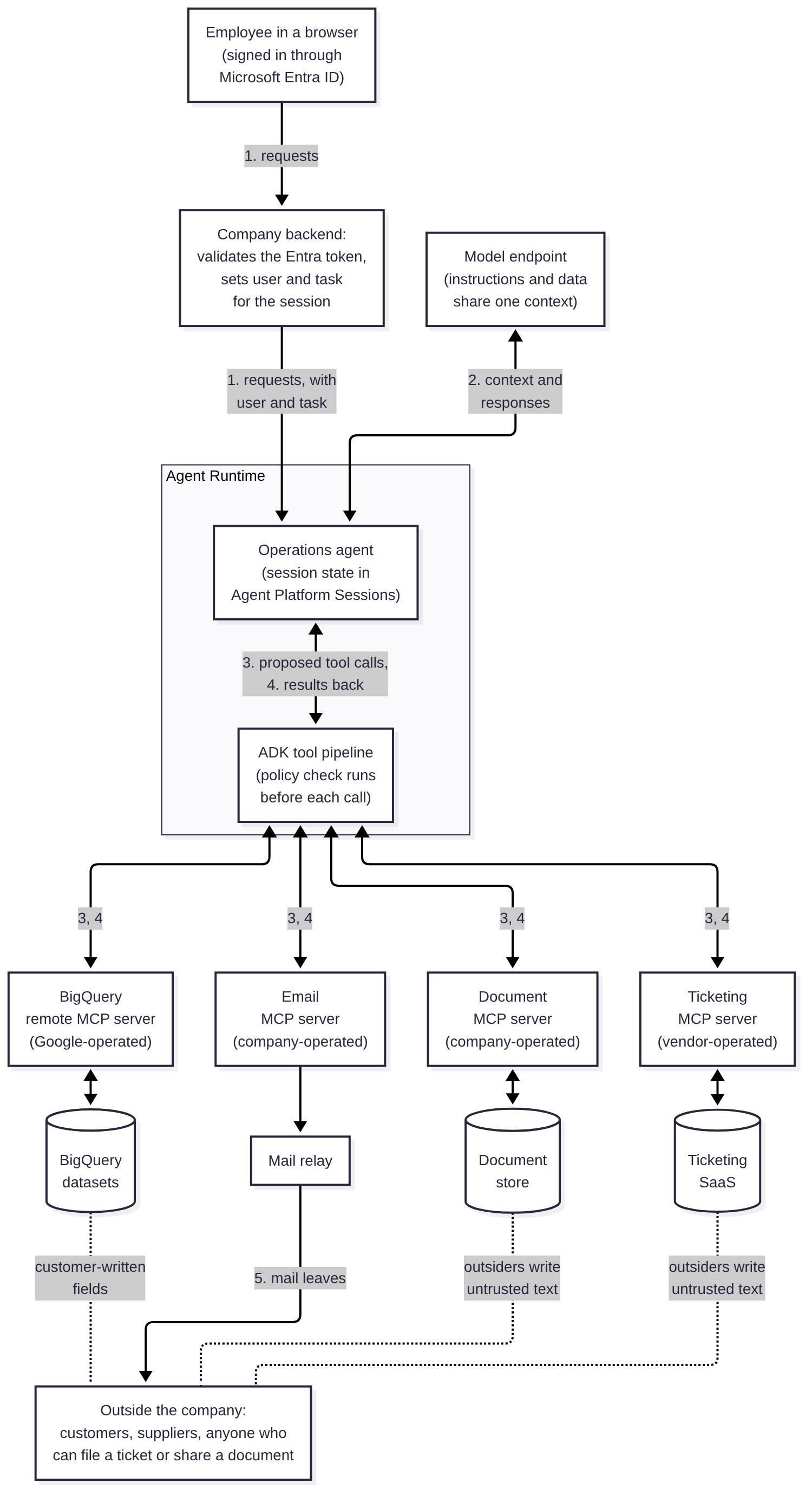
Figure 1 numbers the flows. The tool results in flow 4 are where the design gets harder, because text written outside the company comes back to the agent inside them, while flow 5 sends mail to the same people who can write that text. The company backend matters as much as the runtime: it is the only caller the agent should accept, and it decides which employee and which task each session belongs to.
Two identity questions sit under every arrow in Figure 1: how an employee’s Entra sign-in reaches the agent and binds to the session, which Part 2 covers, and whose authority the agent uses at each MCP server, which Part 3 covers. Google’s Agent Identity gives each agent its own SPIFFE-based identity and can hold tokens that users delegate to it (Google Cloud, n.d.b). Until Part 3 shows how those tokens are handled, I treat code in the agent’s process as able to use any credential the agent holds.
What is worth protecting
An agent’s assets go beyond the data behind its tools. For this one:
- The data behind the tools: BigQuery tables, internal documents, and ticket history, including customer details.
- Credentials: tokens for each MCP server, refresh tokens held on the employee’s behalf (by the agent or a credential broker), and wherever delegated tokens are stored for each user.
- The ability to act: sending mail from a company domain and writing to tickets both carry the company’s name, even when the content is wrong.
- Session state and memory: what the agent carries from one turn or one session to the next.
- The record of what happened: tool-call logs and the decisions around them, which incident response depends on.
- Spend: model tokens and BigQuery bytes scanned, which a looping agent can burn through.
Where instructions get in
Web applications can keep code and data on separate paths, as parameterised queries do, and many injection defences rely on that separation. A language model gets its instructions and its data in the same context window, as text. Anything that reaches the context can be read by the model as a request, whatever channel it arrived through.
| Entry point | Who controls the text | How it reaches the model |
|---|---|---|
| System instructions | The team that deploys the agent | Loaded at startup |
| The employee’s request | The employee | The chat turn |
| Tool names and descriptions | Whoever operates each MCP server | Listed to the model so it can choose tools |
| Ticket bodies and comments | Anyone who can file or comment on a ticket, often outside the company | get_ticket results |
| Documents | Anyone who can write or share into the store | Search results |
| BigQuery rows | Whatever wrote the rows, including free-text fields that customers filled in | Query results |
| Memory and session state | Earlier turns and earlier sessions | Loaded with the session |
Table 1. Where text enters the reference agent’s context.
Only the first two rows are written by people the agent works for. The third is written by whoever runs each server: Google, the ticketing vendor, and the company’s own teams. The next three are written by anyone who can get text into a ticket, a document, or a table, and the last by earlier sessions, which may themselves have read any of those. The BigQuery row is easy to miss: a table that stores ticket text or customer notes carries untrusted content even though the tool reading it is internal.
The employee’s own request isn’t always benign either. The confirmations later in this post are approved by the employee who asked, so they help against a misled model and do little against an employee who wants data out. Where that matters, external sends of query results need a second approver or the company’s existing data loss prevention controls.
Three properties in one agent
Simon Willison names the combination that turns injected text into data loss: access to private data, exposure to untrusted content, and the ability to communicate externally, which he calls the lethal trifecta (Willison, 2025). An agent with all three can be steered by text it reads into sending what it can read to wherever the text says.
The reference agent has all three, and the ticket reply task uses all three in one session. It reads a ticket (untrusted content), queries BigQuery (private data), and sends email to a customer (external communication). It is often the task teams most want to automate, which is why this series attacks it.
One path, end to end
Figure 2 shows the path in its generic form. It needs no software vulnerability, and each step is a call the agent is allowed to make.
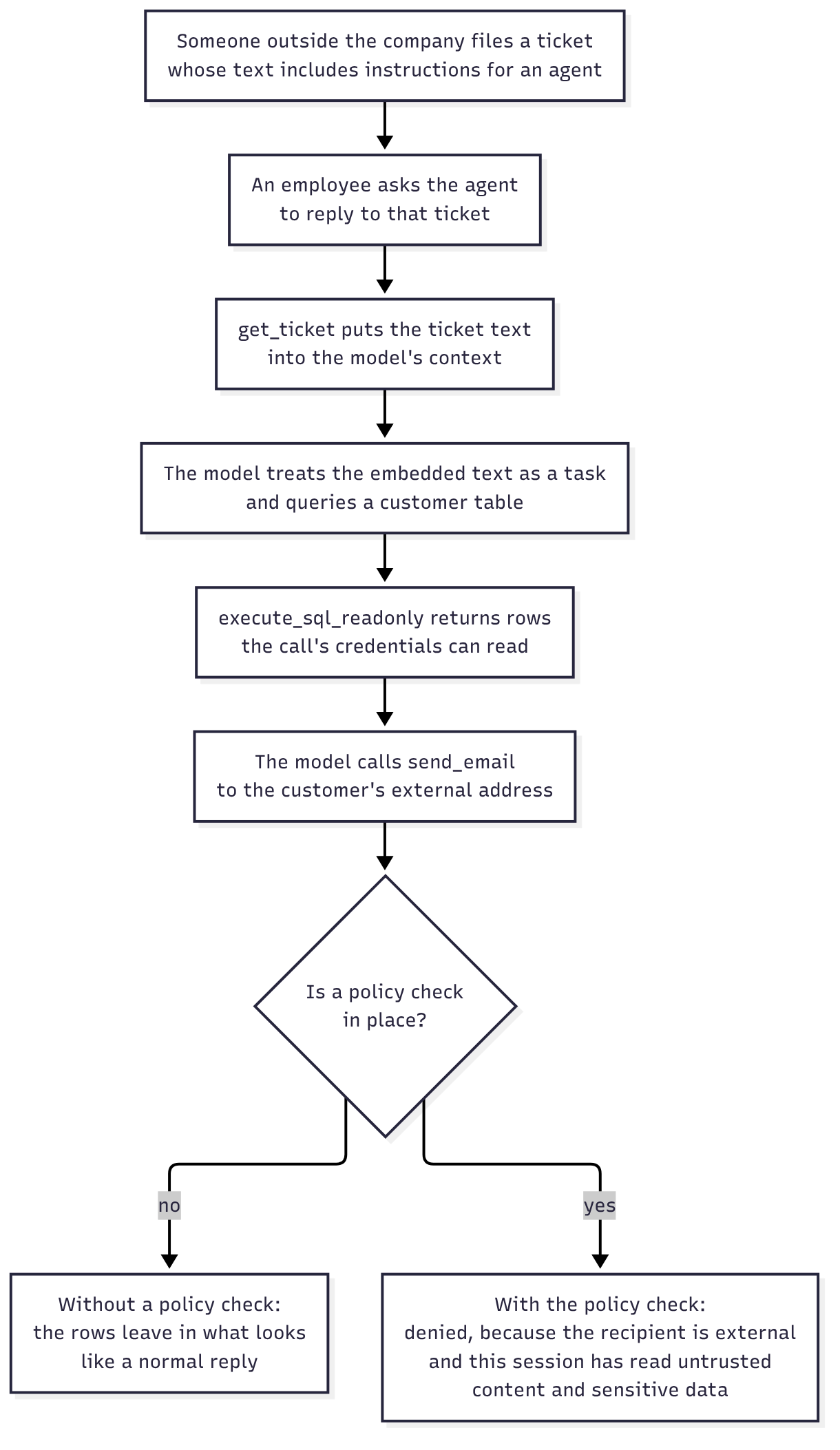
The ticket text asks, in ordinary language, for some extra context to be included in the reply. The model has been told to be helpful with tickets, the request reads like part of the job, and the query and the email are both tools it was given. Whether a given model follows the embedded text can’t be assumed either way, and that is part of the problem. A few test runs without a leak don’t show the path is closed.
Each component in Figure 2 behaves as designed. The ticketing system stores what customers write, the BigQuery MCP server runs a read-only query the credentials allow, and the email server sends mail. The leak comes from the order of the calls, so this post starts with a control that can see that order. It also comes to a simple recommendation for the ticket reply task: let the agent draft the reply and have the employee send it.
If the rows in Figure 2 hold customers’ personal data, the outcome is a data breach, whatever the AI Act says about the agent. In the EU, GDPR Article 33(1) requires the controller to notify the supervisory authority “without undue delay and, where feasible, not later than 72 hours after having become aware of it”, unless the breach is unlikely to result in a risk to people’s rights and freedoms (European Union, 2016). In the US, every state has a breach notification law (National Conference of State Legislatures, 2022), and a financial firm regulated in New York has to notify the Department of Financial Services “no later than 72 hours after determining that a cybersecurity incident has occurred” (New York State Department of Financial Services, n.d.). An EU financial entity also reports major ICT-related incidents to its competent authority under DORA (European Union, 2022). Which of these applies depends on the data and the firm, so check with counsel, but I’d put the agent on the same breach runbook as any other system that holds customer data before it ships.
A first control: a policy check on each tool call
The first control sits where the sequence is visible: between the model proposing a tool call and the tool running. ADK provides the hook. A before_tool_callback is “[c]alled just before a specific tool’s run_async method is invoked, after the LLM has generated a function call for it”; returning None lets the tool run, and returning a dictionary skips it (Google, n.d.b). ATLAS describes the same idea as mitigation AML.M0030, Restrict AI Agent Tool Invocation on Untrusted Data, with human approval as AML.M0029 (MITRE, 2026).
The policy check is deny by default and works from three inputs:
- The task, fixed by the application when it creates the session, from the entry point the employee used. The model doesn’t choose it, so text in a ticket shouldn’t be able to promote a triage session into a reply session, provided nothing else can write that state (see Session state and credentials below).
- The tool’s effect class: reads untrusted content, reads sensitive data, writes internally, or sends.
- What the session has already been exposed to: whether it has read untrusted content and whether it has read sensitive data.
From those it decides allow, confirm, or deny, checking the rows of Table 2 in order.
| Situation | Decision |
|---|---|
| The tool is unknown, or isn’t in the task’s allowlist | Deny |
| An email with no recipients, recipient fields that aren’t plain lists of addresses, an argument the policy check doesn’t list, a subject or body that isn’t text, or control or formatting characters in the subject | Deny |
| An email to any external address after the session has read untrusted content and sensitive data | Deny (the send in Figure 2) |
| Any other email to an external address | Confirm |
| An internal email or a ticket comment after the session has read untrusted content | Confirm |
| Anything else in the task | Allow, and record whether the call reads untrusted content or sensitive data |
Table 2. How the policy check decides.
An address with anything unusual in it, including a plus tag or non-ASCII characters, counts as external. Recipient fields are denied rather than parsed when they aren’t plain lists, an unexpected argument could carry an address or data, and control or bidirectional formatting characters in a subject could add mail headers or disguise what the approver sees. The policy check doesn’t inspect what the body says.
Listing 1 keeps send_email in the ticket reply task so the deny is visible. For most teams a drafting tool is the better fit, as the section on costs explains.
Python
"""Deny-by-default policy check for the reference agent's tool calls."""
import re
import unicodedata
from dataclasses import dataclass
from enum import Enum


class Effect(Enum):
    READ_UNTRUSTED = "read_untrusted"  # content anyone can write: tickets, documents
    READ_SENSITIVE = "read_sensitive"  # internal data: BigQuery
    WRITE_INTERNAL = "write_internal"  # changes inside the company: ticket comments
    SEND = "send"                      # leaves the agent: email


TOOLS = {
    "get_ticket": Effect.READ_UNTRUSTED,
    "search_documents": Effect.READ_UNTRUSTED,
    "execute_sql_readonly": Effect.READ_SENSITIVE,
    "add_ticket_comment": Effect.WRITE_INTERNAL,
    "send_email": Effect.SEND,
}

# The application sets the task from the entry point the employee used.
# The model never chooses it.
TASKS = {
    "triage_ticket": {"get_ticket", "search_documents", "add_ticket_comment"},
    "data_question": {"execute_sql_readonly", "send_email"},
    "ticket_reply": {"get_ticket", "execute_sql_readonly", "send_email"},
}

# A strict local part: anything unusual counts as external, including a
# plus tag, which can route mail into a ticket or a list.
INTERNAL = re.compile(r"[a-z0-9._-]+@example\.com")

# The email tool's arguments. Any other key could carry an address or data.
SEND_FIELDS = {"to", "cc", "bcc", "subject", "body"}


@dataclass
class Session:
    untrusted_seen: bool = False
    sensitive_read: bool = False


@dataclass(frozen=True)
class Decision:
    outcome: str  # "allow", "confirm", or "deny"
    reason: str


def _recipients(args: dict):
    """Every address field, or None if any field isn't a list of strings."""
    found = []
    for field in ("to", "cc", "bcc"):
        value = args.get(field, [])
        if not isinstance(value, list) or not all(isinstance(r, str) for r in value):
            return None
        found += value
    return found


def _unsafe(c: str) -> bool:
    """Control characters, line separators, and bidirectional formatting."""
    return (unicodedata.category(c) == "Cc" or c in "\u2028\u2029\u200e\u200f"
            or "\u202a" <= c <= "\u202e" or "\u2066" <= c <= "\u2069")


def _external(recipients) -> bool:
    return any(not (r.isascii() and INTERNAL.fullmatch(r.lower())) for r in recipients)


def decide(task: str, tool: str, args: dict, s: Session) -> Decision:
    effect = TOOLS.get(tool)
    if effect is None:
        return Decision("deny", f"unknown tool {tool}")
    if tool not in TASKS.get(task, set()):
        return Decision("deny", f"{tool} is not allowed for task {task}")

    if effect is Effect.SEND:
        if set(args) - SEND_FIELDS:
            return Decision("deny", "unexpected argument")
        subject, body = args.get("subject", ""), args.get("body", "")
        if not (isinstance(subject, str) and isinstance(body, str)):
            return Decision("deny", "subject and body must be text")
        if any(_unsafe(c) for c in subject):
            return Decision("deny", "control or formatting character in subject")
        recipients = _recipients(args)
        if not recipients:
            return Decision("deny", "recipients missing or malformed")
        if _external(recipients):
            if s.untrusted_seen and s.sensitive_read:
                return Decision("deny", "external send after untrusted content and sensitive data")
            return Decision("confirm", "external recipient")
    if effect in (Effect.SEND, Effect.WRITE_INTERNAL) and s.untrusted_seen:
        return Decision("confirm", "side effect after untrusted content")

    # Record what the session has now been exposed to.
    if effect is Effect.READ_UNTRUSTED:
        s.untrusted_seen = True
    if effect is Effect.READ_SENSITIVE:
        s.sensitive_read = True
    return Decision("allow", "within task policy")
Rust
//! Deny-by-default policy check for the reference agent's tool calls.
use serde_json::Value;

#[derive(Clone, Copy, PartialEq, Debug)]
pub enum Effect {
    ReadUntrusted, // content anyone can write: tickets, documents
    ReadSensitive, // internal data: BigQuery
    WriteInternal, // changes inside the company: ticket comments
    Send,          // leaves the agent: email
}

pub fn effect_of(tool: &str) -> Option<Effect> {
    match tool {
        "get_ticket" | "search_documents" => Some(Effect::ReadUntrusted),
        "execute_sql_readonly" => Some(Effect::ReadSensitive),
        "add_ticket_comment" => Some(Effect::WriteInternal),
        "send_email" => Some(Effect::Send),
        _ => None,
    }
}

// The application sets the task from the entry point the employee used.
// The model never chooses it.
pub fn task_allows(task: &str, tool: &str) -> bool {
    let allowed: &[&str] = match task {
        "triage_ticket" => &["get_ticket", "search_documents", "add_ticket_comment"],
        "data_question" => &["execute_sql_readonly", "send_email"],
        "ticket_reply" => &["get_ticket", "execute_sql_readonly", "send_email"],
        _ => &[],
    };
    allowed.contains(&tool)
}

#[derive(Default, Debug)]
pub struct Session {
    pub untrusted_seen: bool,
    pub sensitive_read: bool,
}

#[derive(PartialEq, Debug)]
pub enum Decision {
    Allow,
    Confirm(&'static str),
    Deny(String),
}

/// Every address field, or None if any field isn't a list of strings.
fn recipients(args: &Value) -> Option<Vec<String>> {
    let mut found = Vec::new();
    for field in ["to", "cc", "bcc"] {
        match args.get(field) {
            None => {}
            Some(Value::Array(items)) => {
                for item in items {
                    found.push(item.as_str()?.to_string());
                }
            }
            Some(_) => return None,
        }
    }
    Some(found)
}

/// The email tool's arguments. Any other key could carry an address or data.
const SEND_FIELDS: [&str; 5] = ["to", "cc", "bcc", "subject", "body"];

/// Control characters, line separators, and bidirectional formatting.
fn unsafe_char(c: char) -> bool {
    c.is_control()
        || matches!(c, '\u{2028}' | '\u{2029}' | '\u{200e}' | '\u{200f}')
        || ('\u{202a}'..='\u{202e}').contains(&c)
        || ('\u{2066}'..='\u{2069}').contains(&c)
}

/// A strict local part: anything unusual counts as external, including a
/// plus tag, which can route mail into a ticket or a list.
fn is_internal(address: &str) -> bool {
    if !address.is_ascii() {
        return false;
    }
    let a = address.to_ascii_lowercase();
    match a.strip_suffix("@example.com") {
        Some(local) => {
            !local.is_empty()
                && local.chars().all(|c| c.is_ascii_lowercase() || c.is_ascii_digit() || "._-".contains(c))
        }
        None => false,
    }
}

pub fn decide(task: &str, tool: &str, args: &Value, s: &mut Session) -> Decision {
    let Some(effect) = effect_of(tool) else {
        return Decision::Deny(format!("unknown tool {tool}"));
    };
    if !task_allows(task, tool) {
        return Decision::Deny(format!("{tool} is not allowed for task {task}"));
    }

    if effect == Effect::Send {
        let known = args
            .as_object()
            .is_some_and(|o| o.keys().all(|k| SEND_FIELDS.contains(&k.as_str())));
        if !known {
            return Decision::Deny("unexpected argument".into());
        }
        if ["subject", "body"].iter().any(|f| args.get(*f).is_some_and(|v| !v.is_string())) {
            return Decision::Deny("subject and body must be text".into());
        }
        let subject = args.get("subject").and_then(Value::as_str).unwrap_or("");
        if subject.chars().any(unsafe_char) {
            return Decision::Deny("control or formatting character in subject".into());
        }
        let to = match recipients(args) {
            Some(r) if !r.is_empty() => r,
            _ => return Decision::Deny("recipients missing or malformed".into()),
        };
        if to.iter().any(|r| !is_internal(r)) {
            if s.untrusted_seen && s.sensitive_read {
                return Decision::Deny("external send after untrusted content and sensitive data".into());
            }
            return Decision::Confirm("external recipient");
        }
    }
    if matches!(effect, Effect::Send | Effect::WriteInternal) && s.untrusted_seen {
        return Decision::Confirm("side effect after untrusted content");
    }

    // Record what the session has now been exposed to.
    match effect {
        Effect::ReadUntrusted => s.untrusted_seen = true,
        Effect::ReadSensitive => s.sensitive_read = true,
        _ => {}
    }
    Decision::Allow
}
Listing 1. A deny-by-default policy check for the reference agent's tool calls. Tool names follow the MCP servers in Figure 1; example.com stands in for the company's domain.
Listing 2 wires the policy check into the agent as an ADK plugin. We read the ADK for Python 2.11.0 source for this, and our tests exercise the ordering against agent callbacks. Plugin callbacks registered on the app run before any agent’s own before_tool_callback, and they cover the agents the app drives, unless a sub-agent is wrapped in an AgentTool with plugins excluded. They stop at the first plugin that returns a result, so the policy check goes first in the plugin list. Listing 2 is Python only, since it is wiring for ADK’s Python SDK.
Python
"""The policy check as an ADK plugin, registered first on the App."""
from google.adk.plugins.base_plugin import BasePlugin

from policy_check import Session, decide


class PolicyCheck(BasePlugin):
    def __init__(self, raise_approval, log):
        super().__init__(name="policy_check")
        self.raise_approval = raise_approval  # the application's approval queue
        self.log = log

    async def before_tool_callback(self, *, tool, tool_args, tool_context):
        state = tool_context.state
        s = Session(
            untrusted_seen=state.get("policy_untrusted_seen", False),
            sensitive_read=state.get("policy_sensitive_read", False),
        )
        decision = decide(state.get("policy_task", ""), tool.name, tool_args, s)
        # The flags only ever go from False to True.
        if s.untrusted_seen:
            state["policy_untrusted_seen"] = True
        if s.sensitive_read:
            state["policy_sensitive_read"] = True
        self.log(tool_context, tool.name, tool_args, decision)

        if decision.outcome == "allow":
            return None  # ADK runs the tool
        if decision.outcome == "confirm":
            # The application records the employee's decision, and the runtime
            # releases the call after the policy check runs again. Nothing the
            # model writes counts as approval.
            self.raise_approval(tool_context, tool, tool_args)
            tool_context.actions.skip_summarization = True  # end the turn here
            return {"status": "awaiting_approval"}
        return {"status": "not_permitted"}  # the reason stays in the log


# app = App(name="ops", root_agent=agent, plugins=[PolicyCheck(...), *other_plugins])
Listing 2. The policy check as an ADK plugin. Returning None runs the tool; returning a dictionary skips it.
The backend sets the task in session state, and the policy check keeps its exposure flags there under keys of its own. The flags are set when a read is allowed, before it runs, so later calls in the same response see them.
When a call needs confirmation
“Confirm” means the call doesn’t run. The application raises an approval request instead and shows the signed-in employee the real server, tool name, and arguments. The approval is bound to that employee, the session, the task, the server and tool, and a hash of the canonicalised arguments, and it expires and can be used once.
For external sends, asking the employee to sign in again helps confirm that the approver is the employee. In Entra, one option is a Conditional Access authentication context whose policy sets sign-in frequency to every time, requested with a claims challenge for each approval. Microsoft notes that “every time” allows five minutes of clock skew (Microsoft, n.d.b). The API opts in to the optional acrs claim, and the backend checks it along with when the user last authenticated, from the optional auth_time claim (Microsoft, n.d.a; Microsoft, 2026b). A token carrying acrs only shows that the policy was met when the token was issued, and Microsoft’s pages don’t describe this combination end to end, so test it before relying on it. Rate-limiting approval requests and denied calls per session keeps a looping model from flooding the employee.
The plugin also ends the model’s turn when it raises a request, so a looping or misled model gets no further model steps in that turn. Other tool calls it proposed in the same response are each still checked, and each can raise its own request. In ADK 2.11.0 they are checked in the order the model listed them, as long as the policy check updates its flags before awaiting anything, as Listing 2 does. Order matters: a send listed before a query in the same response gets a confirm, while the reverse gets a deny. Running the policy check again at release is meant to close that gap, and Part 4 tests it. Our tests cover the read-then-send order, so rerun them on every ADK upgrade.
Once the employee approves, the backend resumes the session with a reference to the approval, which lives in a record outside session state. Runtime code outside the model loop then releases the call under the credential the agent would have used. That code runs decide again against the session’s current flags and goes ahead only if the result is still confirm. It then calls the tool directly; sending the call back through the ADK pipeline would only raise a fresh request. Because the direct call skips ADK’s after-tool callbacks, the release code also records the result in the session as a new event that references the approval, logs it, and runs any after-tool checks itself, such as the Model Armor scan described later in this post.
Where the call runs under the agent’s own identity, the release should also check that the approving employee is entitled to the data and the action; Part 3 compares that with running under the employee’s delegated authority.
ADK has a built-in tool confirmation feature. At the time of writing, its documentation marks it experimental, lists VertexAiSessionService among the session services it doesn’t support (alongside DatabaseSessionService), and doesn’t describe binding the confirmation to the signed-in user (Google, n.d.a). Check this against the ADK version you run. VertexAiSessionService is the ADK client for Agent Platform Sessions, which are accessed through an Agent Runtime instance (Google Cloud, n.d.h). The reference agent keeps its sessions in Agent Platform Sessions, so the built-in feature is out for now. Part 4 builds approvals into the policy check and the company backend instead.
We tested both listings. The release path is only described here; Part 4 builds and tests it. The Python tests run the policy check on its own and as a plugin inside an ADK 2.11.0 Runner with a scripted model, where the blocked send never reaches the tool, a confirm ends the model’s turn, and the plugin denies a call before the agent’s own callback runs. The Rust tests cover the same decision cases: a lookalike domain, addresses hidden in bcc, a recipient field passed as one comma-separated string, an unexpected reply_to argument, a subject or body passed as a list or object, a subject with an injected line break or a bidirectional override, a plus-tagged address, and local parts with percent signs, bang paths, encoded words, invisible characters, or non-ASCII letters.
What the policy check costs
The first cost lands on the ticket reply task. With the policy check in place, the agent can read a customer’s ticket, look up the facts, and draft a reply, but it can’t send that reply to the customer once both flags are set. The simplest design moves the send out of the agent: the agent drafts, and the employee sends from the ticketing system after reading the draft. For most teams, that is where I’d start. The draft can still carry the data the injected text asked for, so the review screen should show which queries fed the draft and highlight values that came from them; Part 6 covers checking outbound content. Teams that want the agent to send directly need finer-grained tracking than two session flags, which Part 4 covers.
The second cost is confirmation load. Session-level flags are coarse: one ticket read early in a conversation marks everything after it, and in the triage task every comment follows a get_ticket, so the task’s main action always needs confirmation. If employees see a confirmation on most actions, they tend to start approving without reading. In our experience, narrower tasks and shorter sessions do more to reduce that load than prompt changes.
The third is upkeep. Every new tool needs an effect class and a place in each task. A tool that is added to an MCP server but not to the policy check is denied, so the table needs an owner who updates it whenever a server adds or changes tools.
Where the policy check stops helping
The policy check sees tool names, arguments, and session history, and nothing else. It closes the exact path in Figure 2, for that task, with those flags. The rest of this section is what it leaves open, and, where a later part picks a gap up, which one.
Routes data can still take
A deny stops one call. The model sees not_permitted and can try another route, such as an internal address that reaches the customer, which then arrives as a routine confirmation. Ending the session after a deny like the one in Figure 2, or denying every later side effect in it, closes that route within the session, and Part 4 adds it. That particular deny should rarely fire in normal use, so I’d alert on it from day one; Part 8 builds the detection around it.
An address on the company’s domain can still reach outsiders: a ticketing system’s intake address that posts mail to a customer-visible ticket, a group with external guests, or a mailbox that forwards. A colleague may also not be entitled to the rows the agent read. Resolving recipients against the directory and checking their own access belongs in Parts 3 and 6.
Another customer’s ticket is a route too. In the ticket tasks, injected text can ask the agent to read a different customer’s ticket and include it in the reply, which needs only a confirmation that looks routine. Binding the ticket ID when the session is created, and denying get_ticket or add_ticket_comment for any other ID, helps close that route.
Some channels have an outside audience without looking like sends. A ticket comment is classed as an internal write, but on a ticket filed by a customer, the customer may be able to read it. A shared document link works the same way. Effect classes have to follow who can read the result, which Part 6 works through.
Read tools can carry data out through their arguments. Reads are allowed even after sensitive data has been read, and a ticket ID or search query stuffed with query results reaches the vendor’s server and its logs. Strict argument formats help, and so does treating calls to servers run by other organisations as sends once a session holds sensitive data.
The agent’s own output never reaches the policy check. Text the model returns to the employee, including links and images the chat interface renders, never passes through a tool call, and the policy check doesn’t read email bodies, so HTML and remote images in them pass. Remote images and links in mail the agent sends internally can do the same when a colleague’s mail client loads them. Part 6 covers output handling.
What tool names and two flags can’t capture
Some sources are sensitive and untrusted at once. If a BigQuery table holds customer-written notes, a query result is both sensitive and untrusted, and the policy check as written only sets the sensitive flag. Internal documents are the mirror case: the policy check classes them as untrusted only, though they hold internal material. Tickets are mixed too, since get_ticket returns the internal comments the triage task writes, so in the reply task it should set both flags, or the ticket server should return only customer-visible fields. Classifying by source rather than by tool helps with all three, though it needs a data catalogue to work from.
Memory loaded into a new session and text an employee pastes from a customer email set no flag. The application should set both flags when it creates a session that loads memory, since memory can carry earlier query results as well as earlier untrusted text, and the untrusted flag when a session takes pasted text or attachments.
The policy check allows execute_sql_readonly in the right tasks; it doesn’t judge whether a particular query reads more than the task needs. That depends on which identity the query runs as, and on row-level controls in BigQuery, which narrow results per employee when the query runs as that employee. Part 3 compares the options.
What the policy check has to trust
The policy check trusts the approval it receives. The approver can only judge what the application shows them, so the application should render the arguments itself (ASI09 in Table 3).
The policy check also trusts that nothing changes a call after it allows it. Later plugins and the agent’s own callbacks receive the same arguments and can change them after the policy check has allowed the call. In the ADK 2.11.0 source, built-in tools such as Google Search grounding are added to the model request rather than run by the agent’s tool pipeline, so the policy check never sees them.
The policy check trusts tool names. With several MCP servers, two can expose tools with the same name, and a server can change what a tool does after it was approved. Tools denied by the policy check also still have their descriptions listed to the model. ADK’s McpToolset accepts a tool_filter and a tool_name_prefix, which help in the meantime (the policy check’s table then uses the prefixed names), and Part 5 pins tools to the authenticated server and the descriptions that were reviewed.
An in-process plugin governs what a misled model can do, and a compromised runtime can skip it.
Controls outside the process
Agent Gateway, which Google describes as the key enforcement component of Agent Platform, sits outside the agent. Its overview says that by default all connections are blocked unless an explicit IAM policy grants access, and that for MCP traffic it can parse requests so policies can restrict specific tools (Google Cloud, n.d.a). Calls that violate its Access policies are blocked in enforce mode and only logged in dry-run mode (Google Cloud, n.d.e). A destination that isn’t registered in Agent Registry needs an explicit access policy, and Principal Access Boundary policies can also be enforced on the agent’s identity (Google Cloud, n.d.a; Google Cloud, n.d.e). In enforce mode, that narrows what a compromised runtime can reach to what the agent’s identity is allowed, provided egress can’t bypass the gateway. Within that, any delegated user tokens the runtime holds remain usable.
Agent Gateway’s egress policies are keyed on the agent’s identity: “Agent principals are the members that you grant access to” (Google Cloud, n.d.e). The documentation we read doesn’t show policy conditions on the end user, and as far as we can tell the gateway doesn’t see session history, which is what the policy check works from. Google’s pages also read differently on VPC Service Controls. The gateway overview lists enforcing perimeters for agent communications as a benefit (Google Cloud, n.d.a), and the release notes add that support from 9 September 2026 (Google Cloud, 2026a). It applies only to Agent Gateway deployments created after 8 September whose VPC connectivity uses the agent connectivity template in ALL_TRAFFIC egress mode. The IAM Access policies page still carries a note that Access policies don’t support VPC Service Controls (Google Cloud, n.d.e). Part 6 works out what that means for a perimeter around this agent.
My read, while the documentation settles: treat Agent Gateway, and Model Armor below, as defence in depth, and treat the policy check as the control you own and can test today.
Cloud Run note. As of October 2026, Agent Gateway’s documentation lists Agent Runtime (ingress and egress) and Gemini Enterprise (egress only), and doesn’t list Cloud Run, although Agent Identity lists Cloud Run (Google Cloud, n.d.b; Google Cloud, n.d.a). A Cloud Run deployment keeps the in-process policy check but needs its egress controls from elsewhere, which Part 6 covers.
Where Model Armor fits
Filters that look for injected instructions are useful as a second layer. I wouldn’t rely on one on its own, because it can let too much through. As of October 2026, Google’s Model Armor can inspect tools/call requests and responses for Google’s MCP servers, but not tools/list, and Google advises enabling its prompt injection and jailbreak filter only where MCP traffic carries natural language (Google Cloud, n.d.g). BigQuery is on the list of MCP servers it supports (Google Cloud, n.d.i). Google’s BigQuery MCP page also warns that “When Model Armor is enabled with logging enabled, Model Armor logs the entire payload”, so query results can end up in your logs (Google Cloud, n.d.o).
In this design, that integration would see the BigQuery traffic but not the ticket text in Figure 2, which arrives through the vendor’s server.
On Agent Runtime, Model Armor can also be enabled on Agent Gateway. For egress MCP traffic to servers in general, Google’s page says it sanitises tools/call and prompts/get requests and responses and tool execution errors, and it lists tools/list, resources/*, and “Streamable HTTP/SSE for MCP” among the payloads that pass without sanitization. Model Armor also has to be in the same region as the services it integrates with (Google Cloud, n.d.f). The page doesn’t make clear whether a tools/call response that a server streams over SSE is inspected, so check this against the vendor’s server before counting on it. Where that doesn’t apply, including on Cloud Run, the application can send get_ticket results to Model Armor itself, as applications do for prompts and model responses (Google Cloud, n.d.k), for example from an after-tool callback.
Willison’s point about guardrail products applies: vendors often claim to catch “95% of attacks”, but “in web application security 95% is very much a failing grade” (Willison, 2025). A detector can lower the rate of successful injections, and the policy check denies the send in Figure 2 whether or not the detector flags the ticket. Part 4 tests both against the same set of tickets.
Mapping the threats to OWASP and ATLAS
I map against two catalogues, because they answer different questions. The OWASP GenAI Security Project published the Top 10 for Agentic Applications for 2026 in December 2025. It describes risk categories and mitigations, and refers to the 2025 edition of the OWASP LLM Top 10: ASI03, for example, is described as the agentic evolution of Excessive Agency (LLM06:2025) (OWASP GenAI Security Project, 2025). The project published a 2026 edition of the LLM Top 10 in August 2026 with renumbered entries, so Excessive Agency is now LLM03 (OWASP GenAI Security Project, 2026), and Table 3 uses the 2026 numbers. MITRE ATLAS describes adversary techniques and mitigations; the data release used here is 2026.09 (MITRE, 2026).
| Threat to the reference agent | OWASP Agentic 2026 | OWASP LLM 2026 (our mapping) | Part |
|---|---|---|---|
| Ticket or document text redirects the agent | ASI01 Agent Goal Hijack | LLM01 Prompt Injection | 4 |
| Allowed tools chained for an unintended purpose | ASI02 Tool Misuse and Exploitation | LLM03 Excessive Agency | 1, 4 |
| The agent’s authority is wider than the user’s or the task’s | ASI03 Identity and Privilege Abuse | LLM03 Excessive Agency | 2, 3 |
| A caller poses as another employee, resumes someone else’s session, or changes the task or flags in session state | ASI03 Identity and Privilege Abuse | 2 | |
| A token is harvested through the agent or stolen, then replayed | ASI03 Identity and Privilege Abuse | 3 | |
| A tool’s description or behaviour is poisoned or changes | ASI04 Agentic Supply Chain Vulnerabilities | LLM04 Supply Chain | 5 |
| Data leaves through email, links, or rendered images | ASI02 Tool Misuse and Exploitation | LLM02 Sensitive Information Disclosure; LLM10 Improper Output Handling | 6 |
| Poisoned memory changes later sessions | ASI06 Memory & Context Poisoning | 7 | |
| A misleading summary gets a human to approve an action | ASI09 Human-Agent Trust Exploitation | 4 | |
| Looping, runaway cost, or an agent acting outside its purpose | ASI02 Tool Misuse and Exploitation; ASI08 Cascading Failures; ASI10 Rogue Agents | LLM06 Unbounded Consumption | 8 |
Table 3. The reference agent’s threats mapped to OWASP, with the part of the series that covers each. The LLM 2026 column is our mapping; OWASP’s agentic document lists its own related LLM entries, in 2025 numbering, for each ASI item in an appendix. Blank cells are where we didn’t map an entry.
| Threat to the reference agent | MITRE ATLAS 2026.09 |
|---|---|
| Ticket or document text redirects the agent | AML.T0051.001 LLM Prompt Injection: Indirect; AML.T0099 AI Agent Tool Data Poisoning |
| Allowed tools chained for an unintended purpose | AML.T0053 AI Agent Tool Invocation |
| The agent’s authority is wider than the user’s or the task’s | Mitigations AML.M0026, AML.M0027, AML.M0028, and AML.M0037 |
| A token is harvested through the agent or stolen, then replayed | AML.T0091.000 Use Alternate Authentication Material: Application Access Token; AML.T0098 AI Agent Tool Credential Harvesting |
| A tool’s description or behaviour is poisoned or changes | AML.T0010.005 AI Supply Chain Compromise: AI Agent Tool; AML.T0110 AI Agent Tool Poisoning |
| Data leaves through email, links, or rendered images | AML.T0086 Exfiltration via AI Agent Tool Invocation; AML.T0077 LLM Response Rendering; AML.T0057 LLM Data Leakage |
| Poisoned memory changes later sessions | AML.T0080.000 AI Agent Context Poisoning: Memory |
| A misleading summary gets a human to approve an action | AML.T0067 LLM Trusted Output Components Manipulation |
| Looping, runaway cost, or an agent acting outside its purpose | AML.T0034.002 Cost Harvesting: Agentic Resource Consumption |
Table 4. The same threats mapped to MITRE ATLAS. We didn’t find an ATLAS technique that matches over-broad agent authority well, so that row names the ATLAS mitigations for agent and tool permissions instead, and we didn’t map the session-tampering row.
Two OWASP entries get less attention here. ASI07, Insecure Inter-Agent Communication, applies once agents call other agents, and this is a single agent. ASI05, Unexpected Code Execution, is narrow while the agent’s only code-like capability is read-only SQL. A query can still call a remote function, though. BigQuery documents remote functions as running code in Cloud Run or Cloud Run functions through a connection, used “in a query just like any other user-defined functions” (Google Cloud, n.d.p). I haven’t found Google documentation saying whether execute_sql_readonly allows them, so the identity running the query shouldn’t have access to routines, connections, or external data sources it doesn’t need. I’d also test whether execute_sql_readonly accepts EXPORT DATA statements or the EXTERNAL_QUERY function before relying on it.
The mapping is also a useful artefact for governance work in the US and the EU. In NIST’s AI Risk Management Framework, “The MAP function establishes the context to frame risks related to an AI system” (National Institute of Standards and Technology, 2023), and the Generative AI Profile lists information security, including direct and indirect prompt injection, among the risks it covers (National Institute of Standards and Technology, 2024).
In the EU, many internal operations agents won’t fall into a high-risk category under the AI Act. Where one does, Article 15(5) requires such systems to be “resilient against attempts by unauthorised third parties to alter their use, outputs or performance by exploiting system vulnerabilities” (European Commission, n.d.), and the company that built it may count as its provider. For the rest, Article 15 is still a useful bar. The Commission’s page notes that Article 15 has been amended by the Digital Omnibus on AI, so check the current text and dates; our Regulatory Stack post on Article 15 covers that side.
I’d keep the threat model as a versioned table beside the agent’s code, so the engineers and the governance team work from the same file.
Launch stages as of 13 October 2026
Most of the platform features this post relies on shipped this year, so Table 5 records their launch stage as of the date we checked.
| Feature | Launch stage | Source |
|---|---|---|
| Agent Identity | Generally available since 22 April 2026 | Google Cloud, 2026c |
| Agent Identity auth manager | Generally available since 22 August 2026, after a preview from April | Google Cloud, 2026c |
| Agent Gateway | Generally available since 18 June 2026; VPC Service Controls support announced on 9 September 2026 without a stated stage, for deployments created after 8 September that use the agent connectivity template in ALL_TRAFFIC egress mode | Google Cloud, 2026a |
| IAM Unified Access Policies (Access policies) | Generally available since 31 August 2026 | Google Cloud, 2026a |
| Model Armor for Agent Gateway | Generally available since 24 June 2026 | Google Cloud, 2026a |
| Google’s remote MCP servers | Generally available as a capability since 1 May 2026, with individual servers in Preview or GA | Google Cloud, 2026b |
| BigQuery remote MCP server | Not marked Preview in Google’s list of supported MCP products, which the MCP release notes point to for launch status; no stage stated on the server’s own page | Google Cloud, 2026b; Google Cloud, n.d.m; Google Cloud, n.d.o |
| Model Armor’s MCP server integration | No stage stated on its page | Google Cloud, n.d.g |
| ADK tool confirmation | Experimental | Google, n.d.a |
Table 5. Launch stages of the features this post relies on.
Where no stage is stated, I’d confirm it with Google before relying on the feature in production, since pre-GA terms and support differ. The design doesn’t depend on ADK’s experimental confirmation feature.
What I’d check in your own deployment
Most of what follows can’t be settled in a post, because it depends on how your tenant, projects, and servers are configured. These are the checks I’d want to see pass, with evidence, before an agent like this goes near production. Four of them I’d treat as blocking a release: only the backend can call the agent, user_id comes from the validated token, the policy check’s keys can’t be changed after the session is created, and a tool missing from the policy check’s table is denied.
Who can reach the agent
Owner: usually the platform team that runs Google Cloud IAM.
- Only the company backend can call the agent, and only the backend and the agent’s own identity hold permissions on its sessions. The backend gets a custom role with only
aiplatform.reasoningEngines.queryon the agent resource, as Google’s sharing page suggests (Google Cloud, n.d.l), and nothing else inherits that permission from the project, folder, or organisation through a role such asroles/aiplatform.useror a basic role (on Cloud Run, the invoker role). Google notes that default ADK agents trust the frontend, “which gives the frontend full control of sessions and users” (Google Cloud, n.d.l). - Deploy rights on the agent are treated as the agent’s authority: anyone who can change its code or configuration acts as it.
- The backend keeps its own record of which session belongs to which user, and resumes a session only for the user it was created for. Anyone holding the query permission can call the agent’s session operations directly, including creating sessions, so the IAM restriction above is what protects
policy_task.
How the backend checks the employee
Owner: the backend’s developers, with the identity team.
- The backend validates the Entra token’s signature, issuer, tenant, and lifetime (
expandnbf), and checks that the audience identifies its own API: in v2.0 tokens that is the client ID, and in v1.0 tokens the client ID or the resource URI the client requested (Microsoft, 2026a). - It accepts only delegated user tokens that carry its scope in
scp, from client apps it expects (azpin v2.0 tokens,appidin v1.0), and rejects app-only tokens, for which the optionalidtypclaim isapp(Microsoft, 2026b). - It rejects guest accounts unless a task is meant for them, for example by requiring user assignment on the API’s enterprise application and assigning only the intended users or groups, and by checking the optional
acctclaim, which is1for a guest (Microsoft, 2026b). Bothidtypandaccthave to be configured as optional claims on the API’s app registration. Once configured,idtypis emitted on app-only tokens, which is all this check needs (Microsoft, 2026b). - It derives the ADK
user_idfrom the tenant and object IDs (tidandoid; the client has to request theprofilescope for these to be issued), never from a client-supplied field (Microsoft, 2026a). Agent Runtime accepts a user ID the caller chooses (its documentation says “[c]hoose your own user ID”) (Google Cloud, n.d.n), so this binding is the backend’s job. - The agent never sees the Entra token, so it takes the employee’s identity entirely on the backend’s word. If delegated tokens are held per user, a caller who can choose
user_idcan use another employee’s tokens, which makes the backend’s identity and code as sensitive as the tokens they can unlock. Part 2 covers this binding.
Session state and credentials
Owner: the agent’s developers, with the platform team.
The policy check’s keys (
policy_taskand the flags) can’t be changed after the session is created. In practice that means:- no initial
stateoreventsfrom the client, and nostate_deltaor extra session events on a query; - no session PATCH through the ADK API server, and no session rewind outside the backend;
- no agent
output_key, tool, or callback that writes those keys, and nouser:orapp:prefix on them.
Keeping the keys, and the approval records, in a store outside session state is stronger still.
- no initial
Delegated tokens sit with the auth manager or another broker, not in session state that anything reading the session can see (ADK can keep them in session state, so this is a configuration choice), and each task gets its own toolsets, so credentials for servers outside the task aren’t loaded.
Tools, arguments, and approvals
Owner: the agent’s developers, with an application security review.
- No plugin or callback that runs after the policy check modifies tool arguments, model-side built-in tools are off, and no MCP sampling or elicitation callbacks are registered on the toolsets, since server-initiated requests don’t pass through the tool pipeline.
- Every tool exposed by every MCP server the agent can reach appears in the policy check’s table, and a tool that doesn’t is denied in the deployed agent, which a test confirms.
- The email tool’s real argument names match
SEND_FIELDSin Listing 1. Areply_to, attachment, or template field stays denied until the policy check knows how to check it, and the email server builds recipient headers only fromto,cc, andbcc, and normalises line endings in the body so it can’t end the message and start another (SMTP smuggling). - Approvals are bound as described above, single-use, shown by the application rather than summarised by the model, and checked again by the policy check at release.
Where data can go
Owner: the data owners and the teams that run mail and ticketing, with security.
- The internal addresses that reach outsiders (intake addresses, groups with guests, and forwarding mailboxes) are listed and kept current.
- The BigQuery tables that hold text written outside the company are listed, so queries against them can be classed as reading untrusted content.
- Every principal that reaches BigQuery is denied read-write MCP tools and holds no BigQuery write permissions. Google documents a deny policy that limits its MCP servers to read-only tools; its example denies every principal in the project, folder, or organisation it is attached to. The denied tool still appears in the tool list, so a
tool_filteron the toolset keeps it away from the model (Google Cloud, n.d.j). A VPC Service Controls perimeter around the BigQuery project, which Google documents for its own MCP servers with conditions such as read-only tool calls (Google Cloud, n.d.d), helps keep whatever statementsexecute_sql_readonlydoes allow from moving data outside it. Check how that perimeter and Agent Gateway’s Access policies fit together, given the documentation notes above.
Platform support and logging
Owner: the platform team, with security operations.
- Agent Gateway, Model Armor, and the Agent Identity auth manager are confirmed to support the runtime, region, and MCP servers in use, at a launch stage you have accepted for production, checked against Table 5 and Google’s current documentation.
- The policy check’s decisions are logged with the session, task, tool, arguments, and outcome, with access and retention set as for the data the arguments carry. Part 8 builds on this.
What this series leaves out
Some common questions fall outside the reference agent. It is a single agent, so agent-to-agent delegation and multi-agent protocols are out of scope; our post on secure multi-agent protocols covers that ground. It has no code-execution tool or sandbox. Cost and resource exhaustion appear only as far as Part 8 detects and stops a looping agent, and our post on resource governance covers budgets and throttling. The model’s own supply chain, meaning where its weights come from and how they were trained, is also out of scope, as are the web security of the chat front end, the model provider’s data handling, and the ticketing vendor’s own platform security.
The rest of the series
Part 2 follows the employee’s identity into the agent: from an Entra sign-in through the company backend, how the session is bound to that employee, and how the employee’s Entra identity is federated into Google Cloud for the calls that need it. Part 3 follows the agent’s calls out to its tools and compares the authority each can run under: delegated user authority, the agent’s own identity, or a combination. It also covers the current MCP authorization specification (version 2026-07-28), under which servers accept only tokens issued for them and never pass a client’s token on to upstream APIs (Model Context Protocol, 2026a; Model Context Protocol, 2026b), and where the servers in this design depart from it.
Part 4 takes indirect injection through tickets, documents, and query results, with value-level tracking, the approval path, and a test of Model Armor and the policy check against the same tickets. Part 5 deals with MCP servers you didn’t write, Part 6 with the ways data leaves, and Part 7 with memory. Part 8 is about detecting and containing an agent mid-task, and Part 9 is red-teaming before release.
Which of your agents reads text from outside the company in the same session as it reads your data, and what can it send?
References
European Commission, n.d. Article 15: Accuracy, robustness and cybersecurity. AI Act Service Desk. Available at: https://ai-act-service-desk.ec.europa.eu/en/ai-act/article-15 [Accessed 13 October 2026].
European Union, 2016. Regulation (EU) 2016/679 of the European Parliament and of the Council of 27 April 2016 on the protection of natural persons with regard to the processing of personal data and on the free movement of such data, and repealing Directive 95/46/EC (General Data Protection Regulation). Article 33. Available at: http://data.europa.eu/eli/reg/2016/679/oj [Accessed 13 October 2026].
European Union, 2022. Regulation (EU) 2022/2554 of the European Parliament and of the Council of 14 December 2022 on digital operational resilience for the financial sector. OJ L 333, 27.12.2022, Article 19. Available at: http://data.europa.eu/eli/reg/2022/2554/oj [Accessed 13 October 2026].
Google, n.d.a. Get action confirmation for ADK Tools. Agent Development Kit documentation. Available at: https://adk.dev/tools-custom/confirmation/ [Accessed 13 October 2026].
Google, n.d.b. Types of callbacks. Agent Development Kit documentation. Available at: https://adk.dev/callbacks/types-of-callbacks/ [Accessed 13 October 2026].
Google Cloud, 2026a. Gemini Enterprise Agent Platform release notes. Entries from 22 April to 9 September 2026. Available at: https://docs.cloud.google.com/gemini-enterprise-agent-platform/release-notes [Accessed 13 October 2026].
Google Cloud, 2026b. Google Cloud MCP servers release notes. Entry of 1 May 2026. Available at: https://docs.cloud.google.com/mcp/release-notes [Accessed 13 October 2026].
Google Cloud, 2026c. IAM release notes. Entries of 22 April and 22 August 2026. Available at: https://docs.cloud.google.com/iam/docs/release-notes [Accessed 13 October 2026].
Google Cloud, n.d.a. Agent Gateway overview. Gemini Enterprise Agent Platform documentation. Available at: https://docs.cloud.google.com/gemini-enterprise-agent-platform/govern/gateways/agent-gateway-overview [Accessed 13 October 2026].
Google Cloud, n.d.b. Agent Identity overview. Identity and Access Management documentation. Available at: https://docs.cloud.google.com/iam/docs/agent-identity-overview [Accessed 13 October 2026].
Google Cloud, n.d.c. Agent Platform overview. Gemini Enterprise Agent Platform documentation. Available at: https://docs.cloud.google.com/gemini-enterprise-agent-platform/overview [Accessed 13 October 2026].
Google Cloud, n.d.d. Control MCP use in a VPC Service Controls perimeter. Google Cloud MCP servers documentation. Available at: https://docs.cloud.google.com/mcp/control-mcp-use-vpc-sc-perimeter [Accessed 13 October 2026].
Google Cloud, n.d.e. IAM Access policies overview. Gemini Enterprise Agent Platform documentation. Available at: https://docs.cloud.google.com/gemini-enterprise-agent-platform/govern/policies/iam-overview-uap [Accessed 13 October 2026].
Google Cloud, n.d.f. Integrate Model Armor with Agent Gateway. Model Armor documentation. Available at: https://docs.cloud.google.com/model-armor/model-armor-agent-gateway-integration [Accessed 13 October 2026].
Google Cloud, n.d.g. Integrate with Google and Google Cloud MCP servers. Model Armor documentation. Available at: https://docs.cloud.google.com/model-armor/model-armor-mcp-google-cloud-integration [Accessed 13 October 2026].
Google Cloud, n.d.h. Manage sessions with Agent Development Kit. Gemini Enterprise Agent Platform documentation. Available at: https://docs.cloud.google.com/gemini-enterprise-agent-platform/scale/sessions/manage-with-adk [Accessed 13 October 2026].
Google Cloud, n.d.i. Model Armor supported products. Google Cloud MCP servers documentation. Available at: https://docs.cloud.google.com/mcp/model-armor-supported-products [Accessed 13 October 2026].
Google Cloud, n.d.j. Prevent read-write MCP tool use. Google Cloud MCP servers documentation. Available at: https://docs.cloud.google.com/mcp/prevent-read-write-tool-use [Accessed 13 October 2026].
Google Cloud, n.d.k. Protect AI applications with Model Armor. Security Command Center documentation. Available at: https://docs.cloud.google.com/security-command-center/docs/model-armor [Accessed 13 October 2026].
Google Cloud, n.d.l. Share an agent. Gemini Enterprise Agent Platform documentation. Available at: https://docs.cloud.google.com/gemini-enterprise-agent-platform/govern/share-agent [Accessed 13 October 2026].
Google Cloud, n.d.m. Supported products. Google Cloud MCP servers documentation. Available at: https://docs.cloud.google.com/mcp/supported-products [Accessed 13 October 2026].
Google Cloud, n.d.n. Use an Agent Development Kit agent. Gemini Enterprise Agent Platform documentation. Available at: https://docs.cloud.google.com/gemini-enterprise-agent-platform/scale/runtime/use-an-adk-agent [Accessed 13 October 2026].
Google Cloud, n.d.o. Use the BigQuery remote MCP server. BigQuery documentation. Available at: https://docs.cloud.google.com/bigquery/docs/use-bigquery-mcp [Accessed 13 October 2026].
Google Cloud, n.d.p. Work with remote functions. BigQuery documentation. Available at: https://docs.cloud.google.com/bigquery/docs/remote-functions [Accessed 13 October 2026].
Microsoft, 2026a. Access token claims reference. Microsoft identity platform documentation, Microsoft Learn. Available at: https://learn.microsoft.com/en-us/entra/identity-platform/access-token-claims-reference [Accessed 13 October 2026].
Microsoft, 2026b. Optional claims reference. Microsoft identity platform documentation, Microsoft Learn. Available at: https://learn.microsoft.com/en-us/entra/identity-platform/optional-claims-reference [Accessed 13 October 2026].
Microsoft, n.d.a. Developer guide to Conditional Access authentication context. Microsoft identity platform documentation, Microsoft Learn. Available at: https://learn.microsoft.com/en-us/entra/identity-platform/developer-guide-conditional-access-authentication-context [Accessed 13 October 2026].
Microsoft, n.d.b. Conditional Access adaptive session lifetime policies. Microsoft Entra ID documentation, Microsoft Learn. Available at: https://learn.microsoft.com/en-us/entra/identity/conditional-access/concept-session-lifetime [Accessed 13 October 2026].
MITRE, 2026. ATLAS data, release 2026.09. MITRE ATLAS. Available at: https://github.com/mitre-atlas/atlas-data/blob/main/dist/v6/ATLAS-2026.09.yaml [Accessed 13 October 2026].
Model Context Protocol, 2026a. Authorization. Specification, version 2026-07-28. Available at: https://modelcontextprotocol.io/specification/2026-07-28/basic/authorization [Accessed 13 October 2026].
Model Context Protocol, 2026b. Authorization security considerations. Specification, version 2026-07-28. Available at: https://modelcontextprotocol.io/specification/2026-07-28/basic/authorization/security-considerations [Accessed 13 October 2026].
National Conference of State Legislatures, 2022. 2022 Security Breach Legislation. Available at: https://www.ncsl.org/technology-and-communication/2022-security-breach-legislation [Accessed 13 October 2026].
National Institute of Standards and Technology, 2023. Artificial Intelligence Risk Management Framework (AI RMF 1.0). NIST AI 100-1. Available at: https://nvlpubs.nist.gov/nistpubs/ai/NIST.AI.100-1.pdf [Accessed 13 October 2026].
National Institute of Standards and Technology, 2024. Artificial Intelligence Risk Management Framework: Generative Artificial Intelligence Profile. NIST AI 600-1. Available at: https://nvlpubs.nist.gov/nistpubs/ai/NIST.AI.600-1.pdf [Accessed 13 October 2026].
New York State Department of Financial Services, n.d. 23 NYCRR Part 500: Cybersecurity Requirements for Financial Services Companies, section 500.17. Available at: https://www.dfs.ny.gov/cybersecurity/23-NYCRR-Part-500 [Accessed 13 October 2026].
OWASP GenAI Security Project, 2025. OWASP Top 10 for Agentic Applications for 2026. December 2025. Available at: https://genai.owasp.org/resource/owasp-top-10-for-agentic-applications-for-2026/ (document: https://genai.owasp.org/download/52117/?tmstv=1765059207) [Accessed 13 October 2026].
OWASP GenAI Security Project, 2026. OWASP GenAI LLM Top 10 2026. 3 August 2026. Available at: https://genai.owasp.org/home/resources/owasp-genai-llm-top-10-2026/ (document: https://genai.owasp.org/download/56857/?tmstv=1785822482) [Accessed 13 October 2026].
Willison, S., 2025. The lethal trifecta for AI agents: private data, untrusted content, and external communication. Simon Willison’s Weblog, 16 June. Available at: https://simonwillison.net/2025/Jun/16/the-lethal-trifecta/ [Accessed 13 October 2026].