

When an employee asks your operations agent to reply to a ticket, the agent has no idea who they are. Entra gives your web front end a token, your backend checks it, and then the backend calls Agent Runtime as itself and passes along a user ID it picked. Everything that depends on the employee, including the policy check from Part 1, rests on that hand-off. Get it wrong, or let something other than the backend call the agent, and the policy check runs with whatever task and flags the caller hands it.
This part walks through that hand-off, from the sign-in to the session. It covers what the backend checks on the Entra token and how it remembers which employee owns which session. It covers who else can reach the agent through IAM, which turned out to be a lot more roles than I expected, and a narrower version of ADK’s app template that limits what a call can change. Then it covers a step-up sign-in for approvals, and where Workforce Identity Federation fits, which for this agent is at most one task of the three. The checks at the end mark the four I’d hold a release for.
The hand-off
Figure 1, below, is the main path. The front end gets a token from Entra and sends it with every request. The backend checks it, works out which task the request is for, makes sure the employee owns the session, and calls the agent with its own Google Cloud identity. The agent keeps its session state, including the policy check’s keys, in Agent Platform Sessions.
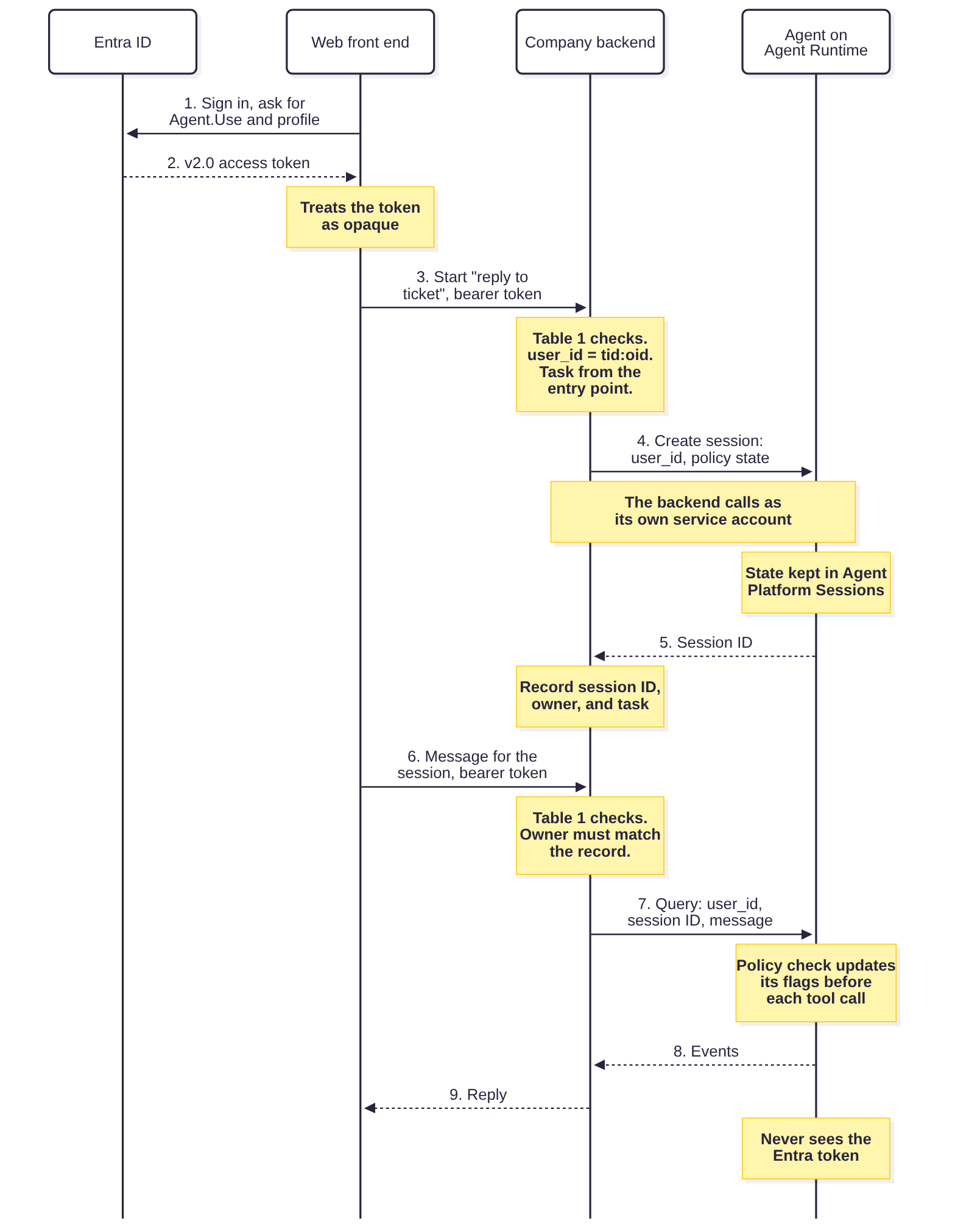
Two things in that picture matter more than the rest. The agent never sees the Entra token, so it knows who the employee is only because the backend says so. And nothing but IAM stops something other than the backend from making the same call.
The token Entra issues
The agent API gets its own app registration in Entra with one delegated scope, which I’ll call Agent.Use. The front end asks for a token with that scope and passes it on without looking inside. That is what Microsoft asks for: client applications “should treat them as opaque strings” and “shouldn’t attempt to validate access tokens”, because the token belongs to the API (Microsoft, 2025a).
One setting on the API’s registration decides which token format turns up, and the default may not be the one you expect. Web APIs that only accept Entra accounts get v1.0 tokens unless you change requestedAccessTokenVersion, where “[t]he values of null and 1 result in v1.0 tokens, and the value of 2 results in v2.0 tokens” (Microsoft, 2025a). The two formats use different issuers, allow different things in aud, and name the client app differently (azp in v2.0, appid in v1.0) (Microsoft, 2026a). I’d set it to 2 and have the backend refuse anything else, so there’s only one format to get right. The code below assumes that.
What the backend checks
Table 1 is the list, in the order the backend runs it. A JWT library handles the first five if you configure it properly. The rest are specific to Entra and to this agent.
| Check | What it rules out |
|---|---|
| The algorithm is RS256, from a list the backend sets rather than the token’s header | Unsigned tokens, and HMAC tokens keyed with the public key (Sheffer, Hardt and Jones, 2020, sections 2.1 and 3.1) |
The signature verifies with a key from the tenant’s published key set, chosen by kid | Forged tokens. Entra rotates its keys and Microsoft asks applications to handle that automatically (Microsoft, 2025a) |
iss is https://login.microsoftonline.com/{tenant}/v2.0 for the company’s tenant | Tokens from another tenant, and v1.0 tokens |
aud is the agent API’s client ID | Tokens issued for another API, or for the front end itself. Microsoft says to verify aud “[b]efore validating claims” (Microsoft, 2025c) |
exp and nbf, with a minute of leeway | Expired tokens and tokens not yet valid |
tid, oid, iat, and ver are present, and ver is 2.0 | Tokens the rest of the checks can’t evaluate |
scp is present and idtyp isn’t app | App-only tokens. scp is “[o]nly included for user tokens”, and the optional idtyp claim is app for an app-only token (Microsoft, 2026a; Microsoft, 2026c) |
azp is the front end’s client ID | Tokens obtained through other registered client apps. It doesn’t prove the request came from your front end: a browser app is a public client, and Microsoft cautions that delegated user tokens “can potentially be obtained by entities other than the application” (Microsoft, 2025c). With a confidential backend-for-frontend, azpacr of 1 or 2 shows the client authenticated with a secret or certificate (Microsoft, 2026a) |
scp contains Agent.Use | Tokens for the API that didn’t ask for this scope |
acct is 0, unless the task allows guests | Guest accounts, for which the optional acct claim is 1 (Microsoft, 2026c). Requiring 0 also fails closed if the claim isn’t configured |
Table 1. The backend’s checks on each request, in order.
You only get idtyp and acct if you configure them as optional claims on the API’s registration. Without the include_user_token property, idtyp shows up only on app-only tokens, which is all this check needs (Microsoft, 2026c), and a missing scp catches the same case if nobody configured idtyp.
The ADK user_id is built from tid and oid. Microsoft’s validation guidance says to “use the immutable claim values tid and oid as a combined key”, and never to decide access on email, preferred_username, or unique_name (Microsoft, 2025c). sub looks tempting but it is “a pairwise identifier that’s unique to a particular application ID”, so a second app reading the same user sees a different value, while oid stays put across applications (Microsoft, 2026a). The client has to request the profile scope to get either tid or oid (Microsoft, 2026a).
Listing 1 is Table 1 in code, Python with PyJWT and Rust with the jsonwebtoken crate. None of the Microsoft pages I read name a Python library for validating access tokens in an API, so the choice is mine. The two libraries don’t agree on defaults. PyJWT checks nbf, but only “if present in payload” (PyJWT, n.d.), so the listing makes it required. jsonwebtoken 11.1.0 doesn’t check nbf at all unless you set validate_nbf (jsonwebtoken, n.d.), and one of our tests failed until the Rust code did.
The entra_keys function reads the key set’s location from the tenant’s metadata document instead of hard-coding it. When a token names a key it hasn’t seen, PyJWKClient fetches the set again, but no more than once per cooldown period (30 seconds by default), so a token signed with a freshly rotated key can be turned away for up to that long (PyJWT, n.d.). If your API uses claims mapping, Microsoft says to add an appid parameter to the metadata URL, because the keys are different (Microsoft, 2025a).
Python
from __future__ import annotations

import base64
import json
import secrets
import threading
import time
import urllib.request
from dataclasses import dataclass, field
from typing import Callable, Protocol

import jwt


class Rejected(Exception):
    """The token or the request is not acceptable. The reason is for logs."""


@dataclass(frozen=True)
class EntraConfig:
    tenant_id: str
    api_client_id: str          # the agent API's app registration (aud in v2.0)
    allowed_clients: frozenset  # client apps allowed to call the API (azp)
    required_scope: str         # delegated scope the client must hold
    allow_guests: bool = False
    leeway_seconds: int = 60

    @property
    def issuer(self) -> str:
        return f"https://login.microsoftonline.com/{self.tenant_id}/v2.0"


@dataclass(frozen=True)
class Employee:
    tenant_id: str
    object_id: str
    client_id: str
    claims: dict = field(repr=False, compare=False)

    @property
    def user_id(self) -> str:
        # oid is the same for this user across apps in the tenant; tid
        # keeps it unique if more than one tenant is ever accepted.
        return f"{self.tenant_id}:{self.object_id}"


KeyResolver = Callable[[str], object]   # token -> verification key


def entra_keys(tenant_id: str,
               authority: str = "https://login.microsoftonline.com"
               ) -> KeyResolver:
    """Signing keys from the tenant's OpenID Connect metadata.

    PyJWKClient caches the key set and fetches it again when a token names
    a key ID it hasn't seen, which covers Entra's key rotation.
    """
    meta = f"{authority}/{tenant_id}/v2.0/.well-known/openid-configuration"
    with urllib.request.urlopen(meta, timeout=10) as r:
        jwks_uri = json.load(r)["jwks_uri"]
    client = jwt.PyJWKClient(jwks_uri, timeout=5, cooldown_duration=30)
    return lambda token: client.get_signing_key_from_jwt(token).key


def validate_token(token: str, cfg: EntraConfig, key_for: KeyResolver) -> Employee:
    try:
        alg = jwt.get_unverified_header(token).get("alg")
        if alg != "RS256":
            raise Rejected(f"unexpected alg {alg!r}")
        claims = jwt.decode(
            token,
            key_for(token),
            algorithms=["RS256"],
            audience=cfg.api_client_id,
            issuer=cfg.issuer,
            leeway=cfg.leeway_seconds,
            options={"require": ["exp", "nbf", "iat", "aud", "iss",
                                 "tid", "oid", "ver"]},
        )
    except jwt.PyJWTError as e:
        raise Rejected(f"token rejected: {e}") from e

    if claims["ver"] != "2.0":
        raise Rejected("not a v2.0 token")
    if claims["tid"] != cfg.tenant_id:
        raise Rejected("wrong tenant")
    if claims.get("idtyp") == "app" or "scp" not in claims:
        raise Rejected("app-only token")
    if claims.get("azp") not in cfg.allowed_clients:
        raise Rejected("client app not allowed")
    if cfg.required_scope not in str(claims["scp"]).split():
        raise Rejected("missing scope")
    if not cfg.allow_guests and str(claims.get("acct")) != "0":
        raise Rejected("guest account, or acct claim not configured")
    return Employee(claims["tid"], claims["oid"], claims["azp"], claims)
Rust
//! Entra access-token checks for the company backend.
//!
//! `jsonwebtoken` verifies the signature, algorithm, audience, issuer, and
//! lifetime. The Entra-specific checks that follow are what turn a valid
//! token into an employee the backend will bind a session to.

use jsonwebtoken::{Algorithm, DecodingKey, Validation, decode, decode_header};
use serde::Deserialize;

pub struct EntraConfig {
    pub tenant_id: String,
    pub api_client_id: String,        // aud in v2.0 tokens
    pub allowed_clients: Vec<String>, // azp
    pub required_scope: String,
    pub allow_guests: bool,
}

#[derive(Debug, Deserialize)]
struct Claims {
    tid: String,
    oid: String,
    ver: String,
    azp: Option<String>,
    scp: Option<String>,
    idtyp: Option<String>,
    acct: Option<u8>,
    #[allow(dead_code)]
    iat: u64, // required: a token without it fails to deserialize
}

#[derive(Debug, PartialEq)]
pub struct Employee {
    pub tenant_id: String,
    pub object_id: String,
    pub client_id: String,
}

impl Employee {
    pub fn user_id(&self) -> String {
        format!("{}:{}", self.tenant_id, self.object_id)
    }
}

#[derive(Debug, PartialEq)]
pub enum Rejected {
    Token(String),
    NotV2,
    WrongTenant,
    AppOnly,
    ClientNotAllowed,
    MissingScope,
    Guest,
}

pub fn validate(token: &str, key: &DecodingKey, cfg: &EntraConfig) -> Result<Employee, Rejected> {
    let bad = |e: jsonwebtoken::errors::Error| Rejected::Token(e.to_string());
    if decode_header(token).map_err(bad)?.alg != Algorithm::RS256 {
        return Err(Rejected::Token("unexpected alg".into()));
    }
    let mut v = Validation::new(Algorithm::RS256);
    v.set_audience(&[&cfg.api_client_id]);
    v.set_issuer(&[format!("https://login.microsoftonline.com/{}/v2.0", cfg.tenant_id)]);
    v.set_required_spec_claims(&["exp", "nbf", "aud", "iss"]);
    v.validate_nbf = true; // off by default in this crate
    let c = decode::<Claims>(token, key, &v).map_err(bad)?.claims;

    if c.ver != "2.0" {
        return Err(Rejected::NotV2);
    }
    if c.tid != cfg.tenant_id {
        return Err(Rejected::WrongTenant);
    }
    if c.idtyp.as_deref() == Some("app") || c.scp.is_none() {
        return Err(Rejected::AppOnly);
    }
    let client = c.azp.unwrap_or_default();
    if !cfg.allowed_clients.contains(&client) {
        return Err(Rejected::ClientNotAllowed);
    }
    if !c.scp.unwrap().split(' ').any(|s| s == cfg.required_scope) {
        return Err(Rejected::MissingScope);
    }
    if !cfg.allow_guests && c.acct != Some(0) {
        return Err(Rejected::Guest); // a guest, or acct not configured
    }
    Ok(Employee { tenant_id: c.tid, object_id: c.oid, client_id: client })
}
Listing 1. Validating the Entra access token and deriving the ADK user ID. The Rust version takes the decoding key as an argument and leaves key fetching to the caller.
The tests sign tokens with local RSA keys. They cover every row of Table 1, plus an unsigned token, an HMAC token keyed with the public key’s PEM, an unknown kid, a key set served from a local metadata endpoint, and a token where sub changes but oid doesn’t. That shows the code does what Table 1 says. Whether your tenant actually issues the claims Table 1 expects is something only a real token from your tenant can tell you.
Why the agent takes the backend’s word
The backend calls Agent Runtime with a Google Cloud OAuth access token for its own service account, the same kind of bearer token Google’s examples send (Google Cloud, n.d.r). The Entra token goes no further than the backend. All the agent learns about the employee is the user_id argument, and Google’s documentation for it says “[c]hoose your own user ID with a character limit of 128” (Google Cloud, n.d.r). I found nothing in the documentation suggesting Agent Runtime checks it against anything.
So in practice the backend is the agent’s identity provider, whatever it says on the architecture diagram. Session lists, session ownership, and per-user state (the user: prefix) are all keyed on a string the backend supplies, and the agent has no Entra token to compare it with. If someone else can make the same call with a different user_id, then as far as the agent can tell, they are that employee. That leaves two questions: who else can make the call, and what else can the call carry.
Who else can call the agent
Google’s sharing page says that to share an agent “you grant the aiplatform.reasoningEngines.query permission on the specific agent resource”, and suggests a custom role with only that permission in it. It also warns that most default ADK agents trust their front end, “which gives the frontend full control of sessions and users” (Google Cloud, n.d.q). Part 1 recommended that custom role for the backend, and said only the backend and the agent’s own identity should hold the query and session permissions. When I went through the roles reference for this part, I found far more roles carrying them than I’d assumed, and the Part 1 rule needs two exceptions in practice: a break-glass group and Google’s own service agents. Both come up below.
As of 19 October 2026, the permissions reference lists aiplatform.reasoningEngines.query in the basic Owner, Editor, and Viewer roles (and in Admin, Writer, and Reader), in Agent Platform Viewer (roles/aiplatform.viewer) and Agent Platform User, and in Data Scientist, ML Engineer, and Support User, among others (Google Cloud, n.d.f). Most of the same roles also carry aiplatform.reasoningEngineRuntimeRevisions.query, which talks to one specific revision of the agent (Google Cloud, n.d.f). Revisions are a Preview feature, and querying a revision’s path “explicitly bypasses traffic rules”, so an older revision stays reachable for as long as it’s active (Google Cloud, n.d.i). Session and memory permissions are spread just as widely. Table 2 is what that means for this agent.
| Permission | Example roles that carry it | What a holder can do to this agent |
|---|---|---|
aiplatform.reasoningEngines.query, aiplatform.reasoningEngineRuntimeRevisions.query | Owner, Editor, Viewer, Agent Platform User, Data Scientist, ML Engineer, Support User; Agent Platform Viewer for the first | Call the agent, or one of its revisions, with any user_id: create a session with chosen state, resume another employee’s session, and, with the default template, search or add to any employee’s memory |
aiplatform.sessions.get, aiplatform.sessions.list, aiplatform.sessionEvents.list | Viewer, Agent Platform Viewer, Agent Platform User; Security Reviewer and Security Admin for some | Read sessions and their event history through the Sessions API, including tool results such as query rows |
aiplatform.sessions.create, aiplatform.sessions.update, aiplatform.sessionEvents.append | Editor, Agent Platform User | Write sessions directly, including events that change state |
aiplatform.memories.get, aiplatform.memories.list, and the rest of aiplatform.memories.* | Viewer, Agent Platform Viewer, Security Reviewer, and Security Admin (read); Editor and Agent Platform User (write) | Read or change Memory Bank memories, which are generated from sessions and can hold what the agent read |
aiplatform.reasoningEngines.update, iam.serviceAccounts.actAs, iam.serviceAccounts.getAccessToken | Editor, Agent Platform User, Data Scientist (update); Editor and Service Account User (actAs); Service Account Token Creator (getAccessToken) | Redeploy the agent with other code, or act as the identities the deny policy exempts |
Table 2. Permissions that reach the agent, its sessions, or its memory, from Google’s IAM references as of 19 October 2026 (Google Cloud, n.d.f; Google Cloud, n.d.g). Grants on the project, folder, or organisation are inherited by the agent.
Don’t skip the read rows. A session’s events hold whatever the agent read on the employee’s behalf, so Viewer on the agent’s project may be enough to read query results that BigQuery would have refused that same person. The last row is there because anyone who can redeploy the agent, or act as the identities it trusts, can undo most of this part.
What I’d do is give the agent its own project with no basic roles on it, run the backend’s service account from a different project, and add a deny policy so a broad grant made later, or one inherited from a folder, doesn’t count for these permissions. Deny policies attach to a project, folder, or organisation, and every permission in Table 2 is on Google’s list of ones a deny policy supports (Google Cloud, n.d.e; Google Cloud, n.d.o). Listing 2 has four rules:
- Calling the agent. Only the backend’s service account can query the agent.
- Calling a revision. Nobody can query a specific revision, since the backend never needs to.
- Reading and writing sessions and memory. Only the agent’s own identity and a break-glass group can.
- Changing the agent or its access. Only the deployment pipeline’s identity can redeploy the agent, change the project’s, the agent’s, or a service account’s IAM policy, or impersonate or create keys for service accounts in the project.
Exceptions in a deny rule apply to whoever is calling. That’s why the backend’s and the pipeline’s service accounts live in their own projects, where the fourth rule doesn’t get in the way of their own workloads using them. The fourth rule also does nothing about keys that already exist, so the agent’s project shouldn’t have any.
Without Agent Identity, a deployed agent runs as either the AI Platform Reasoning Engine Service Agent or a custom service account (Google Cloud, n.d.l), and the listing assumes a custom one. Every rule also exempts the project’s service agents. Google is clear on this one, “[d]on’t deny permissions for service agents”, and gives a principal set for exempting them (Google Cloud, n.d.p). That exemption covers every Google service agent in the project, though, so I’d keep products that call agents on their users’ behalf, Gemini Enterprise for example, out of the agent’s project. If one has to be there, treat it as another caller with its own idea of who the user is.
JSON
{
  "displayName": "Ops agent: who can call it, read its sessions, and change it",
  "rules": [
    {
      "denyRule": {
        "deniedPrincipals": ["principalSet://goog/public:all"],
        "exceptionPrincipals": [
          "principal://iam.googleapis.com/projects/-/serviceAccounts/[email protected]",
          "principalSet://cloudresourcemanager.googleapis.com/projects/PROJECT_NUMBER/type/ServiceAgent"
        ],
        "deniedPermissions": [
          "aiplatform.googleapis.com/reasoningEngines.query"
        ]
      }
    },
    {
      "denyRule": {
        "deniedPrincipals": ["principalSet://goog/public:all"],
        "exceptionPrincipals": [
          "principalSet://cloudresourcemanager.googleapis.com/projects/PROJECT_NUMBER/type/ServiceAgent"
        ],
        "deniedPermissions": [
          "aiplatform.googleapis.com/reasoningEngineRuntimeRevisions.query"
        ]
      }
    },
    {
      "denyRule": {
        "deniedPrincipals": ["principalSet://goog/public:all"],
        "exceptionPrincipals": [
          "principal://iam.googleapis.com/projects/-/serviceAccounts/[email protected]",
          "principalSet://goog/group/[email protected]",
          "principalSet://cloudresourcemanager.googleapis.com/projects/PROJECT_NUMBER/type/ServiceAgent"
        ],
        "deniedPermissions": [
          "aiplatform.googleapis.com/sessions.*",
          "aiplatform.googleapis.com/sessionEvents.*",
          "aiplatform.googleapis.com/memories.*",
          "aiplatform.googleapis.com/agentMemories.*"
        ]
      }
    },
    {
      "denyRule": {
        "deniedPrincipals": ["principalSet://goog/public:all"],
        "exceptionPrincipals": [
          "principal://iam.googleapis.com/projects/-/serviceAccounts/[email protected]",
          "principalSet://cloudresourcemanager.googleapis.com/projects/PROJECT_NUMBER/type/ServiceAgent"
        ],
        "deniedPermissions": [
          "aiplatform.googleapis.com/reasoningEngines.create",
          "aiplatform.googleapis.com/reasoningEngines.update",
          "aiplatform.googleapis.com/reasoningEngines.delete",
          "aiplatform.googleapis.com/reasoningEngines.setIamPolicy",
          "cloudresourcemanager.googleapis.com/projects.setIamPolicy",
          "iam.googleapis.com/serviceAccounts.setIamPolicy",
          "iam.googleapis.com/serviceAccounts.actAs",
          "iam.googleapis.com/serviceAccounts.getAccessToken",
          "iam.googleapis.com/serviceAccounts.getOpenIdToken",
          "iam.googleapis.com/serviceAccounts.implicitDelegation",
          "iam.googleapis.com/serviceAccounts.signBlob",
          "iam.googleapis.com/serviceAccounts.signJwt",
          "iam.googleapis.com/serviceAccountKeys.create"
        ]
      }
    }
  ]
}
Listing 2. A deny policy for the agent's project. Replace the service account emails, the group, and the project number. If the agent runs with Agent Identity, use its principal from Google's principal identifiers page instead of the ops-agent service account.
The deny policy gets in the way of some legitimate work, and it leaves some paths open. Whoever handles an erasure request or an incident needs to read or delete sessions, and so does a security team whose organisation-wide reviewer roles would otherwise have reached them. A just-in-time role grant won’t help, because a deny rule beats an allow grant, so the way in has to be a short, logged spell in the break-glass group. Deployments have to go through the pipeline identity.
Deny Admin is the only predefined role that can delete a deny policy, and Google only lets you grant it at the organisation level, so anyone holding it there, or able to change IAM at the organisation, can still remove this one (Google Cloud, n.d.g). The pipeline identity can’t, because its rights stop at the project. A deny policy can’t protect itself either, since Google’s list of deny-supported permissions has nothing for managing deny policies. Changes to the policy, and to organisation-level IAM, need an alert, and Deny Admin should sit with a small group that someone reviews. Google says policy changes generally take effect within two minutes, though “in some cases, it can take 7 minutes or more” (Google Cloud, n.d.d), so give it time before you test that a pipeline deployment still works and that the agent can still read and write its own sessions.
If tracing is turned on with the template’s enable_tracing flag, the SDK we read switches on capture of message content in ADK’s spans, so prompts and tool results can end up in Cloud Trace and Logging, where the deny policy doesn’t reach. I’d leave content capture off for this agent, or send its telemetry somewhere with the same access as its sessions.
What a query can carry
Locking down who can call the agent still leaves the question of what the backend’s own calls can carry. A REST query names a class_method and an input. Google’s runtime contract, which is about agents deployed as custom containers, includes an example server that looks the method up by name and calls it with the input as keyword arguments (Google Cloud, n.d.a). The SDK’s client sends keyword arguments the same way. Google doesn’t say how the managed deployment of AdkApp dispatches, which is why the tests below matter.
AdkApp, ADK’s app template for Agent Runtime, accepts a lot more than the backend needs. We read version 2.5.0 of the Agent Platform SDK and ran the template locally, in memory, with ADK 2.12.0 and a stub model in place of Gemini:
async_create_sessiontakes an initialstate, which Google’s ADK session page also documents (Google Cloud, n.d.j), and a session ID of the caller’s choosing. Initial state is how the backend setspolicy_task. It’s also how anyone else would.async_stream_query, and the synchronousstream_query, hand any keyword arguments they don’t recognise to ADK’s runner, and the runner accepts astate_delta. In our local test, a query on a session with both policy flags set, carrying astate_deltathat set them false, left them false. The next tool call would be checked as though the session had read nothing.async_stream_queryalso takessession_events, which builds a temporary session from events the caller supplies, and it takes the message as a content dictionary, which can carry files. In our test a file part reached the model without setting the untrusted flag that Part 1 says attachments should set.streaming_agent_run_with_events, also registered by default, creates a session when given an unknown session ID and replays the caller’s events into it, which can set the policy check’s keys directly.- The template registers memory and artifact operations alongside the session ones, including
async_add_session_to_memoryandasync_search_memory, each of which takes a user ID or session from the caller.
We haven’t tried this against a deployed agent. Whether the managed endpoint passes every input field through, and whether it will dispatch a method that isn’t registered, are things to test in your own project. I’d assume it does both until a test says otherwise.
The fix lives in two places. The backend builds every query from its own fields and never forwards a client’s JSON. And the agent refuses anything the backend wouldn’t send. Google’s custom-agent guide uses register_operations to pick which methods a deployed agent registers (Google Cloud, n.d.c), and AdkApp defines that method, so a subclass can narrow it. Listing 3 registers two operations and checks what each one is given:
- Creating a session takes a
tid:oiduser ID and the policy check’s three keys, and nothing else: a known task, the untrusted flag set, and the sensitive flag clear. The caller can’t choose a session ID or adduser:orapp:keys. - Sending a message takes a text message, a
tid:oiduser ID, and the ID of a session that exists, and nothing else.
As a second line of defence, every other public method on the template raises an error, in case the runtime dispatches it anyway. That’s a deny list, so if dispatch really does work by name, set_up, clone, and the private methods are still callable. Only a test against the deployed endpoint settles that. The narrower app also breaks integrations that rely on those methods: the SDK’s docstring says streaming_agent_run_with_events is meant for calls from AgentSpace, which is now part of Gemini Enterprise.
Python
"""An AdkApp that exposes only what the company backend uses.

The default template registers memory, artifact, and session operations,
and its query methods pass keyword arguments they don't name on to the
ADK runner, which accepts a state_delta. This subclass registers two
operations, refuses the template's other public methods as a second line
in case the runtime dispatches methods that aren't registered, and checks
the arguments of the two it keeps.
"""

import re

from agentplatform.frameworks import AdkApp

POLICY_KEYS = {"policy_task", "policy_untrusted_seen", "policy_sensitive_read"}
TASKS = {"triage_ticket", "data_question", "ticket_reply"}
USER_ID = re.compile(r"[0-9a-f-]{36}:[0-9a-f-]{36}")   # tid:oid
MAX_MESSAGE = 20_000
KEEP = {"async_create_session", "async_stream_query",
        "register_operations", "set_up", "clone"}


class BackendOnlyAdkApp(AdkApp):
    def register_operations(self):
        return {"async": ["async_create_session"],
                "async_stream": ["async_stream_query"]}

    async def async_create_session(self, *, user_id, state, **extra):
        # Only the policy check's keys, no caller-chosen session ID,
        # no user: or app: state.
        if (extra or not isinstance(state, dict) or set(state) != POLICY_KEYS
                or state["policy_task"] not in TASKS
                or state["policy_untrusted_seen"] is not True
                or state["policy_sensitive_read"] is not False
                or not isinstance(user_id, str)
                or not USER_ID.fullmatch(user_id)):
            raise ValueError("unexpected session arguments")
        return await super().async_create_session(user_id=user_id, state=state)

    async def async_stream_query(self, *, message, user_id, session_id,
                                 **extra):
        # A text message for an existing session, and nothing else: no
        # implicit sessions, no session_events, no state_delta, and no
        # Content dict that could carry files.
        if extra:
            raise ValueError(f"unexpected arguments: {sorted(extra)}")
        if not session_id:
            raise ValueError("session_id is required")
        if not isinstance(user_id, str) or not USER_ID.fullmatch(user_id):
            raise ValueError("unexpected user_id")
        if not isinstance(message, str) or len(message) > MAX_MESSAGE:
            raise ValueError("message must be text")
        async for event in super().async_stream_query(
                message=message, user_id=user_id, session_id=session_id):
            yield event


def _refuse(name):
    def refused(self, *args, **kwargs):
        raise PermissionError(f"{name} is not exposed by this agent")
    return refused


for _name in dir(AdkApp):
    if (not _name.startswith("_") and _name not in KEEP
            and callable(getattr(AdkApp, _name))):
        setattr(BackendOnlyAdkApp, _name, _refuse(_name))
Listing 3. An AdkApp that exposes only what the backend uses. Tested locally with google-cloud-aiplatform 2.5.0 and google-adk 2.11.0 and 2.12.0. The module has to be shipped with the deployment, like any other code the agent imports.
Our tests run the default template and the subclass side by side. With the default, a query through either the async or the sync method resets the flags. With the subclass, every route we tried raises an error and the flags stay as they were. Listing 3 doesn’t stop someone with the query permission from creating a session with policy keys of their choosing, because the backend needs that operation. Keeping other callers out is Listing 2’s job.
There are two other ways to change session state outside a query. The ADK API server, if anyone puts it in front of the agent, accepts initial state when it creates a session and has a PATCH endpoint for sessions, except in the Go server, whose users are told to pass a stateDelta on runs instead (Google, n.d.c). Rewind is a method on ADK’s runner that AdkApp doesn’t register. It restores session-level state but not “app-level or user-level state” (Google, n.d.a), so a rewind can bring back old flag values. ADK’s own advice is to “[a]void directly modifying the session.state collection” outside an invocation (Google, n.d.b). For this agent, the only code that should ever create a session or touch the policy check’s keys is the backend’s start call and the policy check itself.
Binding the session to one employee
Once the callers are limited, the backend decides which employee a session belongs to. Listing 4 is the part of the backend that does it, and it does three things.
When a session starts, the employee has picked an entry point, replying to a ticket for example. The backend maps that to one of the policy check’s tasks and creates the session with policy_task set. Part 1 said a session that takes pasted text should start with the untrusted flag set. Every entry point here takes free text, and the backend can’t tell typed text from text pasted out of a customer’s email, so all three start with the flag set. That has a cost under Part 1’s decision table. Every internal side effect needs a confirmation, and in the data question task an external email after any query is denied, so that task can only send results inside the company. The deny that Part 1 expected to fire rarely will now fire every time someone tries, and the alert on it needs to tell that case apart. Finally the backend records the session ID, the owner’s user_id, and the task in its own store.
When a session is resumed, the backend looks up the record and compares the owner with the user_id from the current token. An unknown session and someone else’s session get the same answer, so a caller learns very little about which session IDs exist.
When the backend calls the agent, the user_id comes from the record it just matched against the token. The only part of the request body that reaches the agent is the message.
Python
# ---------------------------------------------------------------------------
# Sessions

class AgentRuntime(Protocol):
    def create_session(self, user_id: str, state: dict) -> str: ...
    def query(self, user_id: str, session_id: str, message: str) -> str: ...


@dataclass(frozen=True)
class SessionRecord:
    session_id: str
    user_id: str
    task: str
    created_at: float


class SessionStore(Protocol):
    def put(self, rec: SessionRecord) -> None: ...
    def get(self, session_id: str) -> SessionRecord | None: ...


class MemoryStore:
    def __init__(self):
        self._d: dict[str, SessionRecord] = {}

    def put(self, rec):
        self._d[rec.session_id] = rec

    def get(self, session_id):
        return self._d.get(session_id)


# The entry points the backend offers, matching the policy check's tasks in
# Part 1, and whether each starts as having read untrusted content. Every
# entry point here takes free text from the employee, and the backend can't
# tell typed text from text pasted out of a customer's email, so all three
# start with the flag set. The client never supplies session state.
TASKS = {"triage_ticket": True, "data_question": True, "ticket_reply": True}


class NotFound(Exception):
    """Unknown session, or one owned by someone else (same answer)."""


class Backend:
    def __init__(self, cfg: EntraConfig, key_for: KeyResolver,
                 runtime: AgentRuntime, store: SessionStore,
                 clock: Callable[[], float] = time.time):
        self.cfg, self.key_for = cfg, key_for
        self.runtime, self.store, self.clock = runtime, store, clock
        self.decided = DecidedApprovals()

    def _employee(self, bearer: str) -> Employee:
        return validate_token(bearer, self.cfg, self.key_for)

    def start(self, bearer: str, task: str) -> str:
        emp = self._employee(bearer)
        if task not in TASKS:
            raise Rejected(f"unknown task {task!r}")
        state = {"policy_task": task,
                 "policy_untrusted_seen": TASKS[task],
                 "policy_sensitive_read": False}
        sid = self.runtime.create_session(emp.user_id, state)
        self.store.put(SessionRecord(sid, emp.user_id, task, self.clock()))
        return sid

    def send(self, bearer: str, session_id: str, message: str) -> str:
        emp = self._employee(bearer)
        rec = self.store.get(session_id)
        if rec is None or not secrets.compare_digest(rec.user_id, emp.user_id):
            raise NotFound(session_id)
        # user_id comes from the record and the token, never the request
        return self.runtime.query(rec.user_id, rec.session_id, message)

    def approve(self, bearer: str, approval: "PendingApproval",
                rule: "StepUp") -> dict:
        """Record an employee's approval of a call the policy check held.

        The backend loads `approval` from its queue by ID; the client only
        names it.
        """
        emp = self._employee(bearer)
        rec = self.store.get(approval.session_id)
        if rec is None or not secrets.compare_digest(rec.user_id, emp.user_id):
            raise NotFound(approval.session_id)
        now = self.clock()
        if now - approval.requested_at > rule.approval_ttl:
            raise Rejected("approval request expired")
        try:
            check_step_up(emp, rule, approval.requested_at, now)
        except StepUpNotConfigured:
            raise
        except Rejected:
            if "cp1" in [str(v).lower() for v in _as_list(emp.claims.get("xms_cc"))]:
                raise StepUpRequired(*step_up_challenge(rule, self.cfg.tenant_id))
            raise
        if not self.decided.claim(approval.approval_id):
            raise Rejected("approval already decided")
        return {"approval_id": approval.approval_id,
                "session_id": rec.session_id,
                "request_hash": approval.request_hash,
                "approver": emp.user_id,
                "approved_at": now}


class DecidedApprovals:
    """Each approval is decided once. In production, a unique key in the
    backend's database does this; the lock stands in for it here."""

    def __init__(self):
        self._ids: set[str] = set()
        self._lock = threading.Lock()

    def claim(self, approval_id: str) -> bool:
        with self._lock:
            if approval_id in self._ids:
                return False
            self._ids.add(approval_id)
            return True


@dataclass(frozen=True)
class PendingApproval:
    """Written by the policy check's approval queue when it holds a call."""
    approval_id: str
    session_id: str
    request_hash: str   # hash of the tool name and arguments it held
    requested_at: float
Listing 4. The backend's session binding. AgentRuntime is a small interface over the deployed agent; the tests use an in-memory fake.
The record lives outside the agent on purpose. Agent Platform Sessions stores a user ID with each session too, but the backend put it there, so it can’t act as an independent check on the backend. The backend’s store is also where Part 4’s request-level record will go, next to the approvals.
As written, Listing 4 lets any employee who passes Table 1 start any of the three tasks. If only some people should be answering data questions, Entra app roles assigned to users appear in the roles claim of their delegated tokens (Microsoft, 2026a), and the backend can tie each entry point to a role.
When the employee approves a call
Part 1’s policy check asks for confirmation before some calls, an internal email after the session has read untrusted content, for instance. The person approving should be the employee who owns the session, and ideally someone who is at the keyboard right now. An access token doesn’t tell you that. Microsoft gives the default lifetime as “a random value ranging between 60-90 minutes” (Microsoft, 2025a). Figure 2 shows one way to ask Entra for a recent sign-in instead.
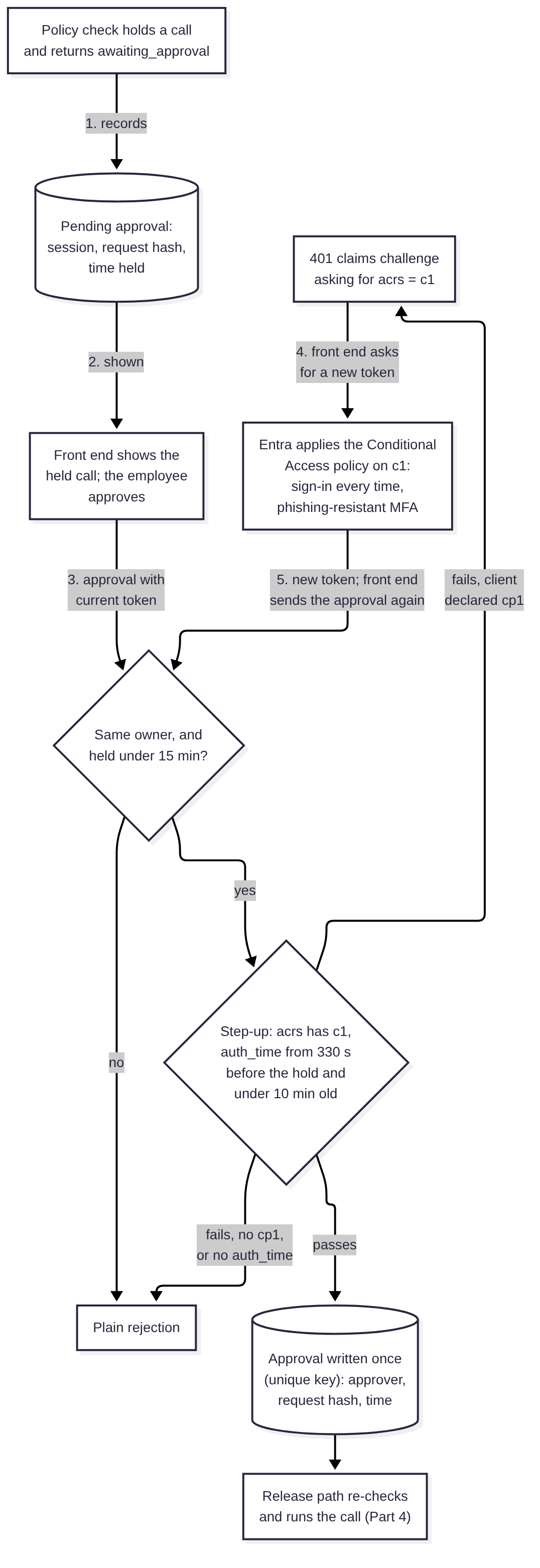
All the pieces come from Microsoft’s Conditional Access documentation.
You start with an authentication context. A tenant can define contexts with IDs from c1 to c99, and a Conditional Access policy targets one of them (Microsoft, 2025b). Here the policy sets sign-in frequency to “Every time”, which “requires full reauthentication when the session is evaluated” (Microsoft, 2026b). Microsoft warns that “every time, without multifactor authentication might result in sign-in looping” (Microsoft, 2026b), and a password on its own only proves someone knows the password, so I’d have the policy require a phishing-resistant authentication strength.
When a token is missing the context, the API sends back a claims challenge: a 401 whose WWW-Authenticate header carries error="insufficient_claims" and a base64-encoded request for acrs (Microsoft, 2024). The client then asks Entra for a new token with those claims. A client says it can handle these challenges by declaring the cp1 capability, which reaches the API as the optional xms_cc claim. Microsoft’s example code only sends the formatted challenge when that claim shows cp1, and sends a plain error otherwise (Microsoft, 2024). Listing 5 does the same.
The API also has to opt in to the optional acrs, auth_time, and xms_cc claims on access tokens. For acrs, Microsoft notes that “[e]ach token type needs to be individually opted-in” (Microsoft, 2025b), and auth_time is the “[t]ime when the user last authenticated” (Microsoft, 2026c). Forget auth_time and Listing 5 rejects every approval.
One detail changes how the check has to work. Microsoft says: “The policy factors in five minutes of clock skew when every time is selected, so that it doesn’t prompt users more often than once every five minutes” (Microsoft, 2026b). If the backend insists on a sign-in after the moment the call was held, an employee who signed in two minutes earlier gets rejected, sent back to Entra, and isn’t prompted, round and round. So Listing 5 accepts a sign-in up to five and a half minutes before the hold, which allows for some clock drift, and no more than ten minutes before the approval arrives. A held call waits at most fifteen minutes for a decision, and each approval can be decided once. The backend’s database should enforce that with a unique key, not a read followed by a write.
acrs on its own proves less than it seems to. Once the API opts in, Entra can add acrs to an ordinary token when the policy is already satisfied (Microsoft, 2025b), so auth_time is the claim that actually shows a recent sign-in. The five-minute window also means one sign-in can approve several calls held a few minutes apart, and the backend can’t demand a fresh prompt for each one because Entra won’t give it. Putting every pending call on one approval screen at least lets the employee see what they’re approving. The numbers in Listing 5 are mine, so tune them, and test the whole sequence in your tenant. Microsoft documents each piece separately, not this combination end to end.
Python
# ---------------------------------------------------------------------------
# Step-up for approvals

@dataclass(frozen=True)
class StepUp:
    auth_context: str = "c1"   # the tenant's authentication context ID
    reuse_window: int = 330    # Entra's five minutes, plus clock skew
    max_age: int = 600         # time allowed from sign-in to approval
    approval_ttl: int = 900    # how long a held call waits for a decision


class StepUpNotConfigured(Rejected):
    """The tenant isn't issuing a claim the step-up needs. A new sign-in
    won't fix that, so no challenge is sent."""


class StepUpRequired(Exception):
    """Carries the 401 claims challenge for a client that can handle it."""

    def __init__(self, status: int, headers: dict):
        super().__init__(status)
        self.status, self.headers = status, headers


def _as_list(v) -> list:
    return [v] if isinstance(v, str) else list(v or [])


def step_up_challenge(rule: StepUp, tenant_id: str) -> tuple[int, dict]:
    """401 response asking the client for a token with the context.

    Sent only to clients whose token shows xms_cc = cp1, as in Microsoft's
    sample; other clients get a plain rejection.
    """
    claims = {"access_token": {"acrs": {"essential": True,
                                        "value": rule.auth_context}}}
    b64 = base64.b64encode(json.dumps(claims, separators=(",", ":"))
                           .encode()).decode()
    uri = f"https://login.microsoftonline.com/{tenant_id}/oauth2/v2.0/authorize"
    return 401, {"WWW-Authenticate":
                 f'Bearer realm="{tenant_id}", authorization_uri="{uri}", '
                 f'error="insufficient_claims", claims="{b64}"'}


def check_step_up(emp: Employee, rule: StepUp, requested_at: float,
                  now: float) -> None:
    """The approval token must show a recent sign-in under the context.

    `requested_at` is when the policy check held the call. A sign-in from
    well before that moment was not made for this approval. Calls held
    within the same few minutes can share one sign-in.
    """
    auth_time = emp.claims.get("auth_time")
    if not isinstance(auth_time, (int, float)):
        raise StepUpNotConfigured("no auth_time claim: configure it as optional")
    if rule.auth_context not in _as_list(emp.claims.get("acrs")):
        raise Rejected("authentication context not satisfied")
    if auth_time < requested_at - rule.reuse_window:
        raise Rejected("sign-in predates the approval request")
    if now - auth_time > rule.max_age:
        raise Rejected("sign-in too old")
Listing 5. The step-up check behind Backend.approve in Listing 4, and the claims challenge it returns to clients that can handle one.
The approval record holds the employee, the session, and a hash of the held call. Part 4 builds the release path that checks the call against that hash before running it, and makes the hash compatible with the canonical-JSON hashes used elsewhere in the series. Rate limits on approval requests belong there too.
When the employee’s identity has to reach Google Cloud
So far the employee hasn’t needed a Google Cloud identity. The backend calls the agent as itself, and the agent’s tools run with whatever authority Part 3 gives them. Part 1 promised this part would cover federating the employee’s Entra identity into Google Cloud “for the calls that need it”, so this section is about which calls those actually are.
Workforce Identity Federation is Google’s mechanism for people. In Google’s words, it “federates user identities whereas Workload Identity Federation federates workload identities” (Google Cloud, n.d.t). A workforce pool sits at the organisation level and maps an identity provider’s claims to Google attributes, and for Entra over OIDC Google recommends mapping google.subject to assertion.oid (Google Cloud, n.d.t; Google Cloud, n.d.b). An application swaps an Entra ID token for a short-lived Google token at https://sts.googleapis.com/v1/token, with a subject token type of urn:ietf:params:oauth:token-type:id_token and the workforce provider’s resource name as the request’s audience (Google Cloud, n.d.n). The ID token’s own aud has to “match the client ID specified in the provider configuration” (Google Cloud, n.d.m), which is the Entra app you register for federation. What comes back acts in IAM as principal://iam.googleapis.com/locations/global/workforcePools/POOL_ID/subject/OID.
This agent only needs that where Google Cloud enforces access per employee, and BigQuery row-level security is the clearest example. A row access policy can name workforce principals as grantees (Google Cloud, n.d.s), and BigQuery is listed as GA for Workforce Identity Federation, with “[n]o known limitations” for API access and some console, connector, and data-loading features excepted (Google Cloud, n.d.h). If the data question task should only return rows that employee is allowed to see, then either the query runs as the employee through the federated token, or the agent’s own identity reads everything and something else does the filtering. Part 3 compares those options, along with on-behalf-of flows and the agent’s own identity.
The federated path costs something, and Part 3 weighs that against the alternatives:
- The token is broad. Whatever does the exchange ends up holding a token that acts as the employee in Google Cloud, with all of their IAM grants. The STS reference notes that “workforce pools do not support Credential Access Boundaries” (Google Cloud, n.d.m), so you can’t narrow the token to one dataset.
- It lasts as long as the pool’s session duration. That “defaults to one hour” and can be set anywhere from 15 minutes to 12 hours (Google Cloud, n.d.k). I’d set it short for this path. I haven’t found anything saying that disabling the user in Entra ends a Google token that’s already been issued, so I’d assume it doesn’t.
- It needs its own Entra app and a billing project. The ID token for the exchange should come from an app registered only for federation, ideally exchanged server-side. If the provider used the front end’s client ID, every sign-in to the front end could be swapped for Google credentials. Google’s exchange example passes a
userProjectfor quota and billing, which the employee needsserviceusage.services.useon (Google Cloud, n.d.n), and BigQuery needs a project where the employee can run jobs.
For triage and ticket replies, I can’t see what the federated path would add, so I wouldn’t build it for them.
What this binding doesn’t establish
With all of the above in place, the backend is a fairly reliable witness to who sent each request. There are still gaps, and these are the ones I’d want a reviewer to know about.
A stolen token passes the checks
A stolen access token passes every check in Table 1 until it expires, and the backend has no way to tell. Token protection, device compliance, and Continuous Access Evaluation live in Entra and the front end, not in this code, so I’ve left them out. Microsoft also gives a default “long lived token lifetime” of 20 to 28 hours, in a passage about tenants with Continuous Access Evaluation turned on (Microsoft, 2025a), so it’s worth finding out what lifetime your tenant gives tokens for the agent API. The step-up only narrows the window for approvals.
The backend can act as any employee
Anyone who can run code as the backend’s service account, or change the backend’s code, can be any employee as far as the agent is concerned. Deploy rights on the backend belong in the same review as deploy rights on the agent, and its service account shouldn’t have keys anyone can download. If Part 3 ends up with the backend holding a delegated Entra token for each employee, that concentration gets worse.
Sessions outlive the sign-in
A session carries on after the employee signs out, after their account is disabled, and after they change roles. Listing 4 doesn’t end sessions when Entra disables someone. Checking account status on resume, or keeping sessions short, closes most of that gap.
Session history is sensitive data
The session records, the approval records, and the agent’s own session history show who asked the agent what, and the history holds what the agent read on their behalf. Each of those stores needs its own access review, which is part of the reason Table 2’s read permissions matter.
GATE covers the agent’s identity, not the employee’s
GATE is the open agent governance framework I maintain, and its C01 control, Workload Identity and Attestation, is about the agent’s own identity: it binds each agent instance to runtime claims you can verify (Stevens, 2026). C01 doesn’t cover the employee behind a request, which is what this part has been about. That gap has been put forward as a candidate for GATE v1.5, and Part 9 will say what came of it.
Versions and platform facts
| Item | Version or stage | Checked |
|---|---|---|
| ADK for Python | Tested with 2.11.0 and 2.12.0 (the current release) | 19 October 2026 |
Agent Platform SDK (google-cloud-aiplatform, providing agentplatform) | Tested with 2.5.0 | 19 October 2026 |
| PyJWT | Tested with 2.15.1 | 19 October 2026 |
jsonwebtoken (Rust) | Tested with 11.1.0, rust_crypto feature | 19 October 2026 |
| Workforce Identity Federation with BigQuery | GA | 19 October 2026 (Google Cloud, n.d.h) |
| Workforce Identity Federation with Agent Platform | GA | 19 October 2026 (Google Cloud, n.d.h) |
| Agent Runtime revisions and traffic | Preview | 19 October 2026 (Google Cloud, n.d.i) |
Table 3. Versions tested and launch stages relied on in this part.
What I’d check in your own deployment
All of this depends on how your tenant, projects, and backend are set up, so treat each item as something to confirm in your own environment. Four of them would stop a release for me, and they’re marked. The backend runs Table 1’s checks on v2.0 tokens. Nobody outside the backend, the agent, the break-glass group, and Google’s service agents holds the query, session, or memory permissions. A query can’t change the policy check’s keys. And a session only resumes for its owner.
Entra registration
Owner: the identity team.
- The agent API’s registration sets
requestedAccessTokenVersionto2, exposes one delegated scope, and hasidtyp,acct,acrs,auth_time, andxms_ccconfigured as optional claims on access tokens. A real token from the tenant shows them. - The front end requests the
profilescope along with the API’s scope, so tokens carrytidandoid. - User assignment is required on the API’s enterprise application, and only the intended users or groups are assigned. If tasks differ by role, app roles map to entry points.
- The authentication context used for approvals has a Conditional Access policy with sign-in frequency set to every time and a phishing-resistant authentication strength, and the front end declares the
cp1client capability.
The backend’s token checks
Owner: the backend’s developers.
- Release-blocking. The backend runs every check in Table 1, on every request, and a test with real tokens from your tenant shows that an app-only token, a guest token, a token for another API, and a token from another client app are each rejected.
- The
user_idis built fromtidandoidand nothing else, and no request field can override it. - Signing keys come from the tenant’s metadata and refresh on an unknown
kid, and a failure to fetch them denies requests instead of skipping validation.
Who can reach the agent
Owner: the platform team, with security.
- Release-blocking. In the agent’s project, only the backend’s service account can query the agent, no one can query a revision directly, and only the agent’s identity and the break-glass group hold the session and memory permissions, apart from the project’s Google service agents, which Listing 2 exempts. A review of effective permissions, including inherited, basic, and organisation-wide security roles, shows no one else, and a deny policy like Listing 2 is attached. After it has propagated, a deployment through the pipeline and a query from the backend both still work. That test also settles whether a query needs any session permission from the caller, such as
aiplatform.sessions.run, which the third rule denies. - Only the deployment pipeline can redeploy the agent, change IAM on the project, the agent, or its service accounts, or act as those service accounts. Deny Admin and organisation-level IAM admin are held by a small, reviewed group, and changes to either raise an alert. The project has no user-managed service account keys, revisions that aren’t serving traffic are removed, and the agent isn’t registered with other products that would call it on their own users’ behalf.
- Membership of the break-glass group is granted for a short time, approved by someone other than the requester, and logged.
- The backend’s and the pipeline’s service accounts live in their own projects. In each, only the workload that runs as the service account can use it, no one can create keys for it, and who can impersonate it is reviewed alongside deploy rights on the agent, since Listing 2 exempts both identities.
Session state and approvals
Owner: the agent’s developers, with the backend’s developers.
- Release-blocking. A query to the deployed agent that carries
state_delta,session_events, a content dictionary, or any field beyond the message, user ID, and session ID is rejected, and so is a call to any method other than the two the agent registers, includingstream_queryandstreaming_agent_run_with_events. A test against the deployed endpoint shows both. - Release-blocking. A session resumes only for the employee recorded as its owner, and a test with two employees’ tokens shows the second one gets the same answer as for a session that doesn’t exist.
- An approval needs a token from the session’s owner with the approval context in
acrsand a recentauth_time, expires if no one decides it, and can be decided once. A test in the tenant shows the whole sequence works, including for an employee who signed in shortly before the call was held. - Sessions are refused on resume when the employee’s account is disabled.
Logging and response
Owner: security operations, with the backend’s developers.
- The backend logs every rejected token, session start, refused resume, and approval with the employee’s
user_id, the session ID, and a request ID, so an Entra sign-in, a backend request, a session, and an approval can be joined. - Changes to the deny policy and to IAM on the agent’s project raise an alert.
- Message content capture in traces is off, or the agent’s telemetry goes somewhere with the same access as its sessions.
- There is a tested way to end all of one employee’s sessions and pending approvals, and to disable the backend’s service account. Part 8 builds detection on top of these records.
The rest of the series
Part 3 follows the agent’s calls out to its four MCP servers and works out which should run as the employee and which as the agent, including the BigQuery row-level security case above and where delegated tokens should live. Part 4 takes on indirect injection and builds the approval release path that Listing 5 feeds into. Parts 5 to 9 cover MCP servers you didn’t write, the ways data leaves, memory, detection and containment, and red-teaming before release.
If you listed every principal that holds aiplatform.reasoningEngines.query on your agent’s project today, inherited roles included, would the list match the people you expect to use the agent?
Disclosure: The author is a lifetime member of the OWASP Foundation. This article reflects an independent reading of public OWASP material and does not represent the views of the Foundation.
Disclosure: GATE is authored and maintained by me personally rather than by Sakura Sky, and there is no paid tier, hosted version, or commercial product built on it. Agent governance is also my day job at Sakura Sky, which is a commercial interest worth stating.
References
Google, n.d.a. Rewind sessions for agents. Agent Development Kit documentation. Available at: https://adk.dev/sessions/session/rewind/ [Accessed 19 October 2026].
Google, n.d.b. State: The Session’s Scratchpad. Agent Development Kit documentation. Available at: https://adk.dev/sessions/state/ [Accessed 19 October 2026].
Google, n.d.c. Use the API Server. Agent Development Kit documentation. Available at: https://adk.dev/runtime/api-server/ [Accessed 19 October 2026].
Google Cloud, n.d.a. Agent Platform runtime contract. Gemini Enterprise Agent Platform documentation. Available at: https://docs.cloud.google.com/gemini-enterprise-agent-platform/scale/runtime/runtime-contract [Accessed 19 October 2026].
Google Cloud, n.d.b. Configure Workforce Identity Federation with Microsoft Entra ID and sign in users. IAM documentation. Available at: https://docs.cloud.google.com/iam/docs/workforce-sign-in-microsoft-entra-id [Accessed 19 October 2026].
Google Cloud, n.d.c. Create a custom agent. Gemini Enterprise Agent Platform documentation. Available at: https://docs.cloud.google.com/gemini-enterprise-agent-platform/build/runtime/create-a-custom-agent [Accessed 19 October 2026].
Google Cloud, n.d.d. Deny access to resources. IAM documentation. Available at: https://docs.cloud.google.com/iam/docs/deny-access [Accessed 19 October 2026].
Google Cloud, n.d.e. Deny policies. IAM documentation. Available at: https://docs.cloud.google.com/iam/docs/deny-overview [Accessed 19 October 2026].
Google Cloud, n.d.f. Gemini Enterprise Agent Platform roles and permissions. IAM documentation. Available at: https://docs.cloud.google.com/iam/docs/roles-permissions/aiplatform [Accessed 19 October 2026].
Google Cloud, n.d.g. Identity and Access Management roles and permissions. IAM documentation. Available at: https://docs.cloud.google.com/iam/docs/roles-permissions/iam [Accessed 19 October 2026].
Google Cloud, n.d.h. Identity federation: products and limitations. IAM documentation. Available at: https://docs.cloud.google.com/iam/docs/federated-identity-supported-services [Accessed 19 October 2026].
Google Cloud, n.d.i. Manage revisions and traffic. Gemini Enterprise Agent Platform documentation. Available at: https://docs.cloud.google.com/gemini-enterprise-agent-platform/scale/runtime/manage-revisions-and-traffic [Accessed 19 October 2026].
Google Cloud, n.d.j. Manage sessions with Agent Development Kit. Gemini Enterprise Agent Platform documentation. Available at: https://docs.cloud.google.com/gemini-enterprise-agent-platform/scale/sessions/manage-with-adk [Accessed 19 October 2026].
Google Cloud, n.d.k. Manage workforce identity pool providers. IAM documentation. Available at: https://docs.cloud.google.com/iam/docs/manage-workforce-identity-pools-providers [Accessed 19 October 2026].
Google Cloud, n.d.l. Managing access for deployed agents. Gemini Enterprise Agent Platform documentation. Available at: https://docs.cloud.google.com/gemini-enterprise-agent-platform/scale/runtime/manage-agent-access [Accessed 19 October 2026].
Google Cloud, n.d.m. Method: token. Security Token Service API reference. Available at: https://docs.cloud.google.com/iam/docs/reference/sts/rest/v1/TopLevel/token [Accessed 19 October 2026].
Google Cloud, n.d.n. Obtain short-lived tokens for Workforce Identity Federation. IAM documentation. Available at: https://docs.cloud.google.com/iam/docs/workforce-obtaining-short-lived-credentials [Accessed 19 October 2026].
Google Cloud, n.d.o. Permissions supported in deny policies. IAM documentation. Available at: https://docs.cloud.google.com/iam/docs/deny-permissions-support [Accessed 19 October 2026].
Google Cloud, n.d.p. Principal identifiers. IAM documentation. Available at: https://docs.cloud.google.com/iam/docs/principal-identifiers [Accessed 19 October 2026].
Google Cloud, n.d.q. Share an agent. Gemini Enterprise Agent Platform documentation. Available at: https://docs.cloud.google.com/gemini-enterprise-agent-platform/govern/share-agent [Accessed 19 October 2026].
Google Cloud, n.d.r. Use an Agent Development Kit agent. Gemini Enterprise Agent Platform documentation. Available at: https://docs.cloud.google.com/gemini-enterprise-agent-platform/scale/runtime/use-an-adk-agent [Accessed 19 October 2026].
Google Cloud, n.d.s. Use row-level security. BigQuery documentation. Available at: https://docs.cloud.google.com/bigquery/docs/managing-row-level-security [Accessed 19 October 2026].
Google Cloud, n.d.t. Workforce Identity Federation. IAM documentation. Available at: https://docs.cloud.google.com/iam/docs/workforce-identity-federation [Accessed 19 October 2026].
jsonwebtoken, n.d. Validation (jsonwebtoken 11.1.0). docs.rs. Available at: https://docs.rs/jsonwebtoken/11.1.0/jsonwebtoken/struct.Validation.html [Accessed 19 October 2026].
Microsoft, 2024. Claims challenges, claims requests and client capabilities. Microsoft identity platform documentation, Microsoft Learn. Available at: https://learn.microsoft.com/en-us/entra/identity-platform/claims-challenge [Accessed 19 October 2026].
Microsoft, 2025a. Access tokens in the Microsoft identity platform. Microsoft identity platform documentation, Microsoft Learn. Available at: https://learn.microsoft.com/en-us/entra/identity-platform/access-tokens [Accessed 19 October 2026].
Microsoft, 2025b. Developer guide to Conditional Access authentication context. Microsoft identity platform documentation, Microsoft Learn. Available at: https://learn.microsoft.com/en-us/entra/identity-platform/developer-guide-conditional-access-authentication-context [Accessed 19 October 2026].
Microsoft, 2025c. Secure applications and APIs by validating claims. Microsoft identity platform documentation, Microsoft Learn. Available at: https://learn.microsoft.com/en-us/entra/identity-platform/claims-validation [Accessed 19 October 2026].
Microsoft, 2026a. Access token claims reference. Microsoft identity platform documentation, Microsoft Learn. Available at: https://learn.microsoft.com/en-us/entra/identity-platform/access-token-claims-reference [Accessed 19 October 2026].
Microsoft, 2026b. Conditional Access adaptive session lifetime policies. Microsoft Entra ID documentation, Microsoft Learn. Available at: https://learn.microsoft.com/en-us/entra/identity/conditional-access/concept-session-lifetime [Accessed 19 October 2026].
Microsoft, 2026c. Optional claims reference. Microsoft identity platform documentation, Microsoft Learn. Available at: https://learn.microsoft.com/en-us/entra/identity-platform/optional-claims-reference [Accessed 19 October 2026].
PyJWT, n.d. API Reference (PyJWT 2.15.1). Available at: https://pyjwt.readthedocs.io/en/stable/api.html [Accessed 19 October 2026].
Sheffer, Y., Hardt, D. and Jones, M., 2020. JSON Web Token Best Current Practices. RFC 8725, BCP 225. IETF. Available at: https://www.rfc-editor.org/rfc/rfc8725 [Accessed 19 October 2026].
Stevens, A., 2026. C01 - Workload Identity and Attestation. GATE v1.4 knowledge bundle. Available at: https://github.com/deterministic-agents/gate-knowledge/blob/main/controls/C01.md [Accessed 19 October 2026].