

On Google Cloud, a lakehouse table can live in BigQuery’s own storage, or as Iceberg files in your bucket, either managed by BigQuery or registered in an open catalog that other engines write to. Native tables give you every BigQuery control, and anything outside BigQuery has to read through it. Managed Iceberg puts Parquet in your bucket, where anyone with the right Storage role can open it, and Google documents it as not supporting authorised views, row-level security, table snapshots, fail-safe, or managed disaster recovery. An open catalog lets Spark and other engines write the files themselves, and hands you the maintenance and the catalog’s uptime.
Each fits some tables. The trouble comes from picking one for the whole platform, when each layer has its own readers, writers, and controls.
This part of the series is written as an architecture decision record: context, drivers, the three options and what each costs, and then a decision for an example platform, layer by layer. Part 1 introduced the options as A, B, and C and left two things for this post, the full comparison and how erasure works when the files belong to an open catalog.
The short version: start from native tables. Move a layer to managed Iceberg only when a named team or pipeline has to read its files, and to an open catalog only when another engine has to write it. BigQuery’s policies apply only to reads through BigQuery, so every role on a bucket is another way to read the data. Each step away from native removes BigQuery controls and adds an erasure path and identities to review.
Two things are out of scope here. Consent withdrawal, which for a publisher is often more common than erasure, and erasure requests from readers known only by a cookie both need their own handling before anything reaches storage. This post assumes Part 1’s intake has already turned a request into tokens.
Status and context
Most of the calls below depend on who writes each table and who reads it.
Status: accepted for the example platform below. Revisit it whenever Google changes what managed Iceberg or the Lakehouse runtime catalog supports. Several of the features that matter here were still in Preview when we read the pages in October 2026.
Part 1 used a composite retailer. This post uses a second composite, a publisher, because its data arrives in more shapes, from change data capture to anonymous event streams, ad logs, and consent records, and goes to more kinds of reader. The publisher runs a national news site, a few magazine brands, and an app, on BigQuery Enterprise edition. Subscriptions and billing live in an operational database and reach the lakehouse through change data capture. Article views, scroll depth, and paywall events arrive as a high-volume event stream, and most of those readers never log in, so the only thing identifying them is a cookie or device ID. Ad servers deliver impression and click logs in batches, and those logs carry IP addresses and device identifiers. The content management system supplies article metadata: sections, authors, tags, and publication times. Consent records decide which of those events can be used for personalisation and advertising at all.
The readers want different things from the same data. Editors and the audience team watch Looker dashboards through the day and notice when the numbers are stale. Ad operations reconcile delivery against bookings. A data science team trains recommendation and churn models in Spark, partly because its feature pipelines also feed a partner platform outside Google Cloud, and it wants long histories of reading behaviour, often more history than anyone else needs, while the recommendation models themselves care most about what someone read recently. Finance wants subscription revenue it can tie back to the billing system.
Part 1’s design maps across without much change. There’s a restricted raw landing area, a split job that swaps identifiers for tokens, an identity table that maps tokens back to people, and an erasure job that deletes in the restricted stores and hands tokens to downstream jobs. For the publisher, the identifiers going into the identity table are subscriber IDs and emails, plus the cookie and device IDs of readers who never sign in. Google lists fail-safe windows among the features managed Iceberg tables don’t support (Google Cloud, n.d.c), which settles the question Part 1 left open about option B and fail-safe. The split lands differently, though. Part 1’s option B variant put silver and gold on managed Iceberg; here gold stays native, for reasons the decision explains.
Two things carry over directly. Bronze, the identity table, and the restricted stores stay on native tables, because the design reads them only through authorised views and managed Iceberg doesn’t support those (Google Cloud, n.d.c). And whatever storage a layer ends up on, the erasure process has to reach it, so each option’s deletion path is part of this decision.
Decision drivers
These are the questions we ask for each layer. Their weight shifts by layer: gold usually turns on BigQuery features, and feature tables on who writes them.
- Who writes the files. Is BigQuery the only writer, or do Spark jobs, streaming pipelines, or other engines need to write the layer too?
- Who reads it, and how. Looker through BigQuery, Spark through a connector, and Spark straight from the files each make different demands.
- Which BigQuery features the layer leans on. Authorised views, row-level security, column-level policies, masking, snapshots, clones, materialised views, and fail-safe aren’t available on every option.
- Where access is enforced. BigQuery’s policies only protect data that’s read through BigQuery. Once an engine reads files from the bucket, the catalog and the bucket are doing the enforcing.
- Which edition you run. Fine-grained security, VPC Service Controls, customer-managed keys, BI Engine, and creating materialised views aren’t on Standard edition, and managed disaster recovery is Enterprise Plus only (Google Cloud, n.d.y).
- Who runs the maintenance, and who pays. Compaction, snapshot expiry, and orphan cleanup either happen for you or become jobs on someone’s list.
- Catalog availability and recovery. An open catalog is one more service that has to be up, backed up, and recoverable.
- Exit cost. How hard it would be to move the layer later, in either direction.
Option A: BigQuery native tables
This is the BigQuery most teams already know. BigQuery stores and manages the data, and every BigQuery feature applies.
What you get
All the security features are available, subject to edition. Authorised views share a subset of a dataset with specific users and groups (Google Cloud, n.d.d). Row access policies filter rows by who’s asking (Google Cloud, n.d.k). Policy tags restrict sensitive columns (Google Cloud, n.d.l), and dynamic masking, which builds on column-level access control, masks values at query time based on the role of whoever runs the query (Google Cloud, n.d.m). Standard edition has none of the fine-grained controls (Google Cloud, n.d.y), so on Standard most of option A’s security lead over option B goes away, and the edition needs settling before the storage.
Recovery is the other strength. Time travel keeps changed and deleted data for a window you set between two and seven days, and fail-safe then keeps deleted data for a further seven days that you can’t configure or extend (Google Cloud, n.d.i). Google’s page describes fail-safe in terms of deleted or replaced tables and deleted or expired partitions, and recovery from it works at the table level (Google Cloud, n.d.i). It doesn’t spell out rows removed by DML, so for erasure planning it’s safer to assume those can sit in fail-safe too, which is how Part 1 counted it. Table snapshots preserve a table’s contents at a point in time, and you pay only for data a snapshot doesn’t share with another table (Google Cloud, n.d.o). Clones give you a cheap writable copy, charged only for what differs from the base table (Google Cloud, n.d.n). On Enterprise Plus, managed disaster recovery keeps a secondary replica, and with turbo replication Google aims to keep it within 15 minutes of the primary, though a hard failover can lose data (Google Cloud, n.d.r).
What you give up
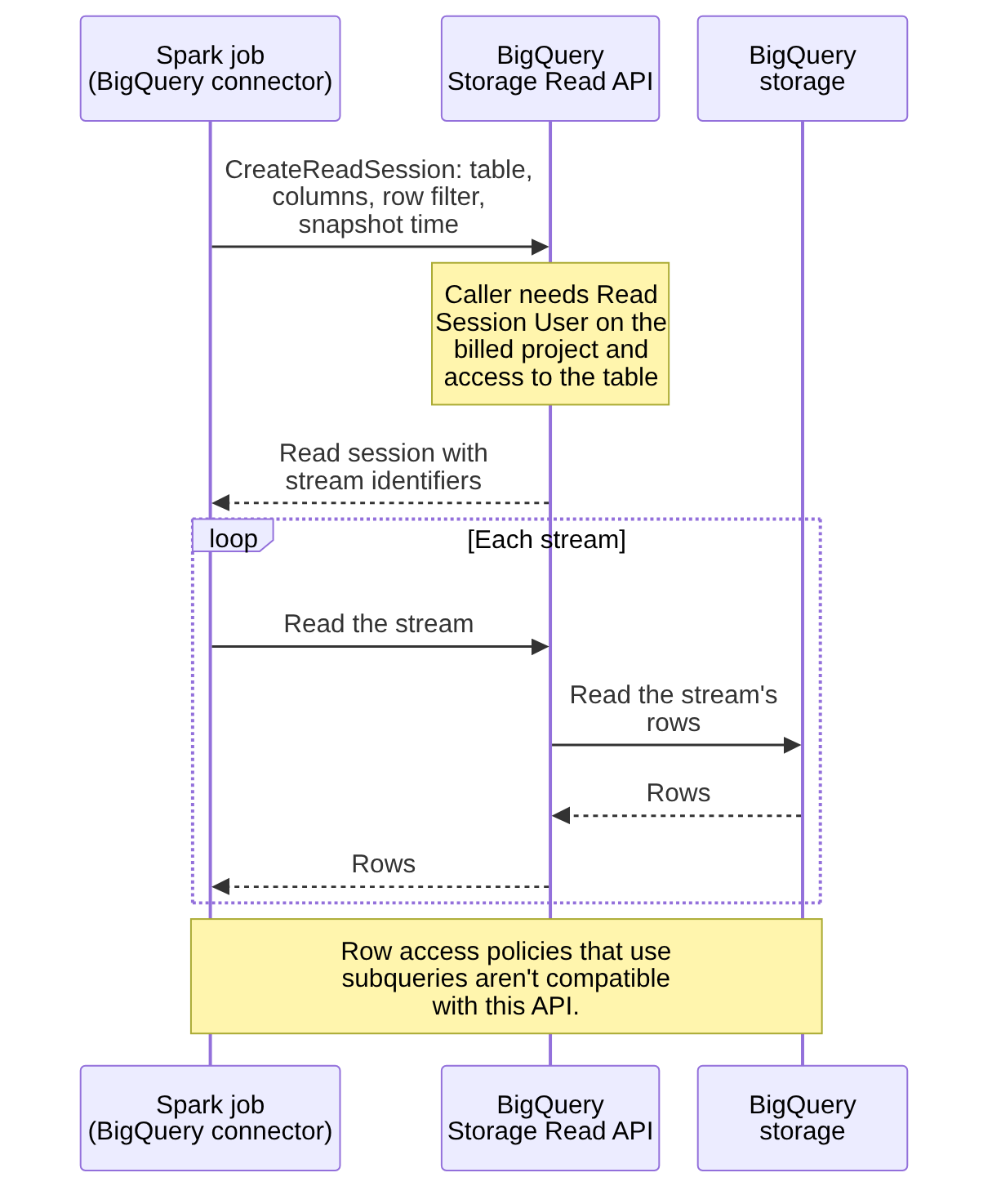
You can’t open the files yourself. Other engines read native tables through BigQuery, usually through the Storage Read API, which gives fast RPC-based access to BigQuery-managed storage (Google Cloud, n.d.aa). The Spark BigQuery connector uses that API (Google Cloud, n.d.e). Google’s row-level security page notes that policies using subqueries aren’t compatible with the Storage Read API, which supports only simple filter predicates (Google Cloud, n.d.k). Reading through the API also needs the Read Session User role on the project (Google Cloud, n.d.aa), and reads from Managed Service for Apache Spark clusters, or Spark on GKE, are charged at standard Storage Read API rates (Google Cloud, n.d.e). Figure 1 follows one Spark read through that path. The client creates a read session naming the table, columns, filter, and snapshot time, and then reads each stream the session returns (Google Cloud, n.d.aa).
Billing changes with this choice too: under logical billing, the default, time travel and fail-safe are included. Under physical billing they’re charged separately at active storage rates, and once you switch you have to wait 14 days before switching again (Google Cloud, n.d.t). Tables that churn, such as bronze tables with frequent deletes, can carry more time travel bytes than you’d guess.
Replication has limits too. Cross-region dataset replication doesn’t copy policy tags or data policies, and Google says it isn’t meant as a disaster recovery plan (Google Cloud, n.d.h). If gold depends on column policies, they have to be set up separately in the secondary region.
Consequences
Native tables suit layers that depend on BigQuery’s controls or are read mostly through it, and they’re the safest home for personal data an erasure job has to reach. They fit less well when another engine has to write the layer in place, or when a team wants to read it as files without going through BigQuery.
Option B: Apache Iceberg managed tables
Managed Iceberg tables, formerly called BigLake tables for Apache Iceberg in BigQuery, keep their data as Parquet files in a Cloud Storage bucket you own. BigQuery commits every change to them.
What you get
Writes are ordinary GoogleSQL DML, load jobs, and streaming. Spark and Dataflow write through the Storage Write API, BigQuery’s gRPC interface for streaming data in (Google Cloud, n.d.c; n.d.p). BigQuery does the housekeeping: it compacts and clusters the data files, and garbage-collects old data files once the time travel window has passed (Google Cloud, n.d.c).
Other engines can get at the data two ways. Through BigQuery, Spark can use the BigQuery connector, which reads with the Storage Read API (Google Cloud, n.d.e). Google’s fine-grained access page shows Spark reading this way, with spark.read.format("bigquery"), for managed Iceberg tables that use a BigQuery connection override (Google Cloud, n.d.b). Or Spark can read the files. You export Iceberg V2 metadata with EXPORT TABLE METADATA, and Google’s example has Spark reading the exported table through a path-based catalog on the bucket (Google Cloud, n.d.c). Google also describes automatic refresh of that metadata, turned on by request to Google, with export costs on each refresh (Google Cloud, n.d.c).
Column-level access control and masking are supported (Google Cloud, n.d.c), but only for reads that go through BigQuery, and Standard edition has no fine-grained controls at all (Google Cloud, n.d.y). A Spark job reading Parquet straight from the bucket never asks BigQuery, so it sees every column its Storage role lets it open.
Storage is billed by Cloud Storage, including historical table data, with no BigQuery storage fees on top. The automatic maintenance isn’t free, though. Google bills it in Data Compute Units, per second, and load and export operations run on Enterprise edition pay-as-you-go slots, which standard tables aren’t charged for (Google Cloud, n.d.c). For a table that gets many small streaming writes, maintenance and metadata export are the costs to watch.
What you give up
Google’s full list is longer than this; check the page. As of this writing, managed Iceberg tables don’t support any of the following (Google Cloud, n.d.c):
- renaming, table copies, table clones, or table snapshots
- materialised views
- authorised views (column-level access control is supported)
- managed disaster recovery
- row-level security
- fail-safe windows
- extract jobs
- partition evolution, or partitioning on columns other than
DATE,DATETIME, orTIMESTAMP - some data types, including
JSON,BIGNUMERIC,INTERVAL,RANGE, andGEOGRAPHY
Concurrency is tighter. Only one mutating DML statement, an UPDATE, DELETE, or MERGE, runs at a time on each managed Iceberg table, and others queue behind it (Google Cloud, n.d.c). A table that takes a merge every few minutes and also has erasure deletes running against it will queue. On the platforms we work on, batching helps: one DELETE per erasure run that removes every token in the run’s hand-off batch, scheduled into a gap between merges, rather than one statement per person.
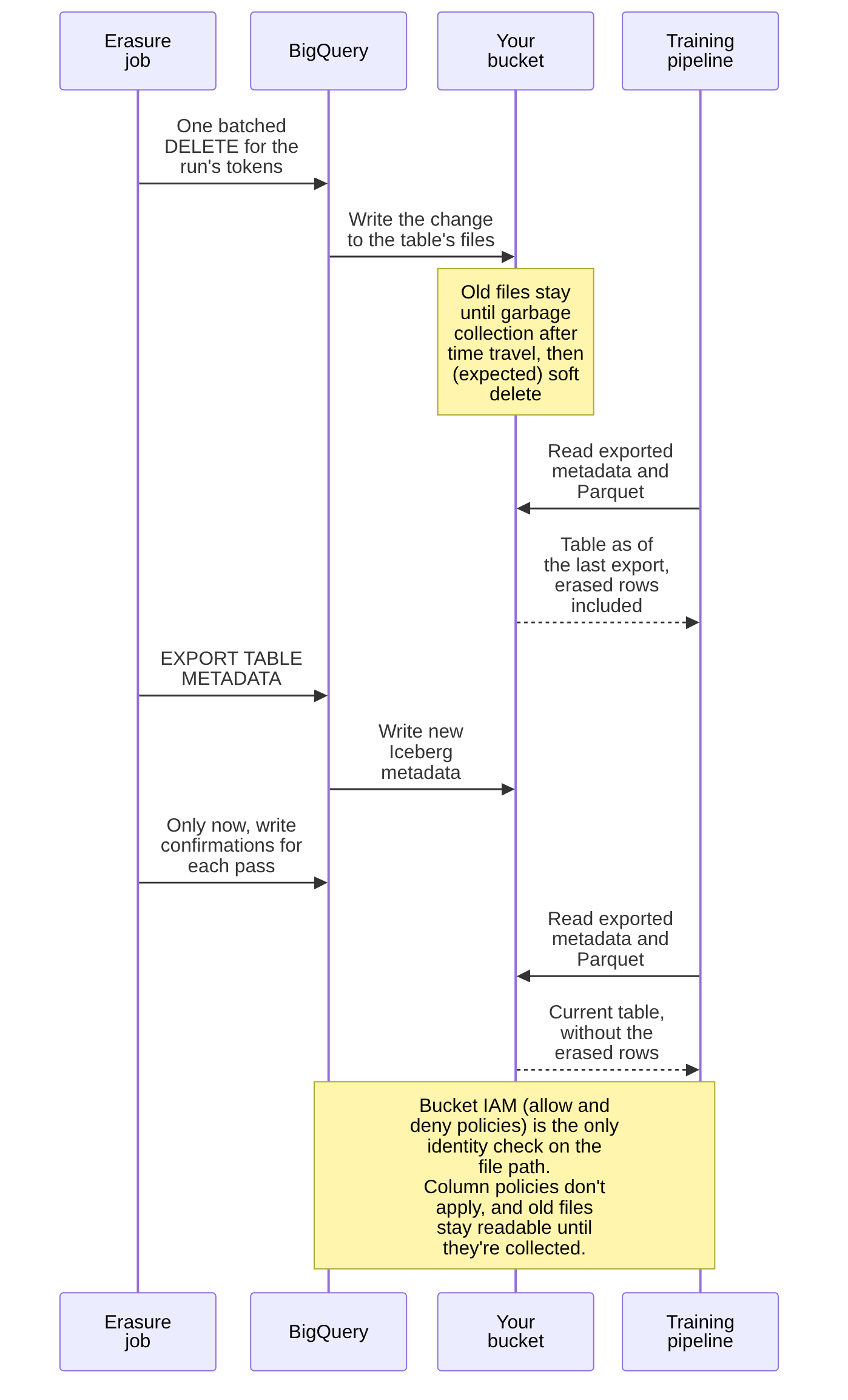
Readers on exported metadata see the table as of the last export. Iceberg metadata might not include data streamed through the Storage Write API in the last 90 minutes (Google Cloud, n.d.c), so a notebook reading through exported metadata can lag behind BigQuery’s view. The same applies to deletes. Until the metadata is exported again, a reader using it still sees rows the erasure job has already deleted in BigQuery, so the erasure job for a managed Iceberg table ends with an export, unless automatic refresh is turned on and you’ve confirmed it runs after deletes. Even then, the old Parquet files stay in the bucket until garbage collection, anything with read access to the bucket can open them, and a reader pinned to an older metadata file can keep seeing the deleted rows. Figure 2 shows that sequence for a pipeline that reads the files directly.
On row-level security, Google’s pages disagree. The managed tables page says row-level security isn’t supported (Google Cloud, n.d.c). A separate Lakehouse runtime catalog page describes fine-grained access control, row-level security included, on a managed Iceberg table in BigQuery that uses a BigQuery connection override (Google Cloud, n.d.b). The two pages use overlapping terms for what may be different table setups, so we’d treat row-level security on managed Iceberg as unavailable unless a test in your own project shows otherwise.
The bucket
Your data now lives in objects that Storage roles can read without any BigQuery permission, so the bucket deserves the same care as the dataset. Google’s setup has the connection’s service account hold Storage Object User and Storage Legacy Bucket Reader on the bucket, and its guidance is to use a single-region bucket in the same region as the dataset, with uniform bucket-level access and public access prevention turned on (Google Cloud, n.d.c). It also recommends restricting write access for tools outside BigQuery, because files added or changed outside BigQuery can make a table unreadable or get garbage-collected (Google Cloud, n.d.c). We make the connection’s service account the only identity outside break-glass access that can write or delete objects there.
A few more of Google’s rules matter for erasure and rebuilds. Avoid object versioning, Object Lock, and Bucket Lock. Keep the default seven-day soft delete, and contact support if data needs restoring rather than restoring objects yourself (Google Cloud, n.d.c). Only create a table in an empty prefix, because files already there aren’t tracked and background garbage collection deletes them (Google Cloud, n.d.c). Creating a table takes connection rights as well as dataset rights, BigQuery Data Owner and BigQuery Connection Admin in Google’s list (Google Cloud, n.d.c). It’s also an access problem. The connection’s service account can read the whole bucket, so anyone who can use the connection and create tables could, as we read it, define an external table over the same Parquet files and read every column, or create a managed table on that prefix and have the existing files garbage-collected. As in Part 1, BigQuery Connection User and Connection Admin on the connection stay with the pipeline’s deployment identity, since either one lets someone use it, and changes to them are audited.
Deleted data leaves by a slightly different route from native tables. Data files are garbage-collected after the time travel window (Google Cloud, n.d.c). Google doesn’t say so in as many words, but we’d expect the collected files then to sit in the bucket’s soft delete, which defaults to seven days and can be set as long as 90 (Google Cloud, n.d.x). There’s no fail-safe stage. So the chain is time travel, then a garbage-collection lag you have to measure, as Part 1’s worked example does, then soft delete. At defaults that’s at least as long as a native table’s chain, with soft delete standing where fail-safe would be, and longer by however long collection takes. Dropping a table is the case to watch: its data files aren’t garbage-collected at all (Google Cloud, n.d.c), so a rebuild that drops and recreates a table leaves the old files behind until someone cleans up the path, and the recreated table needs a fresh, empty prefix anyway.
Consequences
Managed Iceberg suits a layer that BigQuery can own as the writer, that another engine wants to read as files, and that doesn’t need anything on that list. Silver tables with long histories that data scientists read from Spark are the usual candidates. It suits personal data less well than native tables, because the controls you’d lean on for that data are the ones it drops, and because any file reader sits outside BigQuery’s policies.
Option C: Iceberg in an open catalog
Here the catalog lives outside BigQuery’s own metadata, and other engines write the files directly. On Google Cloud the obvious choice is the Lakehouse runtime catalog, formerly BigLake metastore, which offers an Apache Iceberg REST catalog endpoint (Google Cloud, n.d.q; n.d.w). Outside Google, Apache Polaris graduated to an Apache top-level project in February 2026 (Apache Polaris, 2026), Lakekeeper is an Iceberg REST catalog written in Rust and built on iceberg-rust (Lakekeeper, n.d.), and Project Nessie labels its Iceberg REST support experimental (Project Nessie, n.d.).
What you get
Spark writes through the endpoint in Google’s setup guide (Google Cloud, n.d.w), and Google lists read and write support for Flink, Trino, and third-party engines such as Snowflake as a Preview capability (Google Cloud, n.d.s). If the catalog is set up for credential vending, a client sends the X-Iceberg-Access-Delegation: vended-credentials header and the catalog hands it credentials for the table’s storage (Google Cloud, n.d.w). In that mode, people and jobs hold BigLake roles, and only the catalog’s auto-provisioned service account needs Storage Object User on the bucket (Google Cloud, n.d.w). Google’s setup page grants those roles on the project (Google Cloud, n.d.w), and its page on how the Lakehouse works says roles can also be granted on a namespace to cover the tables in it (Google Cloud, n.d.j). BigQuery reads these tables with a four-part name, project, catalog, namespace, then table, and sends the query to the catalog’s primary region (Google Cloud, n.d.v; n.d.a). As we understand them, vended credentials work like bearer tokens until they expire, so a credential that leaves the engine still works, and write credentials can change files without a catalog commit. A VPC Service Controls perimeter around the bucket’s project narrows where they can be used.
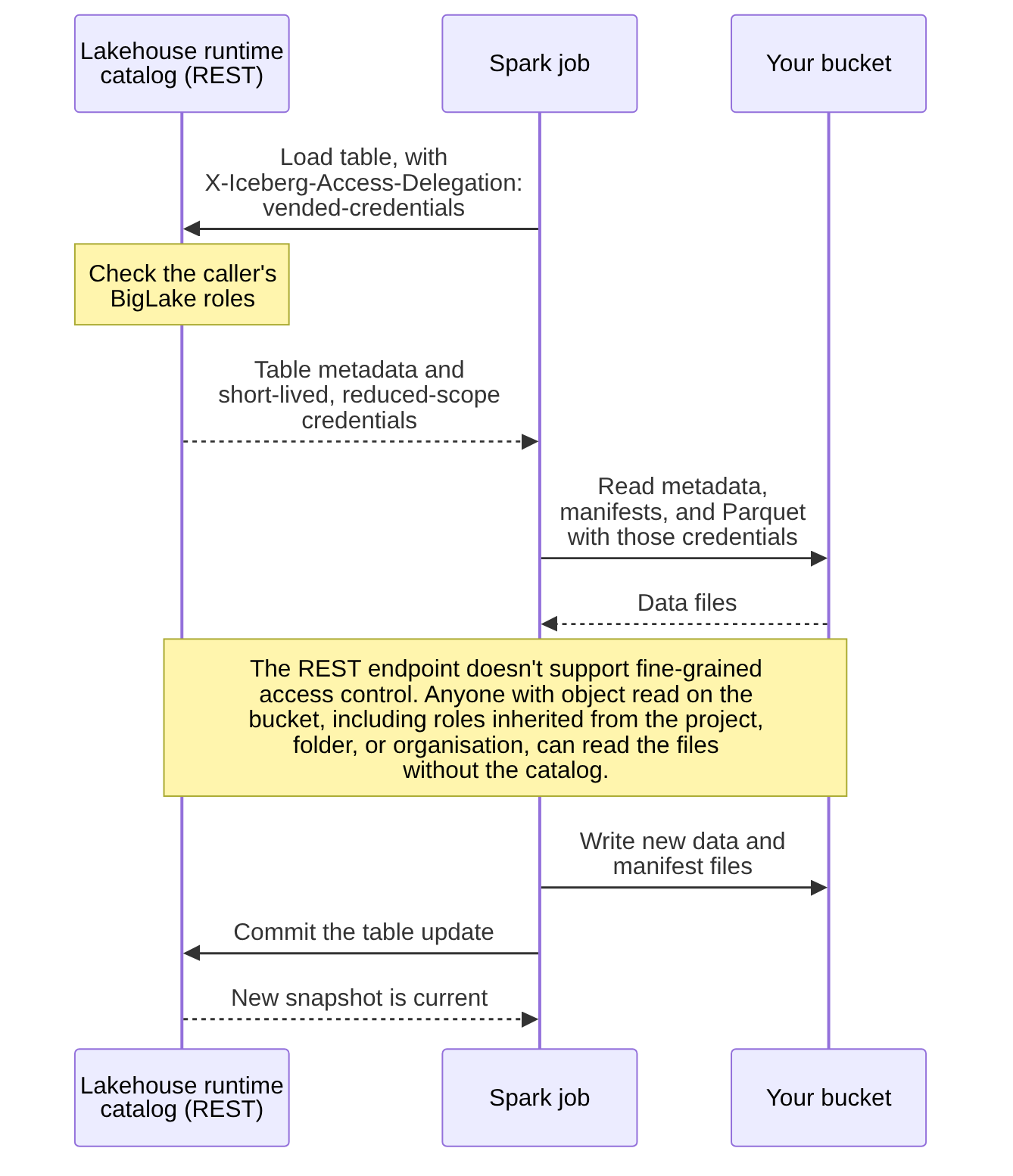
Google describes the read path in a few steps: the engine asks the catalog for the table’s metadata, the catalog checks the request against IAM, and against fine-grained policies where the endpoint supports them, which the REST endpoint doesn’t (Google Cloud, n.d.w), and it returns the metadata, plus a short-lived token if credential vending is on. The engine then reads the data files straight from Cloud Storage (Google Cloud, n.d.j). Figure 3 shows that path for a Spark job, followed by a write.
Iceberg’s format and the REST protocol are open, so moving engines or catalogs later should cost less than leaving A or B. That’s C’s main case on lock-in. Exit costs for A and B follow the comparison table.
What you give up
By default, BigQuery is a reader. The REST endpoint setup page says you can’t create or modify tables in the endpoint with BigQuery DDL or DML, and that changes made through the BigQuery API might be ones the external engine can’t handle (Google Cloud, n.d.w).
Newer Lakehouse pages, marked Preview, say otherwise. They describe opting a REST catalog table into BigQuery DML with the table property gcp.biglake.bigquery-dml.enabled, and into automatic table management with gcp.biglake.table-management.enabled (Google Cloud, n.d.f). Tables created from BigQuery get both by default, and the overview page lists BigQuery DDL among the Preview capabilities (Google Cloud, n.d.s; n.d.f). The opt-in comes with conditions (Google Cloud, n.d.f):
- the table has to be Iceberg format V2 and use copy-on-write for deletes, updates, and merges, so merge-on-read tables can’t opt in
- automatic table management needs credential vending turned on for the catalog
- all the existing limitations of BigQuery-managed Iceberg tables apply
- BigQuery’s project and dataset time travel settings don’t apply, and only the table’s own Iceberg properties count
- snapshot expiry is skipped for the whole table if it has any tags or branches
- orphan files aren’t cleaned up
We read that as the setup page describing the default and the newer pages describing a Preview opt-in. Until it’s generally available, we’d plan option C tables as written by other engines and test the opt-in in a project of your own before relying on it.
BigQuery’s fine-grained controls don’t apply either. Tables managed through the REST catalog endpoint don’t support fine-grained access control, row-level or column-level (Google Cloud, n.d.w). Access sits at the catalog and the bucket. Credential vending narrows who needs bucket roles, but anyone who does hold read access on the bucket can read every row in it.
The endpoint supports only Parquet files, doesn’t support Iceberg V1, supports V2 tables as generally available and V3 tables in Preview, and caps each metadata.json at 1 MB (Google Cloud, n.d.w). Google’s setup page also says to avoid paths that overlap with other catalogs, to prevent credentials being exposed to the wrong data, and to nest table paths within their namespace’s path (Google Cloud, n.d.w), and its overview says nested namespaces aren’t supported (Google Cloud, n.d.j). Administering the catalog needs Storage Admin on its buckets (Google Cloud, n.d.w), so the people who run it can read the data too.
The catalog now has to be available and recoverable. The Lakehouse runtime catalog offers cross-region replication and disaster recovery in Preview, for catalogs backed by dual-region or multi-region buckets (Google Cloud, n.d.z). With a self-run catalog such as Polaris or Lakekeeper, the catalog’s database is one more thing to back up and restore.
And unless you opt in to table management, the maintenance is yours. Iceberg keeps every old snapshot, with the files it references, until something expires it. Iceberg’s own guidance is to expire snapshots regularly so data files that are no longer needed get deleted and to remove orphan files left by failed writes, with compaction listed as optional (Apache Iceberg, n.d.d). Even with table management on, orphan cleanup stays with you (Google Cloud, n.d.f). The erasure section below goes through what that means.
Consequences
Option C suits tables another engine has to write: feature tables a data science team builds in Spark, or data shared with engines outside Google Cloud. It also needs the most operational work: someone has to own the maintenance schedule and the catalog, and anyone with bucket roles can read the data without the catalog.
The three side by side
The table below puts the three side by side, as Google’s documentation described them when we read it in October 2026.
| A. Native | B. Managed Iceberg | C. Open catalog | |
|---|---|---|---|
| Who writes | BigQuery | BigQuery, including Spark and Dataflow through the Storage Write API | Any engine through the catalog; BigQuery DML only by opt-in, in Preview |
| Where the files sit | BigQuery storage | Your bucket | Your bucket |
| Who maintains the files | Google, billed in compute units | You, or Google’s table management in Preview, with orphan cleanup still yours | |
| Where access is enforced | BigQuery | BigQuery for reads through BigQuery; bucket roles for file reads | The catalog and the bucket |
| Authorised views | Yes | No | Not documented; treat as no |
| Row-level security | Yes, not on Standard | No on the managed tables page; unclear, see above | No |
| Column-level access control | Yes, not on Standard | Yes, for reads through BigQuery, not on Standard | No |
| Table snapshots and clones | Yes | No | Not documented; Iceberg tags and branches instead |
| Fail-safe | Yes, seven days | No; bucket soft delete (keep the seven-day default) | No; bucket soft delete, if enabled |
| Managed disaster recovery | Enterprise Plus | No | Catalog replication in Preview |
| Materialised views | Yes (Standard can query, not create) | No | Not documented; treat as no |
The table below lists the line items each option adds, without prices, because most of them scale with data volume or team size.
| What it takes to run | A. Native | B. Managed Iceberg | C. Open catalog |
|---|---|---|---|
| Storage | BigQuery storage, with time travel and fail-safe charged separately under physical billing (Google Cloud, n.d.t) | Cloud Storage, including historical table data (Google Cloud, n.d.c) | Cloud Storage |
| Maintenance compute | None of yours | Data Compute Units for automatic maintenance, and Enterprise pay-as-you-go slots for loads and metadata export (Google Cloud, n.d.c) | Your Spark jobs for expiry, orphan cleanup, and compaction |
| Reads from Spark | Storage Read API rates (Google Cloud, n.d.e) | Storage Read API rates through the connector; Cloud Storage reads for files | Cloud Storage reads |
| Skills | BigQuery and SQL | BigQuery and SQL, plus bucket IAM | Iceberg operations, Spark, catalog IAM, and bucket IAM |
| Operational duties | BigQuery’s own | Metadata export after erasure, and bucket reviews | Maintenance schedule, catalog availability and recovery, and tag rules |
Listing 1 shows the three in SQL: the same silver table created natively and as managed Iceberg, the copy from one to the other, the metadata export that ends an erasure batch on option B, and a query against a table Spark writes in an open catalog. The connection, bucket, and catalog names are illustrative.
SQL
-- Option A: a native table, partitioned by day and clustered by article.
CREATE TABLE silver.article_engagement (
  token STRING,
  article_id STRING,
  event_date DATE,
  seconds_engaged INT64
)
PARTITION BY event_date
CLUSTER BY article_id;

-- Option B: a managed Iceberg table with the same columns. BigQuery writes
-- its Parquet files under the storage URI, through a Cloud resource
-- connection whose service account can read and write that bucket, a
-- single-region bucket in the dataset's region (europe-west2 here). The
-- prefix must be empty: files already there would be garbage-collected.
CREATE TABLE silver.article_engagement_iceberg (
  token STRING,
  article_id STRING,
  event_date DATE,
  seconds_engaged INT64
)
PARTITION BY event_date
CLUSTER BY article_id
WITH CONNECTION `publisher-lake.europe-west2.lake-connection`
OPTIONS (
  file_format = 'PARQUET',
  table_format = 'ICEBERG',
  storage_uri = 'gs://publisher-lake-silver/article_engagement');

-- Moving data from A to B is ordinary DML. There's no in-place conversion,
-- and CREATE OR REPLACE can't swap one kind of table for the other.
INSERT INTO silver.article_engagement_iceberg
SELECT token, article_id, event_date, seconds_engaged
FROM silver.article_engagement;

-- After each erasure batch on option B, export the metadata again so readers
-- of the exported Iceberg metadata stop seeing the deleted rows.
EXPORT TABLE METADATA FROM silver.article_engagement_iceberg;

-- Option C: read a table that Spark writes through the Lakehouse runtime
-- catalog's Iceberg REST endpoint, using a four-part name. The catalog
-- (feature_store) lives in its own project, publisher-features. By default
-- BigQuery only reads it; BigQuery DML on these tables is a Preview opt-in.
SELECT article_id, COUNT(*) AS readers
FROM `publisher-features.feature_store.features.reader_affinity`
GROUP BY article_id;
Listing 1. The same silver table on native storage and managed Iceberg, and a query against an open-catalog table, in BigQuery SQL.
Moving a table between options later means creating a new table and copying the data, as the listing does. Google doesn’t document an in-place conversion, and CREATE OR REPLACE can’t swap a native table for a managed Iceberg table or the other way round (Google Cloud, n.d.c). Readers that go through views can be repointed once the copy is checked, so putting views in front of tables early keeps that exit cheaper.
Delta Lake and Apache Hudi come up too, but BigQuery’s documentation describes them as read paths, Delta Lake as external tables and Hudi through exported manifests (Google Cloud, n.d.g; n.d.u), so they mostly turn up where another platform already owns the data.
Erasure when the files belong to an open catalog
Part 1 worked erasure through on options A and B, where BigQuery runs the deletes and Google’s retention windows decide when deleted data is gone. On option C, a DELETE, or a MERGE that deletes as Listing 3 does, starts the process, and the rows stay in files until every later step finishes.
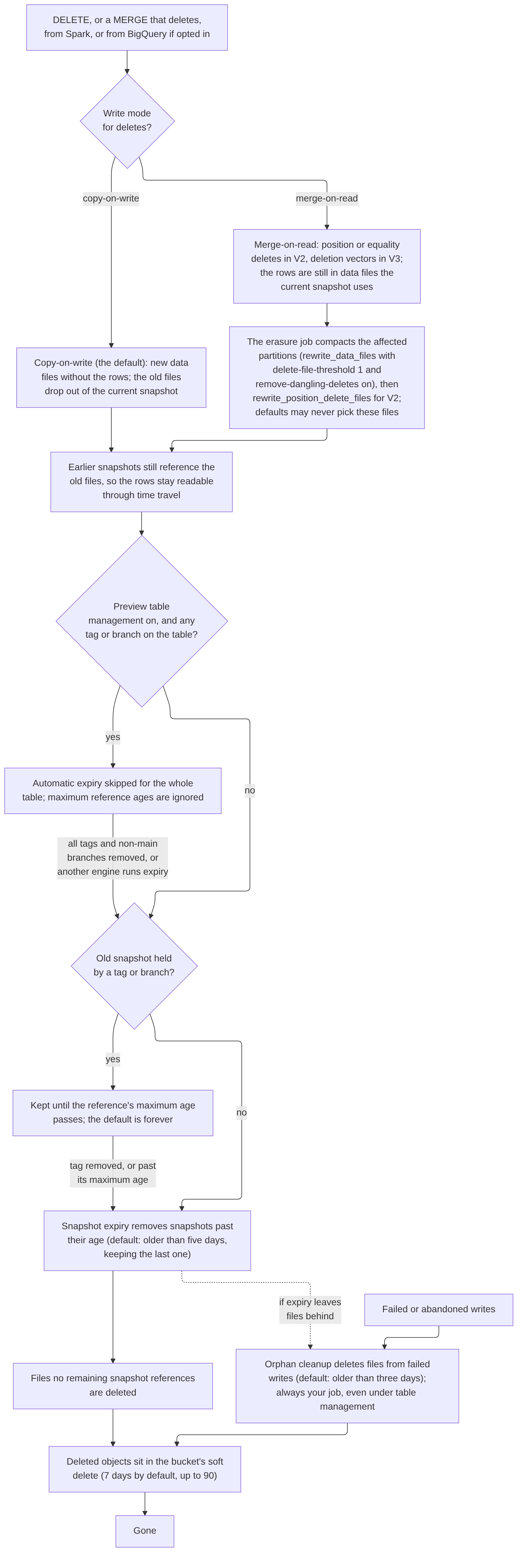
How many steps depends first on the table’s write mode. Iceberg defaults to copy-on-write for deletes, updates, and merges (Apache Iceberg, n.d.b), though that’s a table property each writing engine is expected to honour, so check what any Flink or Trino writers actually do, or keep them read-only on tables with personal data. A delete writes new data files without the deleted rows, the old files drop out of the current snapshot, and earlier snapshots still point to them. Tables set to merge-on-read write delete files instead: position deletes or equality deletes in format V2, or deletion vectors in V3 (Apache Iceberg, n.d.c). That’s faster to write, and it means the deleted rows are still physically present in data files the current snapshot uses. Queries skip them, but anyone reading the Parquet directly can see them, and they stay until compaction rewrites those files.
Compaction at default settings may not do that. Spark’s rewrite_data_files only picks a file because of its deletes once at least 30% of its rows are deleted, and the other trigger, delete-file-threshold, defaults to 2,147,483,647 deletes (Apache Iceberg, n.d.e). One reader’s handful of rows in a large file reaches neither. So on a merge-on-read table, the erasure job runs compaction itself on the affected partitions, with delete-file-threshold set to 1, and, for V2 position deletes, rewrite_position_delete_files after it (Apache Iceberg, n.d.e). Equality delete files hold the deleted values themselves, tokens included. Compaction’s remove-dangling-deletes option, off by default, removes delete files that no longer apply to any live data file. It goes by data sequence numbers and skips global or invalid equality deletes that match no data file (Apache Iceberg, n.d.e). Keeping equality deletes off tables with personal data avoids the question. For a table holding personal data, copy-on-write avoids that step altogether, and it’s the only mode Google’s table management accepts anyway (Google Cloud, n.d.f).
After that, the old files go only when every snapshot that references them is expired. Spark’s expire_snapshots procedure, by default, removes snapshots older than five days and keeps at least the last one (Apache Iceberg, n.d.e). Tags and branches change that. A tagged snapshot is kept until the tag’s maximum reference age passes, and the default retention for branches and tags is forever (Apache Iceberg, n.d.a; n.d.b). A tag a data scientist makes to pin an experiment’s training data keeps every row it covers until someone removes the tag. Under Google’s automatic table management it’s stricter still: a table with tags or branches skips automatic expiry entirely (whether that counts the main branch is one of the tests below), though open-source engines can still run expiry themselves (Google Cloud, n.d.f).
Failed or abandoned writes leave a third kind of file, files no metadata references. remove_orphan_files deletes them, by default only files older than three days (Apache Iceberg, n.d.e), and Google warns that a threshold shorter than your longest-running query can delete files that query still needs (Google Cloud, n.d.f). Whatever gets deleted then moves into the bucket’s soft delete, seven days by default (Google Cloud, n.d.x).
Working out the date
Part 1’s calculator takes each store’s stages as a chain and adds them up. For an option C table, one detail shortens it. Snapshot expiry goes by when a snapshot was created, and the last snapshot that still references a deleted row was created before the delete. So with the five-day setting, that snapshot is old enough to expire no later than five days after the delete, and it actually goes at the first expiry run after that.
Take a copy-on-write feature table with expiry run daily at five days, the bucket’s soft delete left at seven days, and no tags. Day 0 here is the delete itself. A delete on day 0 leaves the old files referenced until the first expiry run after day 5, so day 5 or 6, depending on when the job runs. The files then sit in soft delete for seven days, which puts the end of this chain at about day 13. In Part 1’s calculator the chain starts after the hand-off stage, so the lag before the feature-table job runs its delete comes first. A merge-on-read version of the same table starts the clock when the erasure job’s own compaction finishes. Any tag over the old snapshot stops the clock entirely until the tag goes, so the tag rule belongs in the platform standards: a table with personal data has no long-lived tags, or the erasure job removes or re-points the ones covering an erased person’s rows.
Counted from the request, add Part 1’s hand-off lag and up to a day for the daily feature job in front of this chain. The latest date across all the stores is the figure to compare with GDPR’s one month for responding under Article 12(3), before any extension, and Article 17’s “without undue delay”, and with the 45 days the CCPA allows, also before any extension (European Parliament and Council of the European Union, 2016; State of California Department of Justice, n.d.). A single long-lived tag can push past both. Neither law is written in terms of storage windows, so treat the dates as engineering input for your privacy team. The date also covers the Iceberg files only. The scheduled job’s native output tables are rebuilt the day after, and the rows they replace go through time travel and fail-safe, so with time travel set to the two-day minimum on that dataset, that store ends around day 10 from the delete, or day 15 at the seven-day default. Silver’s own chain, with its measured garbage-collection lag, may run later still. Feature tables keep no column bounds for the token, so their manifests don’t add to it, but any table that does keep bounds on an identifying column holds them until a later commit replaces the deleting snapshot, as the next section explains.
Under Google’s table management the arithmetic changes. Expiry runs in the background after data changes, on Google’s timing (Google Cloud, n.d.f). A table that’s written every day will expire snapshots much as a daily job would. A table nobody writes to after the erasure may never run expiry at all, so if you count on table management, check the jobs in INFORMATION_SCHEMA.JOBS, where Google logs them (Google Cloud, n.d.f).
Listing 2 shows snapshot expiry from Python with PyIceberg, for teams that run maintenance outside Spark. PyIceberg’s maintenance API expires snapshots older than a given time (Apache Iceberg, n.d.f), and its reference documentation says it expires only unprotected snapshots, treating the heads of branches and all tagged snapshots as protected (Apache Iceberg, n.d.h). It doesn’t say whether expiry also deletes the files those snapshots referenced. If it doesn’t, those files become orphans, and their chain runs from expiry to the next orphan cleanup and then soft delete. So we’d still run orphan cleanup in Spark, with the prefix_listing option Google suggests for these catalogs (Google Cloud, n.d.f), and look in the bucket after the first run. The Rust client, iceberg-rust, has an expire_snapshots action on its transactions, but its options aren’t documented yet (Apache Iceberg, n.d.i), which is why this listing is Python only.
Python
from datetime import datetime, timedelta, timezone

from pyiceberg.catalog import load_catalog

# Catalog settings (REST endpoint, warehouse, auth) come from .pyiceberg.yaml.
catalog = load_catalog("lake")
table = catalog.load_table("features.reader_affinity")

# Expire snapshots older than five days, matching Spark's default age. If
# expiry here doesn't delete the files it stops referencing, they become
# orphans, so add the next orphan-cleanup run to this table's chain.
table.maintenance.expire_snapshots().older_than(
    datetime.now(timezone.utc) - timedelta(days=5)
).commit()
Listing 2. Expiring snapshots older than five days with PyIceberg, to match Spark's default.
What the manifests hold
Iceberg’s manifests can also hold personal data, because they store column statistics. By default it stores lower and upper bounds for each column, truncated to 16 characters for strings, for up to the first 100 columns (Apache Iceberg, n.d.b). A truncated bound on a name or email column can be enough to identify someone, and it sits in manifests that no query against the data ever touches. Deletes don’t clear it straight away either. A delete records the removed file in a manifest as a deleted entry, with its statistics still attached, and that entry can only go once the snapshot that deleted it is expired (Apache Iceberg, n.d.c). Older manifests that added the file keep its bounds too. So once a later commit has replaced the deleting snapshot, the statistics leave on the same chain as the data files, snapshot expiry and then soft delete. On a table nobody writes to after the erasure, the deleting snapshot stays current and expiry always keeps it, so the bounds stay until the next commit. The check after expiry is the all_entries metadata table, which covers every snapshot the table still has, rather than entries, which covers only the current one (Apache Iceberg, n.d.g).
The fix is a table property. Setting write.metadata.metrics.column.<name> to none or counts for each identifying column stops Iceberg storing its bounds (Apache Iceberg, n.d.b). In Part 1’s design the identifying columns live in native tables anyway, but any option C table that carries a free-text field or an address should have this set from the start. Google doesn’t say what statistics BigQuery writes into the manifests of managed Iceberg tables, so for option B that’s something to check in your own bucket.
The decision for the example platform
The publisher decides layer by layer. A platform whose data scientists need bucket access would split differently.
Bronze, the identity table, and the restricted stores: native. Part 1’s design reads them only through authorised views, keeps deleted rows away from anyone without table access, and counts time travel and fail-safe as a known recovery chain. Managed Iceberg would take away the authorised views, and with them the design’s main access control.
Silver reading history: managed Iceberg, with conditions. Training jobs scan years of reading behaviour, the team wants that history as Parquet that open tooling can read, and BigQuery is the only writer, so managed Iceberg fits the shape of the work. Silver here carries tokens and no names, and the data scientists already have table access to it, so losing authorised views and row-level security costs little.
Reading history is the part that needs care. What someone reads can point to their health, their religion, or their politics, and data revealing those is in the special categories that Article 9 of the GDPR restricts (European Parliament and Council of the European Union, 2016). Recital 26 treats pseudonymised data that can be attributed to a person with additional information as information about an identifiable person (European Parliament and Council of the European Union, 2016), and the identity table is that additional information. California’s CCPA treats information about a consumer’s health and religious or philosophical beliefs as sensitive personal information (State of California Department of Justice, n.d.), so the same care applies to US readers. That’s the strongest argument for keeping this table native, and on a platform with less control over who reads files, it would be the right call. We weighed the obvious alternative: keep the history native, with its authorised views and row-level security, and export Parquet for training. It meets the training pipeline’s need too. For years of history, a full re-export on every refresh is a large recurring job, so in practice the export would be incremental, by partition, and erasure would need a second path that rewrites every export partition holding an erased token. Set side by side, the export’s exposure is the lag before that rewrite plus the export bucket’s soft delete; managed Iceberg’s is time travel, the garbage-collection lag, and the seven-day soft delete Google asks you to keep, during which bucket roles can read the old files. Managed Iceberg also needs a metadata export after each erasure and a change to when silver confirms. We chose managed Iceberg to avoid running an incremental export and its partition-rewrite path, and we accept a longer window in which the training pipeline’s identity can read old files. If that window is too long for your privacy team, take the export route. The read paths here:
- The reading history sits in a dataset of its own, so dataset roles on it don’t reach other silver tables.
- Notebooks and ad hoc work read the table through the Spark BigQuery connector’s direct reads, which use the Storage Read API, so access is governed by BigQuery roles and every read goes through BigQuery. Each data scientist works on a personal runtime with its own service account, and only that person holds Service Account User on it, granted on the service account itself, so access stays per person; those service accounts get BigQuery Data Viewer on the dataset and Read Session User on the project the connector bills (Google Cloud, n.d.aa; GoogleCloudDataproc, n.d.), and no bucket roles. On this dataset they don’t use the connector’s query mode, which saves results into temporary tables (GoogleCloudDataproc, n.d.). IAM can’t stop someone who can read the table copying it somewhere they can write, so every scratch dataset and bucket data scientists can write to inside the perimeter counts as an erasure store, with a short table expiration or lifecycle rule and a sweep that removes anything older. Time travel still lets them read erased rows until its window closes, which this table’s erasure chain counts, as Part 1 does for its own tables.
- The table carries no column that would need a column policy, because the next path would go around it.
- The scheduled training pipeline reads the Parquet files directly, as a deliberate exception. It runs as one service account with Storage Object Viewer on a bucket that holds only this table, and its runtime sits in a separate project from the bucket. Every way to run as that service account is held as tightly as the bucket role: Service Account User and Token Creator on it, including grants inherited from the project, folder, or organisation; job-submit rights on its runtime project; login access to its runtime’s VMs; Workload Identity User if it runs on GKE; the right to trigger its workflow; and write access to its code, image, and workflow definition. No basic roles are held on any of these projects. Creating keys for it is blocked by organisation policy.
- The connection’s service account is the only identity that can write or delete in the bucket. The bucket sits in a project of its own, and an IAM deny policy on that project denies object reads to everyone except the pipeline’s service account, the connection’s service account, and break-glass administrators, and denies writes, deletes, and restores from soft delete to everyone except the last two. Whether Cloud Storage’s object permissions can be denied this way is one of the tests below, and if they can’t, the fallback is a bucket project under a folder where no organisation- or folder-level role grants object read, with those inherited grants reviewed, and the rights to change the deny policy are held as tightly as the bucket roles. One VPC Service Controls perimeter holds every project involved, the silver bucket’s, the feature catalog’s and bucket’s, the Spark runtimes’, the jobs’, and BigQuery’s, with BigQuery, Cloud Storage, and the Lakehouse runtime catalog API restricted, so those APIs can’t move the data to a project outside it. Managed Service for Apache Spark may need extra steps to sit inside a perimeter, so check Google’s current page. Looker, people using the console, and the partner feed each need an ingress or egress rule, and those rules are reviewed like any other way out. BigQuery Standard edition can’t run inside a perimeter, which is one more reason this platform runs Enterprise. A perimeter covers Google API traffic only, so the runtimes have no external IP addresses, reach Google APIs through the restricted endpoint with Private Google Access, and allow egress only to that endpoint and its DNS, plus the traffic Spark’s workers need inside the subnet, and the partner feed leaves through one named, reviewed path. The partner feed is a downstream recipient under Part 1’s process, with its own erasure arrangement.
- The silver erasure job, which holds DML rights on the history table and the permission
EXPORT TABLE METADATAneeds, found by testing, removes each run’s tokens in one batchedDELETE, between merges, because of the single-writer limit on mutating DML, then exports the metadata again so reads through it stop returning the deleted rows, and only then writes its confirmations, one row per request and pass, as in Part 1. That’s a change from Part 1’s silver job, which confirmed in the same transaction as its delete; here the confirmation waits for the export, so the mapping can’t go while the training pipeline still sees the rows through old metadata. The old files stay readable to the training pipeline’s service account until garbage collection after the time travel window, so that window is part of this table’s erasure chain. The pipeline’s code reads only the current snapshot, which is a code-review rule; IAM can’t enforce it, and anyone holding the service account could read older metadata files.
Other silver tables, and gold: native. Subscription revenue in silver is read through BigQuery and has no use for open files. Gold feeds Looker dashboards, uses column policies on revenue fields, and benefits from materialised views. Gold is built by scheduled SQL that reads silver, including the managed Iceberg history table, and writes native gold tables. Gold stays a registered downstream erasure job, as in Part 1. Its builds leave out tokens still in the hand-off table, and like the feature job it confirms a pass only after silver has. Gold’s materialised views and authorised views sit over those native tables. Google lists materialised views and authorised views among the features managed Iceberg tables don’t support (Google Cloud, n.d.c), so we’d keep both off the Iceberg table itself and not spend time testing where that line falls. That’s the same answer Part 1 reached for a gold built over managed Iceberg silver: a table built by its own job.
Feature tables written in Spark: open catalog, in the Lakehouse runtime catalog. Spark jobs write them, and Spark and, now and then, BigQuery read them.
- What they hold. Tokens and derived features, no direct identifiers. Copy-on-write, with column statistics set to
countsfor the token and any free-text field, so manifests hold no bounds on them. - Where the catalog sits. In its own project, in the same region as the datasets it’s joined with, because BigQuery sends queries against it to the catalog’s primary region (Google Cloud, n.d.a). Paths don’t overlap with any other catalog’s, and there are no nested namespaces.
- Who has access. BigLake roles on the feature namespace, which Google’s page on how the Lakehouse works allows (Google Cloud, n.d.j), so a grant doesn’t reach every table in the catalog. The catalog runs in credential vending mode, so its service account is the only identity with write rights through a bucket-wide role, apart from break-glass access (Google Cloud, n.d.w). Catalog administrators hold Storage Admin because Google requires it, treated as break-glass access with alerting. Analysts get no bucket roles. The same deny-policy pattern as silver covers the feature bucket, with exceptions only for the identities named here, and no basic roles are held on the catalog or bucket projects, since those would get around the namespace grants.
- How BigQuery reads them. BigQuery reading with vended credentials is in Preview (Google Cloud, n.d.s), so for now BigQuery reads run as one scheduled job’s service account, with BigLake Viewer on the namespace, BigQuery Job User, Data Editor on its output dataset only, and, pending a test, Storage Object Viewer on the bucket. That bucket grant reaches every table in the bucket, so the bucket holds feature tables only, and the job rebuilds its native output tables in full on every run, so an erased token drops out on the next run after the feature tables lose it. Those tables aren’t a registered erasure job, so for up to a day after the mapping goes they can still hold an erased token. The output dataset’s time travel is set to the two-day minimum, because analysts with dataset roles could otherwise read earlier versions, and those tables count in the erasure chain.
- How erasure runs. BigQuery can’t run DML on these tables without the Preview opt-in, so erasure is a Spark job. It reads Part 1’s hand-off table, collects the passes it hasn’t confirmed once, deletes those tokens, and writes its own confirmation for exactly that set, request ID and pass number only. Feature builds read silver through the BigQuery connector, never through older exported metadata. Each day the workflow runs the feature builds and then this job, never at the same time, so every row a build writes is in the tables before the job deletes. The job confirms a pass only after silver has confirmed it, so no build that starts later can read the token from silver, and it deletes every token still in the hand-off table on every run, so a token written back by a build that read silver earlier goes again on the next run. Builds also leave out tokens still in the hand-off table. The job handles every registered feature table and confirms once every
MERGEhas committed and its checks on refs and table properties pass. The chain in “Working out the date” starts when the job runs. - What the job’s identity holds. BigLake Editor on the feature namespace; BigQuery Data Viewer on the hand-off table and silver’s confirmation table only, at table level; a custom role on its own confirmation table with
bigquery.tables.get,getData, andupdateData, and nobigquery.jobs.createanywhere, so it can append confirmations but can’t run DML against them or delete the table; Read Session User on the project the connector bills; and Service Usage Consumer on the catalog’s project. Google’s quickstart grants that role to the Compute Engine default service account (Google Cloud, n.d.v); giving it to the job is our reading, because the catalog’s project is the one named in the billing header (Google Cloud, n.d.w). The job runs in a project of its own, separate from the buckets, and the same run-as rights as the training pipeline’s are held tightly. Because it waits for silver, it can confirm up to a day after silver does, so Part 1’s downstream confirmation timeout for the feature job needs at least that margin, and the identity table’s date moves out by the same amount. Feature-build jobs hold BigLake Editor on the namespace too, which also lets them set table properties, so a build could opt a table into Google’s Preview capabilities. The job checks for that before it confirms. - Who maintains them. Snapshot expiry and orphan cleanup run in the same daily job as erasure, under the same identity, and the platform team owns the schedule. Orphan cleanup lists and deletes files under the table paths, which vended credentials may not allow. If it needs a bucket role, that role is granted on managed folders for the table paths, never bucket-wide, because an IAM condition on the object name doesn’t narrow listing. Even path-scoped delete rights let the job remove live files without a catalog commit, so the role is watched like the catalog’s own. Tags and extra branches aren’t allowed, and since anyone with BigLake Editor could create one, the job checks the tables’ refs before it confirms and fails if it finds anything other than main (Apache Iceberg, n.d.g). If namespace-only grants turn out not to work, the fallback is a separate catalog for the feature tables.
Listing 3 is that job, run daily. It uses the Spark catalog settings from Google’s setup guide (Google Cloud, n.d.w), reads and writes the BigQuery tables through the connector (GoogleCloudDataproc, n.d.), fixes the set of pending passes once, removes every token still in the hand-off table with one MERGE per feature table, checks refs and table properties, confirms exactly the passes silver has already confirmed, expires snapshots older than five days, and removes orphan files with prefix listing (Apache Iceberg, n.d.e; Google Cloud, n.d.f). The snapshots holding today’s deleted rows go on a later run, which is why the date arithmetic above counts the expiry run after day 5. It’s Python only, because the job is Spark.
Python
"""Daily erasure and maintenance job for the feature tables (option C).

Runs on Managed Service for Apache Spark against the Lakehouse runtime
catalog's Iceberg REST endpoint, with Iceberg 1.10 or later (Google's
setup guide gives 1.10 for GoogleAuthManager) and the Iceberg GCP bundle. The
catalog settings follow that guide. The catalog, feature_store, lives in the
publisher-features project; other names are illustrative.

It runs in the same daily workflow as the feature builds, after them and
never at the same time, so every row a build writes is in the tables before
this job deletes. It confirms a pass only after silver has confirmed it, so
no later build can read the token from silver, and it deletes every token
still in the hand-off table on every run, so one written back by a build that
read silver earlier goes again. It handles every registered feature table and
confirms once every MERGE has committed and the refs and properties checks
pass.

The job's service account holds:
- BigLake Editor on the feature namespace
- no basic roles on any of the projects involved
- BigQuery Data Viewer on erasure_handoff.tokens and
  erasure_confirm_silver.confirmations only, granted at table level
- a custom role on erasure_confirm_features.confirmations with
  bigquery.tables.get, bigquery.tables.getData, and bigquery.tables.updateData,
  and no bigquery.jobs.create anywhere, so it can append rows but can't run
  DML against the table or delete it
- Read Session User on publisher-lake, the connector's parentProject
- Service Usage Consumer on publisher-features, the project named in
  x-goog-user-project
- if orphan cleanup needs it, an object role on managed folders for the table
  paths only, never bucket-wide
The job runs in a project of its own, separate from the buckets.
"""

from datetime import datetime, timedelta, timezone

from pyspark.sql import SparkSession

CATALOG = "lake"  # Spark's name for the catalog
FEATURE_TABLES = ["features.reader_affinity"]  # every registered feature table
BQ_PROJECT = "publisher-lake"
HANDOFF = f"{BQ_PROJECT}.erasure_handoff.tokens"
SILVER_DONE = f"{BQ_PROJECT}.erasure_confirm_silver.confirmations"
FEATURES_DONE = f"{BQ_PROJECT}.erasure_confirm_features.confirmations"

spark = (
    SparkSession.builder.appName("feature-erasure")
    .config("spark.sql.session.timeZone", "UTC")
    .config("spark.sql.defaultCatalog", CATALOG)
    .config(f"spark.sql.catalog.{CATALOG}", "org.apache.iceberg.spark.SparkCatalog")
    .config(f"spark.sql.catalog.{CATALOG}.type", "rest")
    .config(
        f"spark.sql.catalog.{CATALOG}.uri",
        "https://biglake.googleapis.com/iceberg/v1/restcatalog",
    )
    .config(
        f"spark.sql.catalog.{CATALOG}.warehouse",
        "bl://projects/publisher-features/catalogs/feature_store",
    )
    .config(f"spark.sql.catalog.{CATALOG}.header.x-goog-user-project", "publisher-features")
    .config(
        f"spark.sql.catalog.{CATALOG}.rest.auth.type",
        "org.apache.iceberg.gcp.auth.GoogleAuthManager",
    )
    .config(f"spark.sql.catalog.{CATALOG}.io-impl", "org.apache.iceberg.gcp.gcs.GCSFileIO")
    .config(
        f"spark.sql.catalog.{CATALOG}.header.X-Iceberg-Access-Delegation",
        "vended-credentials",
    )
    .config(
        "spark.sql.extensions",
        "org.apache.iceberg.spark.extensions.IcebergSparkSessionExtensions",
    )
    .getOrCreate()
)


def read_bq(table: str):
    return spark.read.format("bigquery").option("parentProject", BQ_PROJECT).load(table)


def utc_cutoff(days: int) -> str:
    return (datetime.now(timezone.utc) - timedelta(days=days)).strftime("%Y-%m-%d %H:%M:%S")


def erase() -> None:
    # 1. Read, once, the passes silver has confirmed and this job hasn't.
    #    Collecting them fixes the set, so the job confirms exactly the
    #    passes it deleted, even if new rows arrive while it runs. Erasure
    #    batches are small, so they fit on the driver.
    read_bq(SILVER_DONE).createOrReplaceTempView("silver_done")
    read_bq(FEATURES_DONE).createOrReplaceTempView("features_done")
    read_bq(HANDOFF).createOrReplaceTempView("handoff")
    pending_df = spark.sql("""
        SELECT s.request_id, s.pass_number
        FROM silver_done s
        LEFT ANTI JOIN features_done f
          ON f.request_id = s.request_id AND f.pass_number = s.pass_number
    """)
    pending = pending_df.distinct().collect()

    # Delete every token still in the hand-off table, not just the new
    # passes, so a token written back before silver confirmed goes again.
    spark.sql("SELECT DISTINCT token FROM handoff").createOrReplaceTempView("erasure_batch")

    # 2. One MERGE per feature table removes those tokens. The tables
    #    are copy-on-write, so this writes new files without the rows, as a
    #    DELETE would. A failed commit raises, and nothing is confirmed.
    for table in FEATURE_TABLES:
        spark.sql(f"""
            MERGE INTO {CATALOG}.{table} t
            USING erasure_batch b
            ON t.token = b.token
            WHEN MATCHED THEN DELETE
        """)

    # 3. Refuse to confirm if any table has a tag or a non-main branch, which
    #    would hold erased rows indefinitely, or a gcp.biglake.* property
    #    opting it into Google's Preview capabilities.
    check_tables()

    # 4. Confirm each pass in the fixed set, request ID and pass number only,
    #    after every MERGE has committed.
    if not pending:
        return
    passes = spark.createDataFrame(pending, schema=pending_df.schema)
    (
        passes.write.format("bigquery")
        .option("parentProject", BQ_PROJECT)
        .option("writeMethod", "direct")
        .mode("append")
        .save(FEATURES_DONE)
    )


def check_tables() -> None:
    problems = []
    for table in FEATURE_TABLES:
        refs = spark.sql(
            f"SELECT name, type FROM {CATALOG}.{table}.refs WHERE name <> 'main'"
        ).collect()
        problems += [f"{table}: {r.type} {r.name}" for r in refs]
        props = spark.sql(f"SHOW TBLPROPERTIES {CATALOG}.{table}").collect()
        problems += [
            f"{table}: {r.key}={r.value}"
            for r in props
            if r.key.startswith("gcp.biglake.") and r.value.lower() == "true"
        ]
    if problems:
        raise RuntimeError(f"not safe to confirm: {problems}")


def maintain() -> None:
    for table in FEATURE_TABLES:
        # 5. Expire snapshots older than five days, keeping the last one. The
        #    snapshots that still hold today's deleted rows go on a later run.
        spark.sql(f"""
            CALL {CATALOG}.system.expire_snapshots(
                table => '{table}',
                older_than => TIMESTAMP '{utc_cutoff(5)}',
                retain_last => 1)
        """)

        # 6. Remove files no snapshot references, left by failed writes (or
        #    by a non-Spark expiry that doesn't delete them), using the prefix
        #    listing Google's table-options page suggests. Three days is
        #    Iceberg's default; raise it if any query runs longer than that.
        spark.sql(f"""
            CALL {CATALOG}.system.remove_orphan_files(
                table => '{table}',
                older_than => TIMESTAMP '{utc_cutoff(3)}',
                prefix_listing => true)
        """)


if __name__ == "__main__":
    # Maintenance runs only after a clean erasure pass, so a refused
    # confirmation (a tag, a branch, or an opt-in) surfaces as the job's error.
    erase()
    maintain()
Listing 3. The daily erasure and maintenance job for the open-catalog feature tables, in PySpark.
Listing 4 turns the whole decision into code. Each option lists only the capabilities Google documents for it as generally available, and each layer lists what it can’t do without. It’s deliberately small, and the capability lists are the part to update whenever Google changes what managed Iceberg or the Lakehouse runtime catalog supports.
Python
"""Check what each layer needs against what each storage option documents.

The capability lists come from Google's documentation for each option, as
read in October 2026. They change, so re-check them before relying on this.
Edition matters for options A and B: row-level security, column-level
access control, and data masking aren't on Standard, and managed disaster
recovery is Enterprise Plus only.
"""

from __future__ import annotations

KNOWN = frozenset({
    "authorised_views",
    "row_level_security",
    "column_level_security",
    "data_masking",
    "table_snapshots",
    "fail_safe",
    "managed_disaster_recovery",
    "materialised_views",
    "bigquery_dml",
    "files_in_your_bucket",
    "other_engines_write_files",
})

CAPABILITIES: dict[str, frozenset[str]] = {
    # A. BigQuery native tables
    "A": frozenset({
        "authorised_views",
        "row_level_security",
        "column_level_security",
        "data_masking",
        "table_snapshots",
        "fail_safe",
        "managed_disaster_recovery",
        "materialised_views",
        "bigquery_dml",
    }),
    # B. Apache Iceberg managed tables: Parquet in your bucket, written
    # only through BigQuery.
    "B": frozenset({
        "column_level_security",
        "data_masking",
        "bigquery_dml",
        "files_in_your_bucket",
    }),
    # C. Iceberg in an open catalog: other engines write the files, and
    # BigQuery reads them. BigQuery DML on these tables is an opt-in in
    # Preview, so it's left out here until it's generally available.
    "C": frozenset({
        "files_in_your_bucket",
        "other_engines_write_files",
    }),
}


def _check(needs: set[str]) -> None:
    unknown = needs - KNOWN
    if unknown:
        raise ValueError(f"unknown needs: {sorted(unknown)}")


def missing(option: str, needs: set[str]) -> list[str]:
    """What a layer needs that the option doesn't document."""
    _check(needs)
    if option not in CAPABILITIES:
        raise ValueError(f"unknown option: {option}")
    return sorted(needs - CAPABILITIES[option])


def options_for(needs: set[str]) -> list[str]:
    """Options that document everything the layer needs."""
    _check(needs)
    return [o for o in sorted(CAPABILITIES) if not missing(o, needs)]
Rust
//! Check what each layer needs against what each storage option documents.
//!
//! The capability lists come from Google's documentation for each option,
//! as read in October 2026. They change, so re-check them before relying on
//! this. Edition matters for options A and B: row-level security,
//! column-level access control, and data masking aren't on Standard, and
//! managed disaster recovery is Enterprise Plus only.

use std::collections::BTreeSet;

pub const KNOWN: [&str; 11] = [
    "authorised_views",
    "row_level_security",
    "column_level_security",
    "data_masking",
    "table_snapshots",
    "fail_safe",
    "managed_disaster_recovery",
    "materialised_views",
    "bigquery_dml",
    "files_in_your_bucket",
    "other_engines_write_files",
];

/// Options in order, each with the capabilities its documentation lists.
pub fn capabilities() -> Vec<(&'static str, BTreeSet<&'static str>)> {
    vec![
        // A. BigQuery native tables
        (
            "A",
            BTreeSet::from([
                "authorised_views",
                "row_level_security",
                "column_level_security",
                "data_masking",
                "table_snapshots",
                "fail_safe",
                "managed_disaster_recovery",
                "materialised_views",
                "bigquery_dml",
            ]),
        ),
        // B. Apache Iceberg managed tables: Parquet in your bucket,
        // written only through BigQuery.
        (
            "B",
            BTreeSet::from([
                "column_level_security",
                "data_masking",
                "bigquery_dml",
                "files_in_your_bucket",
            ]),
        ),
        // C. Iceberg in an open catalog: other engines write the files,
        // and BigQuery reads them. BigQuery DML on these tables is an
        // opt-in in Preview, so it's left out here until it's generally
        // available.
        (
            "C",
            BTreeSet::from(["files_in_your_bucket", "other_engines_write_files"]),
        ),
    ]
}

fn check(needs: &BTreeSet<&str>) -> Result<(), String> {
    let unknown: Vec<&str> = needs.iter().copied().filter(|n| !KNOWN.contains(n)).collect();
    if unknown.is_empty() {
        Ok(())
    } else {
        Err(format!("unknown needs: {unknown:?}"))
    }
}

/// What a layer needs that the option doesn't document.
pub fn missing(option: &str, needs: &BTreeSet<&str>) -> Result<Vec<String>, String> {
    check(needs)?;
    let caps = capabilities()
        .into_iter()
        .find(|(name, _)| *name == option)
        .map(|(_, caps)| caps)
        .ok_or_else(|| format!("unknown option: {option}"))?;
    Ok(needs
        .iter()
        .filter(|n| !caps.contains(*n))
        .map(|n| n.to_string())
        .collect())
}

/// Options that document everything the layer needs.
pub fn options_for(needs: &BTreeSet<&str>) -> Result<Vec<&'static str>, String> {
    check(needs)?;
    Ok(capabilities()
        .into_iter()
        .filter(|(_, caps)| needs.iter().all(|n| caps.contains(n)))
        .map(|(name, _)| name)
        .collect())
}
Listing 4. Checking each layer's needs against what each storage option documents.
The Python needs version 3.9 or later, and the Rust uses only the standard library.
Consequences of the decision
The platform team now runs three kinds of storage, each with its own identities to review. Native tables need dataset roles. Managed Iceberg adds the bucket, with the connection’s service account, the training pipeline’s service account, break-glass administrators, the deny policy, and the perimeter, plus the silver erasure job, which deletes and exports, and the gold build, which reads the history through BigQuery. The open catalog adds BigLake roles on a namespace, the catalog’s service account, catalog administrators, the feature-build jobs, the read job and its output tables, and the erasure job with its BigQuery, confirmation, and possibly managed-folder object roles.
The erasure job from Part 1 gains two paths. The managed Iceberg silver table has no fail-safe, so its chain is time travel, a measured garbage-collection lag, then soft delete, at least as long as a native table’s, and the job has to batch its deletes and re-export metadata at the end. The feature tables get a daily Spark job for erasure and maintenance, and a tag rule that someone has to own and check.
In return, the training pipeline reads the full history as Parquet without a separate copy of the data, and Spark writes feature tables directly, while identifying data stays on native tables.
What a data engineer still has to test
Test these in your own project before anything moves.
| Test | How | Pass |
|---|---|---|
| Row-level security on managed Iceberg | Create a row access policy on a test table with a connection override | It’s accepted and filters connector reads |
| Connector reads with the narrowed roles | Read the history table from Spark as a data scientist with direct reads, then try to write the rows to a project outside the perimeter and to the internet | Reads work with Data Viewer and Read Session User, and both writes fail |
| Metadata export after erasure | Delete a token, export, then read the files from Spark | The row is gone after the export, and you know whether older snapshots are still reachable |
| Stale reads and refresh | Stream rows in, read through exported metadata | You know the lag, and whether automatic refresh runs after deletes |
| Manifest statistics | Inspect the manifests of a managed Iceberg table | You know which column bounds BigQuery writes |
| Who can read the buckets | List IAM on the silver and feature buckets, including inherited roles, then try reads and deletes as an identity the deny policy should stop | Only the identities named above can read, and the deny policy blocks the rest |
| The training pipeline’s identity | Try to write and delete as it; list who can impersonate it or submit to its runtime | Writes fail, and the lists match what you intended |
| The BigQuery connection | Try to create an external table over the silver files as a non-deployment identity | It fails |
| Vended credentials | Load the catalog config and tables as BigLake Viewer and Editor granted only on the feature namespace | Namespace-only grants are enough, credentials cover only those paths, and Viewer’s are read-only |
| BigQuery reads of feature tables | Query a feature table from BigQuery | You know which identity reads the files, and analysts don’t need bucket roles |
| Listing 3 end to end | Run it against test copies of the catalog, hand-off, and confirmation tables; add hand-off rows while it runs, write an erased token back through a build that read silver before silver confirmed, and add a tag | It confirms only the passes it deleted, confirms only after silver, deletes the written-back token on the next run, refuses to confirm with the tag, appends confirmations without jobs.create and with the table’s schema mode, expiry deletes files through vended credentials, and you know whether an empty MERGE commits a snapshot and which managed-folder role orphan cleanup needs |
| Merge-on-read compaction | Compact a test table with position and equality deletes, with delete-file-threshold 1 and remove-dangling-deletes on | The erased token is gone from data files and delete files, and you know which equality deletes stay |
| Personal runtimes | Read the history as data scientist A | The audit log names A’s runtime service account (confirm what the logs record), and no shared identity can read it |
EXPORT TABLE METADATA permissions | Run the silver erasure job with only the roles listed | You know the exact permission the export needs |
| Table properties through the catalog | Set a gcp.biglake.* property on a test table and run Listing 3’s check | SHOW TBLPROPERTIES returns it and the job refuses to confirm |
| Transactions on managed Iceberg | Run the silver merge as a multi-statement transaction | It commits or rolls back as one |
| Silver confirmation order | Run the silver erasure job and stop it after the delete | No confirmation is written until the metadata export has finished |
| PyIceberg expiry | Run Listing 2 on a test table, then list the data prefix | You know whether it deletes files or leaves orphans |
| The Preview opt-in, if you try it | Enable table management on a test table, with and without a tag | Expiry runs as often as your erasure dates assume, and you know whether the main branch alone stops it |
| The perimeter | Call each restricted API from outside the perimeter and from a runtime inside it | Calls from outside fail, and the runtimes reach Google APIs only through the restricted endpoint |
| Listing 1 | Run it as a dry run against real dataset, connection, and bucket names | It validates |
Turn on Data Access audit logs for Cloud Storage in both bucket projects, and for the BigLake API (biglake.googleapis.com) in the catalog’s project, before anything moves, so file reads are recorded and break-glass alerts have something to fire on. We’d expect Spark reads made with vended credentials to appear in the Cloud Storage logs under the catalog’s service account, so confirm that in testing and attribute those reads through the catalog’s own logs.
Where this leaves you
For the example platform, the decision is native tables for bronze, the identity and restricted stores, gold, and most of silver; managed Iceberg for the silver reading history, read through the BigQuery connector apart from one locked-down training pipeline; and an open catalog for the feature tables Spark writes. Several of the calls depend on features that were in Preview when we read the pages, and these changes would reopen them:
- Row-level security on managed Iceberg confirmed or generally available: other silver tables become candidates for managed Iceberg.
- BigQuery DML on catalog tables generally available: feature-table erasure can move into BigQuery, and the Spark job shrinks to maintenance.
- Automatic table management generally available: it can take over snapshot expiry on the feature tables, as long as they stay free of tags. Orphan cleanup stays yours.
- BigQuery credential vending generally available: the scheduled-job workaround for BigQuery reads of feature tables can go.
- Any move between options: it stays a copy plus repointing views.
The next part moves from storage to matching: what happens when match rules improve and the IDs they assign change underneath the tables that stored the old ones.
This post describes engineering approaches, based on Google’s documentation as read in October 2026. It isn’t legal advice. Product limits change, and several of the features discussed are in Preview, so check the current pages before relying on any of them.
References
Apache Iceberg, n.d.a. Branching and tagging. Apache Iceberg documentation. Available at: https://iceberg.apache.org/docs/latest/branching/ [Accessed 16 October 2026].
Apache Iceberg, n.d.b. Configuration. Apache Iceberg documentation. Available at: https://iceberg.apache.org/docs/latest/configuration/ [Accessed 16 October 2026].
Apache Iceberg, n.d.c. Iceberg table spec. Apache Iceberg. Available at: https://iceberg.apache.org/spec/ [Accessed 16 October 2026].
Apache Iceberg, n.d.d. Maintenance. Apache Iceberg documentation. Available at: https://iceberg.apache.org/docs/latest/maintenance/ [Accessed 16 October 2026].
Apache Iceberg, n.d.e. Procedures. Apache Iceberg documentation. Available at: https://iceberg.apache.org/docs/latest/spark-procedures/ [Accessed 16 October 2026].
Apache Iceberg, n.d.f. PyIceberg: API. PyIceberg documentation. Available at: https://py.iceberg.apache.org/api/ [Accessed 16 October 2026].
Apache Iceberg, n.d.g. Queries. Apache Iceberg documentation. Available at: https://iceberg.apache.org/docs/latest/spark-queries/ [Accessed 16 October 2026].
Apache Iceberg, n.d.h. snapshot - PyIceberg. PyIceberg API reference. Available at: https://py.iceberg.apache.org/reference/pyiceberg/table/update/snapshot/ [Accessed 16 October 2026].
Apache Iceberg, n.d.i. Transaction in iceberg::transaction - Rust (iceberg 0.10.1). docs.rs. Available at: https://docs.rs/iceberg/0.10.1/iceberg/transaction/struct.Transaction.html [Accessed 16 October 2026].
Apache Polaris, 2026. Apache Polaris graduates to Top Level Project! Apache Polaris blog, 19 February. Available at: https://polaris.apache.org/blog/2026/02/19/apache-polaris-graduates-to-top-level-project/ [Accessed 16 October 2026].
European Parliament and Council of the European Union, 2016. Regulation (EU) 2016/679 of the European Parliament and of the Council of 27 April 2016 (General Data Protection Regulation). Official Journal of the European Union, L 119. Available at: https://eur-lex.europa.eu/eli/reg/2016/679/oj [Accessed 16 October 2026].
Google Cloud, n.d.a. About the Apache Iceberg REST catalog endpoint. Lakehouse documentation. Available at: https://docs.cloud.google.com/lakehouse/docs/about-iceberg-rest-catalog-endpoint [Accessed 16 October 2026].
Google Cloud, n.d.b. Additional Lakehouse runtime catalog features. Lakehouse documentation. Available at: https://docs.cloud.google.com/lakehouse/docs/lakehouse-catalog-features [Accessed 16 October 2026].
Google Cloud, n.d.c. Apache Iceberg managed tables. BigQuery documentation. Available at: https://docs.cloud.google.com/bigquery/docs/biglake-iceberg-tables-in-bigquery [Accessed 16 October 2026].
Google Cloud, n.d.d. Authorized views. BigQuery documentation. Available at: https://docs.cloud.google.com/bigquery/docs/authorized-views [Accessed 16 October 2026].
Google Cloud, n.d.e. BigQuery connector. Managed Service for Apache Spark documentation. Available at: https://docs.cloud.google.com/managed-spark/docs/concepts/connectors/bigquery [Accessed 16 October 2026].
Google Cloud, n.d.f. Configure table options. Lakehouse documentation. Available at: https://docs.cloud.google.com/lakehouse/docs/table-options [Accessed 16 October 2026].
Google Cloud, n.d.g. Create BigLake external tables for Delta Lake. BigQuery documentation. Available at: https://docs.cloud.google.com/bigquery/docs/create-delta-lake-table [Accessed 16 October 2026].
Google Cloud, n.d.h. Cross-region dataset replication. BigQuery documentation. Available at: https://docs.cloud.google.com/bigquery/docs/data-replication [Accessed 16 October 2026].
Google Cloud, n.d.i. Data retention with time travel and fail-safe. BigQuery documentation. Available at: https://docs.cloud.google.com/bigquery/docs/time-travel [Accessed 16 October 2026].
Google Cloud, n.d.j. How borderless Lakehouse works. Lakehouse documentation. Available at: https://docs.cloud.google.com/lakehouse/docs/lakehouse-basics [Accessed 16 October 2026].
Google Cloud, n.d.k. Introduction to BigQuery row-level security. BigQuery documentation. Available at: https://docs.cloud.google.com/bigquery/docs/row-level-security-intro [Accessed 16 October 2026].
Google Cloud, n.d.l. Introduction to column-level access control. BigQuery documentation. Available at: https://docs.cloud.google.com/bigquery/docs/column-level-security-intro [Accessed 16 October 2026].
Google Cloud, n.d.m. Introduction to data masking. BigQuery documentation. Available at: https://docs.cloud.google.com/bigquery/docs/column-data-masking-intro [Accessed 16 October 2026].
Google Cloud, n.d.n. Introduction to table clones. BigQuery documentation. Available at: https://docs.cloud.google.com/bigquery/docs/table-clones-intro [Accessed 16 October 2026].
Google Cloud, n.d.o. Introduction to table snapshots. BigQuery documentation. Available at: https://docs.cloud.google.com/bigquery/docs/table-snapshots-intro [Accessed 16 October 2026].
Google Cloud, n.d.p. Introduction to the Storage Write API (gRPC). BigQuery documentation. Available at: https://docs.cloud.google.com/bigquery/docs/write-api [Accessed 16 October 2026].
Google Cloud, n.d.q. Key concepts. Lakehouse documentation. Available at: https://docs.cloud.google.com/lakehouse/docs/key-concepts [Accessed 16 October 2026].
Google Cloud, n.d.r. Managed disaster recovery. BigQuery documentation. Available at: https://docs.cloud.google.com/bigquery/docs/managed-disaster-recovery [Accessed 16 October 2026].
Google Cloud, n.d.s. Overview of Apache Iceberg tables. Lakehouse documentation. Available at: https://docs.cloud.google.com/lakehouse/docs/manage-tables [Accessed 16 October 2026].
Google Cloud, n.d.t. Overview of BigQuery storage. BigQuery documentation. Available at: https://docs.cloud.google.com/bigquery/docs/storage_overview [Accessed 16 October 2026].
Google Cloud, n.d.u. Query open table formats with manifests. BigQuery documentation. Available at: https://docs.cloud.google.com/bigquery/docs/query-open-table-format-using-manifest-files [Accessed 16 October 2026].
Google Cloud, n.d.v. Quickstart: Use the Iceberg REST catalog with Cloud Storage. Lakehouse documentation. Available at: https://docs.cloud.google.com/lakehouse/docs/use-lakehouse-metastore-iceberg-rest-catalog [Accessed 16 October 2026].
Google Cloud, n.d.w. Set up the Apache Iceberg REST catalog endpoint. Lakehouse documentation. Available at: https://docs.cloud.google.com/lakehouse/docs/set-up-lakehouse-iceberg-rest-catalog [Accessed 16 October 2026].
Google Cloud, n.d.x. Soft delete. Cloud Storage documentation. Available at: https://docs.cloud.google.com/storage/docs/soft-delete [Accessed 16 October 2026].
Google Cloud, n.d.y. Understand BigQuery editions. BigQuery documentation. Available at: https://docs.cloud.google.com/bigquery/docs/editions-intro [Accessed 16 October 2026].
Google Cloud, n.d.z. Use cross-region replication and disaster recovery. Lakehouse documentation. Available at: https://docs.cloud.google.com/lakehouse/docs/use-managed-disaster-recovery [Accessed 16 October 2026].
Google Cloud, n.d.aa. Use the BigQuery Storage Read API to read table data. BigQuery documentation. Available at: https://docs.cloud.google.com/bigquery/docs/reference/storage [Accessed 16 October 2026].
GoogleCloudDataproc, n.d. spark-bigquery-connector: README. GitHub. Available at: https://github.com/GoogleCloudDataproc/spark-bigquery-connector/blob/master/README.md [Accessed 16 October 2026].
Lakekeeper, n.d. Lakekeeper: Apache Iceberg REST catalog written in Rust. Lakekeeper documentation. Available at: https://docs.lakekeeper.io/ [Accessed 16 October 2026].
Project Nessie, n.d. Configure Nessie with Iceberg REST. Project Nessie documentation. Available at: https://projectnessie.org/guides/iceberg-rest/ [Accessed 16 October 2026].
State of California Department of Justice, n.d. California Consumer Privacy Act (CCPA). Office of the Attorney General. Available at: https://oag.ca.gov/privacy/ccpa [Accessed 16 October 2026].