

Your first job on an erasure request is a search: where does this person’s data sit? For a customer with one online order, the example estate in this series holds it in more than twenty places across the source database, the lakehouse, and the records around it. Some are obvious, such as the orders table and its bronze copy. Others are easy to miss: the change tables that feed replication, a month-end snapshot, the text of a query someone ran to look into a refund, and the table that caught a pipeline error. Each has its own rule for how long data stays after a delete, and several keep it for weeks after the DELETE statement succeeds.
This series is for teams that have built a medallion lakehouse on Google Cloud and now have to run it. It assumes the layers are in place, as described in our post on the medallion architecture. Part 1 starts with bronze, because bronze is where replay comes from and also where personal data is often kept longest, in its least processed form. The aim is an erasure process that finishes by a date the platform can compute for its own stores. That date applies to erased data. A lot of order data is kept on purpose under legal obligations, and this post keeps the two apart.
The estate is a composite built for this series, close to the one in our post on multi-cloud retail: Microsoft Entra ID for workforce identity (which a later part on access uses), Google Cloud for the data platform, and Azure SQL Database under an online retailer’s operational systems.
The storage options this series refers to
Several parts of this series depend on how bronze, silver, and gold are stored, so we give three storage options a letter here. A later part compares them in depth.
- A. BigQuery native tables, stored and managed entirely by BigQuery.
- B. Apache Iceberg managed tables (formerly BigLake tables for Apache Iceberg in BigQuery). Data files sit in your Cloud Storage bucket and BigQuery manages them. Google garbage-collects data files after the time travel window, but not the files of a dropped table, and recommends keeping the bucket’s default soft delete policy (Google Cloud, n.d.b).
- C. Iceberg in an open catalog, such as Google’s Apache Iceberg REST catalog endpoint, with other engines writing the files and you running the file maintenance. BigQuery can’t create or modify tables in that endpoint with DDL or DML (Google Cloud, n.d.y).
This part works through the design on options A and B, where BigQuery runs both the split job and the erasure job. On option C, those jobs run in Spark against the catalog instead. The file chain (delete files, compaction, snapshot expiry, and orphan cleanup) belongs with the storage comparison.
Option B carries one constraint that shapes the design. Google lists authorised views as unsupported for managed Iceberg tables (Google Cloud, n.d.b). In this design, readers reach bronze, the retained store, and the identity table only through authorised views. So on option B those three stay native tables, as do the stores those views read (the suppression entries, the reopen table, the hand-off table, and the kept list). Managed Iceberg holds silver and gold, whose readers have table access anyway. If you put bronze on managed Iceberg, you have to give silver and analysts read access on the tables, and that lets them read deleted rows during the time travel window. The option B rows in the ledger and the worked example cover that case’s timing. That read exposure comes on top.
Where this design follows the textbook medallion, and where it departs
Google’s guide to the medallion architecture describes four implementation steps (Google Cloud, n.d.ag). The first three build the layers. Ingestion moves data into bronze “without changing it”, so no information is dropped or accidentally altered on the way, and bronze acts as a permanent, historical archive. Building silver uses Spark or SQL to apply data quality rules, such as converting timestamps to UTC or removing test accounts. Gold comes from SQL queries that join tables into metrics like revenue by category, often as high-performance views that a tool such as Looker can read directly.
The fourth step, orchestration and governance, names Managed Service for Apache Airflow for scheduling. Its governance example is letting only a few authorised service accounts write to silver and gold. The page’s list of Google Cloud products also names Dataform for building and scheduling the transformations that turn silver into gold (Google Cloud, n.d.ag).
This series follows those steps, with SQL for every move between layers on options A and B, and Spark SQL on option C. It’s one approach, and we’ve seen it work well where the data already sits in BigQuery: the work runs where the data is, with no separate cluster to run and no data to move out. On the estates we’ve worked on, it has usually been cheaper and faster to run, and quicker to build and change, than the same work in pipeline code. The right pattern depends on the data, team, and existing tooling, and another estate can call for another.
The tool that runs that SQL varies by engagement. We’ve used Airflow, Dataform, and dbt (scheduled by the existing orchestrator or by dbt Cloud), usually whatever you already run. The example estate uses Managed Service for Apache Airflow. It schedules every job in this post and submits each SQL script to BigQuery as a job under that job’s own service account. The infrastructure account creates the gold view once. The hardening section sets out the access rules for Airflow and what changes under Dataform or dbt.
Personal data calls for one departure. Google’s page doesn’t cover it, and a bronze layer that keeps every customer’s identifiers as a permanent archive makes the storage limitation and erasure duties hard to meet. So this series splits Google’s bronze in two:
- A restricted raw dataset takes the source rows as received, except the email (which in the main design never leaves the source), and keeps them only for a short retention period.
- Bronze holds the longer-lived history for replay, kept for its purpose periods, with direct identifiers replaced by a token.
Google’s steps leave every change to the data until silver. This design tokenises before bronze, so the history kept longest holds the least.
There are two smaller differences. Google says data scientists often want raw bronze data to train models. Here they get tokenised bronze through authorised views, and no person or analyst reads raw. Google also names Cloud Storage as the bronze landing zone. In this design raw lands in BigQuery through Datastream, and on option B, bronze’s data files sit in Cloud Storage under BigQuery’s management.
What bronze is kept for, and what has to be kept anyway
After launch, bronze usually serves three purposes: replaying history when a rule changes or a bug is found, answering audit questions about what arrived and when, and debugging pipelines. Each needs a different amount of history. In the estates we’ve seen, retention is easier to justify per purpose than as one number for the whole layer.
GDPR’s storage limitation principle in Article 5(1)(e) asks that personal data be kept in a form that permits identification of people “for no longer than is necessary for the purposes for which the personal data are processed” (European Parliament and Council, 2016). In California, section 1798.100(a)(3) of the Civil Code requires businesses to disclose how long they intend to keep each category of personal information or, if that isn’t possible, the criteria used to decide it (California Legislature, n.d.a), and the regulations require the same in the notice at collection (California Privacy Protection Agency, n.d.a).
Retention runs the other way too. Orders, invoices, payments, and returns are often subject to tax and accounting retention, and both regimes allow for this. Under Article 17(3)(b) and (e), GDPR’s right to erasure doesn’t apply to the extent processing is necessary “for compliance with a legal obligation” under Union or Member State law, or “for the establishment, exercise or defence of legal claims” (European Parliament and Council, 2016). Section 1798.105(d) of the CCPA has an exception for complying with a legal obligation (California Legislature, n.d.b). So the first step in this design is to sort event families into two groups. In the running example:
- Erased: saved carts, recently viewed items stored by the application, wishlists, and reviews. Marketing preferences are erased too, with one exception covered below.
- Kept under a stated obligation: orders, order lines, invoices, payments, and returns, with shipment events following their orders. They’re access-restricted and minimised, and recorded in the erasure log with their retention and basis. Where the obligation allows, they lose their token-to-person mapping.
Where an obligation requires identifying fields, such as the name and address on an invoice, those fields stay in the retained record under the record’s own access and retention. You can still trace retained records to the person through the source system’s own retained records, so they stay personal data for as long as those exist.
That split is an illustration. Which records a business has to keep, and for how long, depends on where it trades. This post doesn’t set out any country’s retention periods.
Three ways to make bronze erasable
Rewrite on delete. Keep identifiers in the events and delete or rewrite the person’s rows wherever they are. It needs nothing extra at landing, but every erasure scans every table that might hold the person, and a missed table means a missed erasure.
Separate identifiers with a random token. Split identifiers from events soon after landing. It costs a split job and an identity table, and each erasure then starts from a short, known list of tokens.
Per-subject encryption. Encrypt each person’s fields with their own key, and delete the key to make the data unreadable. Google describes deleting a key to render data unreadable as crypto-shredding, and BigQuery’s AEAD functions can use keysets wrapped by Cloud KMS (Google Cloud, n.d.a). Each person’s keyset would usually sit in a table. Deleting its row is then subject to that table’s time travel, with fail-safe assumed as an upper bound.
If the keysets are wrapped, destroying the wrapping KMS key version means no keyset wrapped by it can be unwrapped again. That suits shredding a whole dataset more than one person. The key material is destroyed only after a scheduled period of 30 days by default, and Google says it can then remain in its systems for up to 45 days from the scheduled destruction time (Google Cloud, n.d.j).
Encryption also covers only the copies that stayed encrypted. Values decrypted into silver, gold, caches, or extracts aren’t affected. When the KMS resource name and wrapped keyset are passed to KEYS.KEYSET_CHAIN as constants, they can appear in the diagnostic query plan, though Google says the keys are never exposed in plaintext and decrypting the wrapped keyset needs permission on the Cloud KMS key (Google Cloud, n.d.e). NIST classes cryptographic erase as a purge technique for media sanitisation (National Institute of Standards and Technology, 2025). Its conditions include, as NIST says ISO/IEC 27040 specifies, being able to sanitise all copies of the key. In our reading, keyset rows held in time travel are copies. We haven’t found EU guidance that treats key deletion as erasure, so this design uses crypto-shredding, where it uses it at all, alongside deletion rather than in place of it.
Each fits a different context. Where your estate has many event tables and erasure requests arrive regularly, we’ve seen the token approach work well, with rewrite-on-delete for the few stores that have to hold identifiers. That’s the design the rest of this post builds. If yours has few tables, or identifiers that can’t leave the events, rewriting on delete may serve you better. Per-subject encryption suits retiring a whole dataset more than erasing one person.
The design in brief
These terms carry most of the post.
- Source key: the customer’s account ID in the source system.
- Customer key: a pseudonymous join key, an HMAC of the normalised email address, computed by one key service. Guest orders and carts carry one even though they have no source key. The split gives each guest customer key an identity row of its own, with no source key, so erasure finds a guest’s records by customer key. Retained records carry the token in place of the customer key, for guests too.
- Token: a random value that stands in for the person on bronze events.
- Identity table: the mapping from token to source key and customer key. Only the split and erasure jobs, and any named scanner, read or write it directly. Analysts and silver jobs get tokens and never the mapping.
- Suppression entries: the keys of people who have asked for erasure, checked by the split job before anything new is written.
- Retained store: the restricted home of event families kept under an obligation.
- Erasure time: when the source system’s erasure of the person took effect, fixed once by the erasure job and used to tell the person’s old events from a returning customer’s new ones.
- Request intake, queue, and erasure log: the service account that records verified requests, the table where a request’s keys wait for the erasure job, and the job’s record of what it did, which holds no keys or tokens.
- Hand-off table and kept list: where the erasure job passes a person’s tokens, with a pass number, to the jobs that erase silver and gold; and the identity rows an obligation requires to be kept, with their basis.
- Horizon: the computed date by which erased copies have left the pipeline’s own stores.
- Cutoff and landing check: the last split run whose identity rows count as the person’s own, recorded by the erasure job at its first step; and the test that the source erasure has reached the raw dataset.
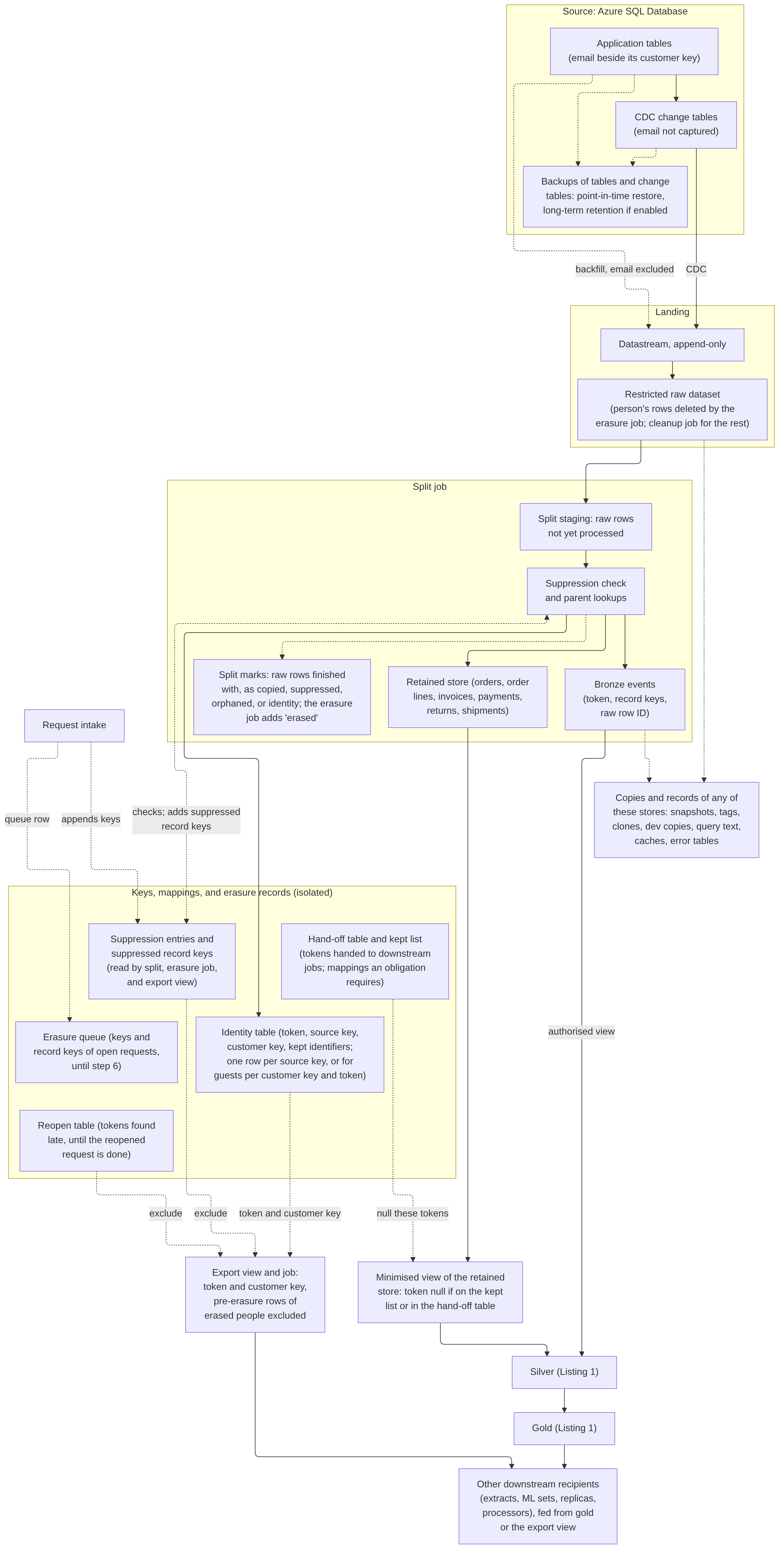
Figure 1 shows where one customer’s record lands, with the backfill path drawn separately from CDC.
One customer, end to end
Take one account holder with a wishlist and one order. In the application’s customers table, their row holds their email next to the customer key the key service returned. Their wishlist and order rows hold their source key.
Datastream copies changes to all three rows into the restricted raw dataset, leaving out the email. From there the split job does three things:
- It creates an identity row, one per source key, with a new token, the source key, and the customer key.
- It writes the wishlist events to bronze with the token in place of the account ID.
- It writes the order to the retained store, also with the token, because orders are kept under an obligation.
An analyst who counts wishlist items by category reads a gold metric with no token in it. That metric is built from a silver table that carries the token.
A month later, the customer asks for erasure. Request intake adds their source key and customer key to the suppression entries, so no new parent event keyed to them reaches bronze. Child rows of records already in bronze are removed in steps 1 and 3. The source system erases the customer row on its own schedule, and the erasure job works through its steps:
- It deletes the wishlist events by token (step 1).
- It waits for any split run already under way, and checks again (steps 2 and 3).
- It hands the token to the jobs that erase silver and gold (step 4).
- Once they confirm, it deletes the identity row and clears the token from the retained order (step 5).
- When the source erasure has landed, it deletes the customer’s rows from raw (step 6).
The order stays in the retained store, linked to its invoice by order ID. It has no token and no mapping back to the person, though it keeps any identifying fields its obligation requires. Bronze, the identity table, and raw still hold the deleted rows for their time travel and fail-safe windows, and the post works out when those windows close.
The tables, and the SQL between the layers
Table 1. Tables in the listings. It groups them by layer. We explain each column where its rule comes up: the erasure time and cutoff in stage 2, and split runs in the split job section. The names are illustrative. Each erased family, such as carts, has tables of the same shape.
| Table | Layer | Holds | Written by | Read by |
|---|---|---|---|---|
raw.* | Raw | Source rows as received, minus the email | Datastream | Split, erasure job, cleanup job |
staging.wishlist_changes, staging.wishlist_item_changes | Raw | Raw rows the split hasn’t processed yet | Split, as new tables each run, named per run (shown without the suffix), each with a one-day expiry | Split |
identity.identity_map | Keys | Token, source key, customer key, and the split run that set the key (key_set_run): one row per source key, or for guests one per customer key and token, so a returning guest gets a second row | Split; the erasure job deletes rows | Split, erasure job, export view |
suppression.source_keys, suppression.customer_keys | Keys | Erased keys with their request ID, request time (requested_at), and erasure time (erasure_ts) | Intake appends; the erasure job fixes the erasure time | Split, erasure job, export view |
suppression.record_keys | Keys | Suppressed record keys with their family, request ID, and how far each reaches (suppress_through) | Split, erasure job | Split, erasure job |
erasure.queue_keys | Erasure | The request’s queue row: its keys and record keys, one table row each, every one carrying the request’s cutoff (cutoff_run) once step 1 records it | Intake, erasure job | Erasure job |
split_marks.marked_rows | Raw | Raw rows finished with, by row ID, reason, record key, and request ID | Split, erasure job | Split, cleanup job, erasure job |
ops.split_runs, ops.committed_split_runs, ops.merge_watermarks | Operations | Run numbers and start times only | Split; silver merge | Split staging, silver merge, erasure job |
bronze.wishlists, bronze.wishlist_items | Bronze | Events with the token, record keys, the raw row each came from (raw_row_id), the split run that wrote them (split_run), and an ordering field for changes in the same instant (change_seq) | Split; the erasure and bronze retention jobs delete | Split, erasure job; silver through bronze_views |
bronze_views.wishlist_items | Bronze | An authorised view, storing nothing | Infrastructure account | Silver merge |
silver.wishlist_items, silver.orders, silver.products | Silver | Cleaned rows; items and orders carry the token | Silver merges (only the items merge is shown); silver’s erasure job deletes items and clears order tokens | Gold view (items and products); other gold jobs |
gold.wishlist_items_by_category | Gold | A view of counts, storing nothing and carrying no token | Infrastructure account | Dashboards |
erasure_handoff.tokens, erasure_confirm_silver.confirmations | Erasure | Tokens with request ID and pass number; confirmations with no token | Erasure job; silver’s erasure job | Downstream erasure jobs; erasure job |
Listing 1 traces the wishlist from bronze to gold, in the shape of Google’s steps. A MERGE rebuilds each changed item in silver from its bronze history. Along the way it converts timestamps to UTC and drops test accounts. A view then joins silver tables into a gold metric. You’ll find the split that writes bronze in Listing 2, in the split job section, and the erasure DELETEs in Listing 3, in stage 2. Each block runs as its own script. Silver reads and moves its watermark inside its own transaction, so it needs no per-run values.
SQL
-- Two scripts: the merge into silver, run after each committed split run,
-- and the gold view, created once.

-- Bronze to silver: recompute each changed item from its full bronze history,
-- read through an authorised view, up to the latest committed split run.
-- Timestamps become UTC, and an item whose latest change is a delete, or
-- comes from a test account, leaves silver. The watermark is read and moved
-- inside the transaction, so this script needs no per-run values.
DECLARE last_merged INT64;
DECLARE merge_to INT64;

BEGIN TRANSACTION;

SET last_merged = (SELECT IFNULL(MAX(last_merged_run), 0)
                   FROM ops.merge_watermarks
                   WHERE target = 'silver.wishlist_items');
SET merge_to = (SELECT IFNULL(MAX(split_run), 0)
                FROM ops.committed_split_runs);

MERGE silver.wishlist_items AS s
USING (
  SELECT token, wishlist_id, product_id, change_type, added_at_utc, is_test
  FROM (
    SELECT e.token, e.wishlist_id, e.product_id, e.change_type,
           TIMESTAMP(e.added_at_local, e.time_zone) AS added_at_utc,
           IFNULL(e.is_test_account, FALSE) AS is_test,
           ROW_NUMBER() OVER (PARTITION BY e.wishlist_id, e.product_id
                              ORDER BY e.source_ts DESC, e.change_seq DESC)
             AS latest
    FROM bronze_views.wishlist_items AS e
    JOIN (
      SELECT DISTINCT wishlist_id, product_id
      FROM bronze_views.wishlist_items
      WHERE split_run > last_merged
        AND split_run <= merge_to) AS changed
      ON changed.wishlist_id = e.wishlist_id
     AND changed.product_id = e.product_id
    WHERE e.split_run <= merge_to)
  WHERE latest = 1
) AS b
ON s.wishlist_id = b.wishlist_id AND s.product_id = b.product_id
WHEN MATCHED AND (b.change_type IN ('DELETE', 'UPDATE-DELETE') OR b.is_test)
  THEN DELETE
WHEN MATCHED THEN
  UPDATE SET token = b.token, added_at_utc = b.added_at_utc
WHEN NOT MATCHED AND b.change_type NOT IN ('DELETE', 'UPDATE-DELETE')
  AND NOT b.is_test THEN
  INSERT (token, wishlist_id, product_id, added_at_utc)
  VALUES (b.token, b.wishlist_id, b.product_id, b.added_at_utc);

MERGE ops.merge_watermarks AS m
USING (SELECT 'silver.wishlist_items' AS target) AS t
ON m.target = t.target
WHEN MATCHED THEN UPDATE SET last_merged_run = merge_to
WHEN NOT MATCHED THEN INSERT (target, last_merged_run)
  VALUES (t.target, merge_to);

COMMIT TRANSACTION;

-- Silver to gold: a plain view that joins silver tables into a metric for
-- dashboards. It stores nothing and carries no token or key. The
-- infrastructure account creates it once and authorises it on silver's
-- dataset, so its readers need no access to silver; no job recreates it.
CREATE OR REPLACE VIEW gold.wishlist_items_by_category AS
SELECT DATE(w.added_at_utc) AS day_added, p.category, COUNT(*) AS items
FROM silver.wishlist_items AS w
JOIN silver.products AS p
  ON p.product_id = w.product_id
GROUP BY day_added, p.category;
Listing 1. Bronze to silver and silver to gold for one wishlist, in BigQuery SQL.
On option A, the gold view is authorised on silver’s dataset, so dashboard readers don’t need access to the silver tables that carry the token. If silver is a managed Iceberg table, the view can’t be authorised. In that case gold is a table built by its own registered job.
A plain view like this gold one stores nothing, so it needs no erasure job of its own. Silver can only be rebuilt from bronze, and by the time the token is handed off, bronze holds nothing for it. Gold is different when it’s a table, or, on option A, a materialised view built for speed (our reading of Google’s “high-performance views”). Then it holds aggregates computed from the person’s rows until it’s refreshed or rebuilt. A table has its own time travel, and a materialised view needs the same check. That gold job registers for the hand-off and confirms only after the refresh. Where aggregates are published widely, this design also suppresses small counts, because a count of one can single someone out.
Silver tables built from retained families, such as orders, keep their rows at erasure. Silver’s erasure job clears their token, as step 5 does in the retained store, so revenue in gold doesn’t move. A later part of this series covers what gold readers see when published numbers do change.
The rest of the post fills in each part: keeping the email out of capture, what the split writes, the two stages of erasure and their edge cases, marketing preferences, the stores to account for, and the date. The design leans on access controls throughout, so we’ve gathered them in one section near the end.
Keeping the email address out at source
Our post on multi-cloud retail computed the customer key in one key service, the only identity with sign and verify permission on the secret key in Cloud KMS. It also set out the choice between replicating raw addresses into the data platform and keying at source. This part takes the keying-at-source route and adds the mechanism for an estate fed by Datastream.
The email gets this treatment because it’s the input to the join key. Other identifiers, such as names, phone numbers, delivery addresses, and free text, do land in the raw dataset. From there the split moves them to the identity side, or keeps them in a retained record whose obligation needs them.
The source application stores the customer key the key service returns. That post allows records to be stored first and keyed asynchronously. Neither the database nor the application holds the secret key, though the application can still request keys. Because the source database holds each email next to its customer key, its change tables and backups are on the ledger. The hardening section covers the controls that keep the key service’s key to itself.
Two controls keep the email out of the lakehouse, one for each way data leaves the source.
- Change data capture. Datastream supports Azure SQL Database only with the change tables CDC method, and lists it at service tier S3 and above (Google Cloud, n.d.aa). The
@captured_column_listparameter limits which columns reach a change table, and Microsoft documents it for Azure SQL Database where only some columns should be tracked “for privacy or performance reasons” (Microsoft, 2025b). Primary key columns, or the columns of the unique index named with@index_name, must be captured (Microsoft, 2026h), so the email mustn’t be part of either. - Backfill. A Datastream backfill streams a snapshot of the existing data (Google Cloud, n.d.o). We don’t rely on the capture instance’s column list to govern it. The stream’s API schema allows columns to be listed under its included and excluded objects (Google Cloud, n.d.v). We’d list the allowed columns under included objects and treat that list as the control for backfills. A column added later then stays out until someone adds it.
A table over 500 million rows can be backfilled only if it has a unique index with no nullable columns and every index column is in the stream (Google Cloud, n.d.aa). That’s one more reason to keep the email out of such indexes.
When a stream starts, Datastream selects the latest capture instance, doesn’t switch to one created afterwards, and skips a table whose selected instance is deleted (Google Cloud, n.d.aa). So the instance that excludes the email has to exist before the stream starts.
If CDC is already running with every column, you recreate the stream against the new instance, usually with a backfill, and only then drop the original instance. Dropping it removes its change table (Microsoft, 2026g), but backups taken before then still contain it. SQL Server allows two capture instances per table (Microsoft, 2026h), so adding a source column becomes a planned change. A later part covers it.
This design leaves Datastream’s enable_ddl_support_for_ct label off. With the label on, Datastream creates and switches to a new capture instance when a column is added (Google Cloud, n.d.aa), and the documentation doesn’t say which columns that instance captures. Without the label, columns added after the stream starts don’t replicate, and that’s what this design wants. Masking the column isn’t a workaround either. Datastream doesn’t support tables with masked columns, and where they are replicated, the values arrive unmasked (Google Cloud, n.d.aa). Datastream’s own login on the source is a privileged account, and the hardening section covers it.
If you can’t change the source application, one fallback is a BigQuery remote function that calls a batch endpoint of the key service from the split job. It comes at a cost. Because the email is captured, it stays in the change tables and the raw dataset for their full retention. The schema check allowlists that one column, and the split job keys it and doesn’t carry it forward. The worked example in “Computing the date” assumes keying at source. Under the fallback, its change-table and raw chains would also be chains for the email itself. The hardening section covers the endpoint’s controls.
The split job
Datastream writes to BigQuery in merge mode by default, which keeps no history of change events (Google Cloud, n.d.f). A lakehouse that replays from bronze needs that history, so the example estate uses append-only mode. There, an update becomes a single UPDATE-INSERT row, an update that changes the primary key becomes an UPDATE-DELETE and UPDATE-INSERT pair, and a delete becomes one DELETE row (Google Cloud, n.d.f). Datastream applies these through the Storage Write API over gRPC (Google Cloud, n.d.f). Rows written that way can be changed by UPDATE, DELETE, or MERGE, with no waiting period stated (Google Cloud, n.d.ac). The erasure steps below rely on that.
Datastream can write every table into a single dataset (Google Cloud, n.d.f). The example estate creates that raw dataset beforehand, because otherwise a new BigQuery dataset gives READER, WRITER, and OWNER access to project Viewers, Editors, and Owners, and OWNER access to its creator (Google Cloud, n.d.c). Its access list names only the split job, the erasure job, the raw cleanup job, and any named scanner. Datastream writes through its project-level service agent. Raw, bronze, the identity table, the suppression entries, and the other restricted stores all follow one isolation rule, set out in the hardening section.
Datastream applies partitioning only when it creates a table, and you configure it in the stream (Google Cloud, n.d.r). So ingestion-time partitioning goes in before the stream first runs. Expiration alone doesn’t give a date: an expired partition is removed by a background process that “can take several days to complete”, and that deletion isn’t recorded in audit logs (Google Cloud, n.d.p). A deleted partition’s data is then kept under time travel and fail-safe (Google Cloud, n.d.p).
So the erasure job deletes the person’s raw rows itself, and a scheduled cleanup job deletes everything else older than the raw retention period. The cleanup job skips rows that the split is holding back or that are waiting for a parent. A hold older than a stated threshold pages someone.
Expiration stays as a backstop, set longer than the raw retention period plus that hold threshold. The split records the raw rows it has finished with in its marks table, split_marks.marked_rows, with a reason: ‘copied’ for retained-family rows it has sent to the retained store, ‘suppressed’ for rows it dropped, ‘orphaned’ for erased-family children whose parent never arrived, and ‘identity’ for rows from identity sources, such as the customers table, once their fields are on the identity side. On its next daily run, the cleanup job removes marked rows, including the erasure job’s ’erased’ rows. It deletes a mark once its raw row is gone. Expiration set as a dataset default affects newly created tables (Google Cloud, n.d.ad), so it goes in before the stream creates its tables, or per table afterwards with ALTER TABLE ... SET OPTIONS (Google Cloud, n.d.p).
The split job is written in BigQuery SQL, runs from Airflow on options A and B, and writes three things. Airflow starts each split run one at a time, with a run timeout. Each run begins with a task that runs as the split account. It takes the next run number from a counter table, ops.split_runs, and records its start time there. Numbers therefore increase by start time, and a retry gets a new number. Without that, Airflow would run the retry under the same run. That task also waits until INFORMATION_SCHEMA.JOBS shows no earlier split job still pending or running, so two runs never overlap. A run that times out is cancelled when Airflow kills its task, and a job timeout set on the BigQuery script ends it even if the worker running the task dies.
- The identity table maps a random token to the source key and the customer key. Clear identifiers from erased families are kept only where a named purpose needs them (for example a coarsened delivery postcode). Each has its own retention, which the erasure job enforces, and the purpose reads it through its own authorised view. Free text counts as an identifier. Erasure deletes the whole identity row, these identifiers included.
- Bronze events carry the token in place of both the direct identifiers and the customer’s source key. Record keys such as order and cart IDs stay, because deduplication and child lookups need them. Those keys can be joined back to the person through the source system while its records are kept. That’s one more reason to treat the events as personal data. The events are clustered by token, and only the split job inserts them. A bronze retention job deletes erased-family events once they pass the longest of bronze’s purpose periods, so bronze isn’t kept indefinitely for people who never ask.
- The retained store holds event families kept under an obligation, including any identifying fields the obligation requires. They don’t go to bronze. While the mapping exists, they carry the token like bronze events. Silver reads them through a minimised view that returns the token as null for any token on the kept list or in the erasure hand-off table (the view is authorised on both datasets). That way, a retained record merged into silver after silver’s erasure job has run doesn’t bring the token back. A retention job deletes records when their obligation period ends.
Child records, such as cart lines, wishlist items, order lines, and shipments, get their token from the token-keyed parent event. A child that arrives before its parent waits in the raw dataset. One whose parent never arrives is counted. In an erased family, it’s then marked ‘orphaned’ for the cleanup job. In a retained family it goes to the retained store unlinked.
When the split suppresses a parent in an erased family, it writes that parent’s record key, with its family (cart or wishlist) and the request ID from the matching entry, to a table of suppressed record keys kept with the suppression entries. A source-key match suppresses every event of that record. A customer-key match covers events up to the erasure time, or up to the request while that time isn’t fixed. The erasure job’s own entries, from step 1, cover every event. A suppressed parent’s children are then dropped and counted separately. Every suppression entry carries its request ID.
Listing 2 is the split for the wishlist family. It writes a wishlist event to bronze only when no suppression entry covers it. For each wishlist it suppresses, it records the key and marks those rows and their items for the cleanup job. The other items take their token from the wishlist’s latest event in bronze. Each split run’s statements share one transaction, so a failed run leaves nothing in bronze. The listing leaves out the ‘orphaned’ marks, the retained-store writes with their ‘copied’ marks, and the identity rows. The split writes those identity rows under the same suppression check.
Each bronze row carries the raw_row_id it came from. A raw row therefore counts as processed once it’s in bronze, the retained store, or the marks table, from a committed split run or the erasure job. Because that column links bronze back to raw, only holders of raw access can read it. The raw retention period is set shorter than bronze’s shortest purpose period, so a row the bronze retention job deletes is never copied back. A halted cleanup job breaks that ordering as well as the raw dates. So it pages someone, and its delay moves the date the same way a halted split does.
The split’s run number is a named query parameter, written with @ (Google Cloud, n.d.w). The run’s first task takes it from ops.split_runs and passes it to the script.
SQL
-- Raw to bronze (split job). The split's staging tables hold raw rows it
-- hasn't processed yet: rows not in bronze, the retained store, or the marks
-- table under any reason, including the erasure job's 'erased' marks, which
-- carry no split run. They're written as new tables before this transaction,
-- named per run (shown here without the suffix), each with a one-day expiry.
-- Each run's statements run in one transaction, so a failed run leaves nothing
-- in bronze. Not shown: identity rows and their 'identity' marks, guest
-- records keyed by customer key, retained-store writes with their 'copied'
-- marks, and 'orphaned' marks for children whose parent never arrives.
BEGIN TRANSACTION;

-- Parents: write a wishlist event only when no suppression entry covers it.
-- Rows it skips stay in raw, either suppressed or held back until the
-- person's erasure time is known. Identity rows are written under the
-- same check.
INSERT INTO bronze.wishlists
  (token, wishlist_id, change_type, change_seq, source_ts, raw_row_id,
   split_run)
SELECT i.token, w.wishlist_id, w.change_type, w.change_seq, w.source_ts,
       w.raw_row_id, @split_run
FROM staging.wishlist_changes AS w
JOIN identity.identity_map AS i
  ON i.source_key = w.customer_id
WHERE NOT EXISTS (
    SELECT 1 FROM suppression.source_keys AS s
    WHERE s.source_key = w.customer_id)
  AND NOT EXISTS (
    SELECT 1 FROM suppression.customer_keys AS c
    WHERE c.customer_key = i.customer_key
      AND (c.erasure_ts IS NULL OR w.source_ts <= c.erasure_ts))
  AND NOT EXISTS (
    SELECT 1 FROM suppression.record_keys AS r
    WHERE r.record_family = 'wishlist'
      AND r.record_key = w.wishlist_id
      AND (r.suppress_through IS NULL OR w.source_ts <= r.suppress_through));

-- Record the key of each wishlist this run suppressed, with the covering
-- entry's request ID and how far it reaches: a source-key match covers
-- every row (NULL), a customer-key match covers rows up to the erasure
-- time, or up to the request while that time isn't fixed. Held-back rows
-- aren't suppressed yet. A source-key match counts even after the
-- person's identity row has been deleted.
INSERT INTO suppression.record_keys
  (record_family, record_key, request_id, suppress_through, split_run)
SELECT DISTINCT 'wishlist', w.wishlist_id,
       COALESCE(s.request_id, c.request_id),
       IF(s.source_key IS NOT NULL, NULL,
          IFNULL(c.erasure_ts, c.requested_at)),
       @split_run
FROM staging.wishlist_changes AS w
LEFT JOIN identity.identity_map AS i
  ON i.source_key = w.customer_id
LEFT JOIN suppression.source_keys AS s
  ON s.source_key = w.customer_id
LEFT JOIN suppression.customer_keys AS c
  ON c.customer_key = i.customer_key
 AND ((c.erasure_ts IS NOT NULL AND w.source_ts <= c.erasure_ts)
      OR (c.erasure_ts IS NULL AND w.source_ts <= c.requested_at))
WHERE s.source_key IS NOT NULL OR c.customer_key IS NOT NULL;

-- Mark the suppressed parent and child rows once each, for counting and for
-- the cleanup job.
INSERT INTO split_marks.marked_rows (raw_row_id, reason, record_key,
                                     request_id, split_run)
SELECT raw_row_id, 'suppressed', record_key, MIN(request_id), @split_run
FROM (
  SELECT w.raw_row_id, w.wishlist_id AS record_key, r.request_id, w.source_ts,
         r.suppress_through
  FROM staging.wishlist_changes AS w
  JOIN suppression.record_keys AS r
    ON r.record_family = 'wishlist' AND r.record_key = w.wishlist_id
  UNION ALL
  SELECT w.raw_row_id, w.wishlist_id AS record_key, r.request_id, w.source_ts,
         r.suppress_through
  FROM staging.wishlist_item_changes AS w
  JOIN suppression.record_keys AS r
    ON r.record_family = 'wishlist' AND r.record_key = w.wishlist_id)
WHERE suppress_through IS NULL OR source_ts <= suppress_through
GROUP BY raw_row_id, record_key;

-- The other children take their token from the parent's latest event in
-- bronze, under the same customer-key check as the parent. Items whose parent
-- hasn't arrived stay in raw for a later run. A child written after intake but
-- before its account's identity row has a customer key is caught by steps 1
-- and 3.
INSERT INTO bronze.wishlist_items
  (token, wishlist_id, product_id, change_type, change_seq, added_at_local,
   time_zone, is_test_account, source_ts, raw_row_id, split_run)
SELECT p.token, w.wishlist_id, w.product_id, w.change_type, w.change_seq,
       w.added_at_local, w.time_zone, w.is_test_account, w.source_ts,
       w.raw_row_id, @split_run
FROM staging.wishlist_item_changes AS w
JOIN (
  SELECT wishlist_id, token
  FROM (
    SELECT wishlist_id, token,
           ROW_NUMBER() OVER (PARTITION BY wishlist_id
                              ORDER BY source_ts DESC, change_seq DESC)
             AS latest
    FROM bronze.wishlists)
  WHERE latest = 1) AS p
  ON p.wishlist_id = w.wishlist_id
WHERE NOT EXISTS (
    SELECT 1 FROM identity.identity_map AS i
    JOIN suppression.customer_keys AS c
      ON c.customer_key = i.customer_key
    WHERE i.token = p.token
      AND (c.erasure_ts IS NULL OR w.source_ts <= c.erasure_ts))
  AND NOT EXISTS (
    SELECT 1 FROM suppression.record_keys AS r
    WHERE r.record_family = 'wishlist'
      AND r.record_key = w.wishlist_id
      AND (r.suppress_through IS NULL OR w.source_ts <= r.suppress_through));

INSERT INTO ops.committed_split_runs (split_run) VALUES (@split_run);

COMMIT TRANSACTION;
Listing 2. Raw to bronze for the wishlist family, in BigQuery SQL: one split run, in one transaction.
A schema check runs on the raw tables every time. If a column’s name suggests an email address, the run stops and pages someone. The same happens when a content check finds email addresses in a column not already routed to the identity side. Other unrecognised columns go to the identity side. A halted split job pages someone well inside the raw retention period, and it also holds up erasures, as step 6 below shows.
Downstream, silver jobs and analysts work with tokens. Some uses need the cross-system customer key, such as the campaign audiences our earlier post described leaving the platform as customer keys. For those, a named export job resolves tokens through one authorised view. The view returns token and customer key only, and it leaves out an erased person’s own identity rows. The hardening section gives its rule. Whatever the job exports goes on the ledger with its recipient.
The events are still personal data. As our earlier post set out, Recital 26 says pseudonymised data that could be attributed to a person with additional information should be considered information on an identifiable person (European Parliament and Council, 2016). The EDPB’s 2025 coordinated enforcement action found that some controllers relying on anonymisation in place of deletion applied only basic pseudonymisation or partial masking, which “would not fulfil the requirements of the GDPR regarding deletion” (European Data Protection Board, 2026).
California’s regulations, by contrast, let a business comply with a deletion request by deidentifying or aggregating the information (California Privacy Protection Agency, n.d.b), so the bar differs from one regime to another. Section 1798.140(m) of the CCPA defines deidentified information as information that “cannot reasonably be used to infer information about, or otherwise be linked to, a particular consumer”, provided the business also takes reasonable measures, commits publicly to keep it deidentified, and binds recipients by contract (California Legislature, n.d.d). As we read it, tokenised events with a live mapping and record keys wouldn’t meet that. Where this post says a source system anonymises a record, it means the record can no longer identify the person. The split shortens the search for a person’s events. The erasure job below still deletes them.
Erasure in two stages
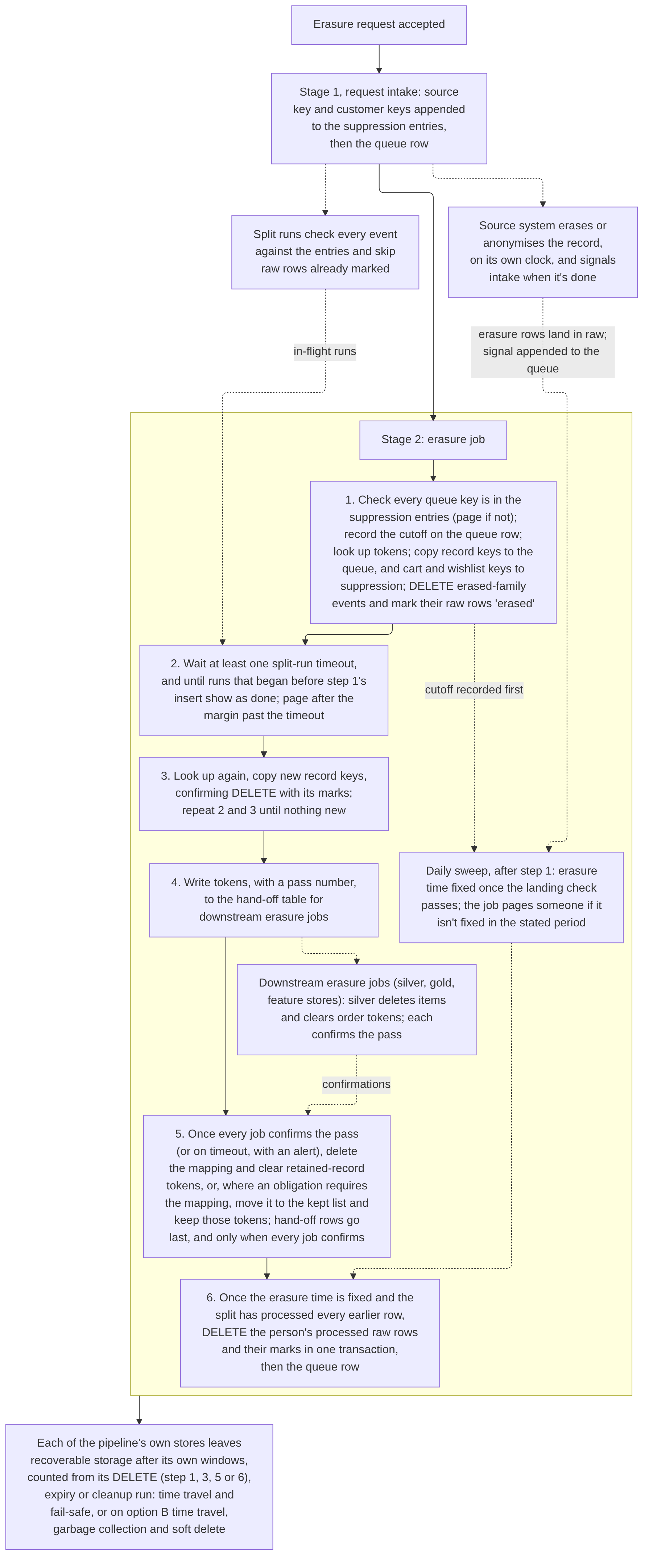
Figure 2 shows the two stages.
Stage 1, at the request
Only the request-intake service account records verified requests. IAM can’t tell whether a request is verified, so intake’s application makes that check. It appends the person’s keys to the suppression entries first. The queue row goes last, and only after the entries’ appends are acknowledged, so the erasure job never sees a request whose entries aren’t there.
The keys come from the source. At intake, the source application uses its existing path to the key service. It sends every address it holds or has held for the person and verified for the account, plus the verified address the requester supplied. It passes the returned customer keys, computed under every enabled key version, to intake. Stored addresses matter because the requester may type a different one, and older guest orders may carry an older address. The person’s source key and customer keys then go on the suppression entries and in the queue. You need both, because a guest order carries a customer key but no account’s source key.
The source erasure itself runs on its own clock. When it finishes, the source tells intake, and intake appends that signal to the queue. The source also clears the customer key from the records it keeps, so a later backfill can’t link them to the person again.
The split job checks every event against the entries. The rules apply top to bottom, and the first match wins:
| Event | Condition | Action |
|---|---|---|
| A change row from an identity source, such as the customers table, including its DELETE or anonymising UPDATE-INSERT row at source erasure | Any time | Identity fields go to the identity side, except that no identity row is written or updated for an erased source key or a covered customer key; the raw row is marked ‘identity’ either way |
| The DELETE row, or anonymising UPDATE-INSERT row, for the source erasure | Erased family, any timestamp | Suppressed |
| Other erased-family event for an erased source key | Dated after the erasure time | Suppressed, and raised with the source system’s owner as a sign of a reused key or an incomplete source erasure |
| Erased-family event with an erased source key | Any time | Suppressed, and the source key’s entry is kept while retained events for that key can still arrive |
| Retained-family event with an erased source key | Any time | Sent to the retained store without a token and with the source key and customer key dropped, with no new identity row |
| Erased-family event with an erased customer key | Dated at or before the request, or at or before the erasure time once it’s fixed | Suppressed |
| Retained-family event with an erased customer key | Dated at or before the request, or at or before the erasure time once it’s fixed | Sent to the retained store without a token, with the customer key and source key dropped |
| Any event with an erased customer key | Dated after the request, erasure time not yet known | Held back in raw |
| Event with the same customer key | Dated after the erasure time | Treated as a returning customer and given a new token |
Two of these rules carry a cost. The source system’s own retained records keep the account’s source key for as long as the source keeps them, often years. Source-key entries last that long too, and it’s worth saying so in the retention notice. Customer-key entries reveal that a returning customer was erased before, so they expire once no pre-erasure event can still land. That point depends on change-table retention, landing lag, and any backfill window. The erasure job deletes suppression entries when their retention ends.
Fixing the erasure time
The erasure job (its steps follow below) fixes the erasure time once. It does so on its first daily sweep after both of these are true: the landing check has passed for every table where the person has rows, and step 1 has recorded the request’s cutoff. The job takes the latest source timestamp among the person’s erasure change rows and sets it on their customer-key suppression entries, updating intake’s rows. On the same entries it records the latest split run that finished before the erasure time was written. The split and the export view read that value. Both values stay on the entries after the queue row is gone.
Sometimes there’s nothing to erase at source, because the source purged the person’s records long ago while bronze kept them. In that case the source reports the time it checked, and the erasure job accepts that time as the erasure time once a heartbeat row has landed past it.
The landing check needs a watermark that always advances, because a table’s latest source timestamp stops moving when nothing in it changes. The check runs only on tables where the person has rows. It reads Datastream’s source timestamp metadata, which Google defines as the time the record changed on the source (Google Cloud, n.d.l).
| Table | The check waits for |
|---|---|
| A table where the source erasure deleted the person’s rows | Their DELETE rows |
| A table where the source erasure anonymised the person’s rows | The change that clears the customer key, which touches a captured column and so produces a change row |
| Any other table where the person has rows | A heartbeat row, written every few minutes to a small captured table holding no personal data, landed with a source timestamp past the source’s signal |
Stage 2, the erasure job
The job picks up new requests on a daily sweep. From there it runs each request as a state machine that wakes when one of its waits ends. Fixing the erasure time and step 6 both happen on the daily sweep.
- Check that every key in the queue row is present in the suppression entries. If any is missing, stop and page someone. Then record the request’s cutoff: the latest split run that started before this step began. A run starts when its number is taken, and run IDs increase by start time. Look up the person’s tokens. Copy their erased-family parent record keys (cart and wishlist IDs) from bronze into the queue and into the suppressed record keys, each with its family and no date limit, because every event of the person’s own records goes. Copy their order IDs from the retained store into the queue only, since order lines and refunds must still reach the retained store. Then DELETE their events in erased families, marking their raw rows ’erased’ (Listing 3).
- Wait until every split run that began before step 1’s record-key insert has finished. Split runs are serialised and time out. The job waits until
INFORMATION_SCHEMA.JOBSshows no job by the split’s service account, started before the insert, still pending or running, and until at least one split-run timeout has passed since the insert. That view’s job states are pending, running, and done (Google Cloud, n.d.m). A timed-out run is cancelled, and its jobs can take a while to stop, so the wait ends only when the view shows them done. If it hasn’t after a stated margin past the timeout, the job pages someone and keeps waiting. For this, the erasure job can read job metadata in the split’s project. - Look up the tokens and record keys again, to catch anything a run in flight wrote. Copy any new record keys and run a confirming DELETE. If this found anything new, repeat steps 2 and 3 until a lookup finds nothing new.
- Write the person’s tokens to the hand-off table with a pass number. Each registered downstream erasure job (silver, gold, and feature stores) reads the table and writes its confirmation to its own table. The confirmation holds a request ID and pass number only. Without this step, those jobs would have no way to find the person once the mapping is gone.
- Once every registered job has confirmed the current pass, or after a stated timeout that pages someone, delete the mapping and clear the token from the person’s retained records. Where the obligation requires the mapping, it moves to the kept list with its basis instead. In that case the retained records keep their token, the minimised view that silver reads returns that token as null, and the mapping never passes through the export view. The hand-off rows go only when every job has confirmed, so a job that timed out can still find the person. They also always go after the retained token is cleared or moved to the kept list, so a merge into silver in between can’t bring the token back.
- Wait until step 5 has finished, the erasure time is fixed (as above), and the split has processed every row that landed before it. Then, in one transaction, DELETE the person’s raw rows that steps 1 and 3 or the split have already processed, along with the marks of the rows it deletes. After that, delete the queue row. If the erasure time isn’t fixed within a stated period of the request, the job pages someone, because the queue row keeps the person’s keys until step 6.
Step 6 finds raw rows four ways: by source key, by customer key on rows dated at or before the erasure, by the record keys in the queue, and by the suppressed record keys carrying the request ID. That catches retained families’ raw rows too, once the split has copied them to the retained store. Rows that land after the split’s last processed point are left to the split. It routes retained rows to the retained store and marks suppressed ones for the cleanup job.
The job takes only a request ID as a parameter. It processes only request IDs that appear in intake’s own record of verified requests, and it joins its DELETEs on the queue table, as Listing 3 shows. BigQuery reruns a DML statement that conflicts with a concurrent one up to three times (Google Cloud, n.d.ac), and the job retries beyond that. The bronze mark-and-DELETE pair runs as a transaction. BigQuery cancels it on a conflict, so the job retries the whole transaction. Silver’s erasure job and the merge into silver both run in transactions, and BigQuery cancels conflicting transactions (Google Cloud, n.d.q), so each retries a cancelled transaction. The erasure log records the request ID, timestamps, row counts, and the computed horizon. It holds no keys or tokens.
Listing 3 shows two of the DELETEs erasure needs. The bronze DELETE in steps 1 and 3 is keyed by request ID alone, so no key or token appears in its query text. In the same transaction it marks the person’s raw rows ’erased’, so the split doesn’t stage them again and step 6 can find them. Silver’s DELETE is keyed by the tokens the erasure job hands off. For a reopen entry, the job runs the same bronze pair, but takes the token from the reopen table for that request in place of the identity lookup. A token found late can belong to a guest whose key was set after the cutoff, and neither branch of the lookup matches such a key. The erasure jobs run as Airflow tasks and pass the request ID and pass number as query parameters.
SQL
-- Two scripts: the erasure job's bronze DELETE, and silver's erasure job.

-- Erasure job, steps 1 and 3: delete the person's erased-family events from
-- bronze, and mark the raw rows behind them 'erased' in the same transaction,
-- so the split still counts those raw rows as processed and step 6 can delete
-- them. Raw rows that never reached bronze are left to step 6. The same pair
-- runs on bronze.wishlists and each erased-family table. The only parameter is
-- the request ID, and the keys come from the queue table, so no key or token
-- appears in the query text. Step 1 records cutoff_run before this runs; a
-- NULL cutoff would make the customer-key branch match nothing. For a reopen
-- entry the job runs the same pair with the token taken from the reopen table
-- in place of the identity lookup.
BEGIN TRANSACTION;

INSERT INTO split_marks.marked_rows (raw_row_id, reason, record_key,
                                     request_id, split_run)
SELECT e.raw_row_id, 'erased', e.wishlist_id, @request_id, NULL
FROM bronze.wishlist_items AS e
WHERE e.token IN (
  SELECT i.token
  FROM identity.identity_map AS i
  JOIN erasure.queue_keys AS q
    ON q.request_id = @request_id
  WHERE i.source_key = q.source_key
     OR (i.customer_key = q.customer_key
         AND i.key_set_run <= q.cutoff_run));

DELETE FROM bronze.wishlist_items AS e
WHERE e.token IN (
  SELECT i.token
  FROM identity.identity_map AS i
  JOIN erasure.queue_keys AS q
    ON q.request_id = @request_id
  WHERE i.source_key = q.source_key
     OR (i.customer_key = q.customer_key
         AND i.key_set_run <= q.cutoff_run));

COMMIT TRANSACTION;

-- Silver's erasure job, after step 4: delete by the hand-off tokens for this
-- request, up to the current pass, and confirm the pass in the same
-- transaction, so a failed DELETE is never confirmed. Silver tables from
-- retained families keep their rows and lose the token, so gold's revenue
-- doesn't move.
BEGIN TRANSACTION;

DELETE FROM silver.wishlist_items AS s
WHERE s.token IN (
  SELECT h.token
  FROM erasure_handoff.tokens AS h
  WHERE h.request_id = @request_id
    AND h.pass_number <= @pass_number);

UPDATE silver.orders AS o
SET token = NULL
WHERE o.token IN (
  SELECT h.token
  FROM erasure_handoff.tokens AS h
  WHERE h.request_id = @request_id
    AND h.pass_number <= @pass_number);

INSERT INTO erasure_confirm_silver.confirmations (request_id, pass_number)
VALUES (@request_id, @pass_number);

COMMIT TRANSACTION;
Listing 3. The erasure DELETEs in bronze and silver, in BigQuery SQL.
The customer-key branch of the bronze DELETE matches only identity rows whose key was set by split runs up to the request’s cutoff (the latest run that started before the erasure job’s first step). Rows set up to the cutoff can’t belong to a returning customer. New tokens for that key wait until the erasure time is fixed, and that never happens before the cutoff is recorded. The edge cases below explain the ordering.
Late arrivals and edge cases
These cases are rare, but each one needs a defined path.
A token found late. If a row arrives before its customer key, the suppression check runs again when the key arrives, under the same date rules, so a returning customer’s row isn’t reopened. On a match, the split writes the reopen entry before it sets the key on the identity row, so the export view never sees the key unexcluded.
A match, or any token found after step 3, goes with its request ID to a reopen table kept alongside the suppression entries. The erasure job processes reopen entries whether or not the request is still open. If it’s still open, the token joins the request under a new pass number. If step 6 has finished, the job rebuilds the request’s queue row from the suppression entries that carry its request ID. If those entries have expired, the reopen pages someone and is handled by hand. Either way, the job deletes the token’s events and marks their raw rows, hands the token downstream, deletes its mapping once the pass is confirmed, and logs a new horizon that includes those raw rows.
Returning customers and the customer-key lookups. Each identity row records the split run that set its customer key. The lookups match customer keys only on rows set by runs up to the request’s cutoff. Intake’s entries were visible before step 1 began, so every later run saw them. Each of those runs suppressed or held back the person’s events, and any identity row it created for that key belongs to a returning customer. The cutoff can include a few runs that had already seen the entries. That only widens the search for the person’s own rows, because the hold-back rule stops new identity rows for that key until the erasure time is fixed, and the erasure time is never fixed before the cutoff is recorded.
Rows that land after step 6. As we understand it, Datastream reads each change table separately, so the heartbeat shows that capture and landing are moving, but it doesn’t prove that every other table has caught up. If a pre-erasure row lands after step 6, the split suppresses and marks it, and the cleanup job deletes it on its next run. Any such row moves the date, because its chain runs from when it landed. It’s recorded against the request with a new horizon.
Backfilled rows. Datastream labels backfill events with a read_method starting sqlserver-backfill (Google Cloud, n.d.l), and as we understand it they don’t carry the original change time. So the split treats backfilled erased-family rows for an erased key as pre-erasure. While customer-key entries live, that also drops a returning customer’s new carts and wishlists from a backfill. You can accept that cost, or avoid it by not backfilling during that window.
Key rotation. The lakehouse holds no emails, so it can’t re-key anything itself. A rotation of the customer-key secret isn’t started while any request is open before step 6, because the suppression entries hold keys computed under the old version and a rotated key on a guest’s identity row would no longer match them. The source recomputes its stored customer keys through the key service, and the split updates identity rows from the resulting change rows. It matches a guest’s rotated key to the existing token by record key, so the row keeps its token and the erasure job can still find it. The row also keeps the run recorded as having first set the key. An old key version stays enabled until every customer-key suppression entry made under it has expired, because the addresses behind those entries are gone.
Marketing preferences
Article 21(2) and (3) give people the right to object to direct marketing at any time, after which their data “shall no longer be processed for such purposes” (European Parliament and Council, 2016). In the US, CAN-SPAM bars sending commercial email more than 10 business days after an opt-out request, unless the person later gives affirmative consent (United States Congress, n.d.). So when preferences are erased, a forward-looking do-not-contact marker stays, and we’d record a basis for keeping it. The UK ICO’s direct marketing guidance describes a suppression list as keeping just enough information to respect people’s preferences in future (Information Commissioner’s Office, 2026).
The marker is an HMAC of the email under a separate suppression key that only the key service can use. It’s stored in the key project, where only the key service can read it. The source application asks the key service to create the marker at erasure, and the consent system asks it to remove one when someone gives fresh consent. The sending system asks about an address and gets back allow or suppress. Customer-key rotation doesn’t touch the marker, and the suppression key can be rotated without the erased addresses, as the hardening section describes. The marker covers email-keyed channels, and other channels need their own suppression.
The ledger
Figure 1 shows the main stores, and the ledger lists all of them across two tables. The first covers the pipeline’s own stores, which the worked example below computes, with backups listed as beyond use. The second covers stores outside the computed date, each with its owner. Some are kept by design, some are owned elsewhere, and silver, gold, and other downstream stores are covered in later parts.
Stores within the horizon (backups listed as beyond use)
| Where it sits | How it’s removed | What sets when it’s gone |
|---|---|---|
| CDC change tables | Azure SQL Database’s CDC scheduler | Retention (three days by default) and hourly cleanup, plus measured cleanup lag (Microsoft, 2025b) |
| Restricted raw dataset | Erasure job, step 6; cleanup job for marked and older rows | Landing, erasure time fixed, split catch-up, job timing, then time travel and fail-safe |
| Identity table | Erasure job, step 5 | Job timing and downstream confirmation, then time travel and fail-safe |
| Token hand-off table | Erasure job, step 5, once every downstream job confirms | Job timing and downstream confirmation, then time travel and fail-safe |
| Tokens in retained records | Erasure job, step 5 (token cleared) | Job timing and downstream confirmation, then time travel and fail-safe |
| Bronze events | Erasure job, steps 1 and 3; bronze retention job for the rest | Job timing, then time travel and fail-safe |
| Erasure queue table | Erasure job, step 6 | The same as the raw dataset |
| Split job staging tables | Expiry set on each table | Split processing of the erasure rows, expiry, then time travel and fail-safe |
| Split marks | Erasure job, step 6, with the raw rows it deletes; cleanup job for the rest, once the marked raw rows are deleted | Job timing, then time travel and fail-safe |
| Reopen table | Erasure job, once the reopened request is done | Job timing, then time travel and fail-safe, for a request that reopens |
| Point-in-time restore backups | Expire on schedule (beyond use until then) | Restore window of 1 to 35 days (1 to 7 on Basic), 7 by default; files kept up to a week longer (Microsoft, 2026a) |
Stores outside the horizon: kept by design, or owned elsewhere
| Where it sits | Owner and rule |
|---|---|
| Source application tables | The source system’s erasure or anonymisation |
| Original all-column change table | Removed when its capture instance is dropped (Microsoft, 2026g) |
| Long-term retention backups | Up to 10 years, if enabled (Microsoft, 2026f). Can’t be deleted while any immutability applies: an unlocked time-based policy has to be disabled first, a locked one keeps each backup until its retention ends, and a legal hold, a preview feature, keeps it until the hold is removed. An immutable backup stays after its retention expires until every immutability is removed (Microsoft, 2026d). Beyond use throughout |
| Source query history and audit logs | Settings on the source database |
| Intake’s record of verified requests | Kept by design, with its own basis, apart from the ticketing system; links the request ID to the requester |
| Ticketing | Kept by design, with its own basis |
| Suppression entries | Customer-key entries until no pre-erasure event can land; source-key entries while retained events can arrive; record-key entries until no child of that parent can land; then time travel and fail-safe |
| Do-not-contact markers | Until fresh consent; kept by design, with a stated basis |
| Kept list | Identity rows an obligation requires, for the obligation’s period, then time travel and fail-safe; reached only through a named authorised view |
| Downstream confirmation tables | Request IDs and pass numbers only, kept with the erasure log; linkable to a person only through intake’s record |
| Erasure log | Kept by design; holds no keys or tokens |
| Retained store | The obligation’s period, recorded per family |
| Table snapshots and Iceberg tags | Google lists table snapshots as unsupported for managed Iceberg tables, so on option B this covers native tables only. Snapshot expiry, set early enough that expiry plus time travel and fail-safe, which we assume apply as for any table, ends by the computed horizon |
| Table clones, materialised views, search indexes, dev copies | Their owners, or rebuilt after the erasure |
Query text in INFORMATION_SCHEMA.JOBS | Google’s retention for the view, covered in a later part |
| Audit logs and log sinks | Log bucket retention and each sink’s settings |
| Cached and anonymous query results | BigQuery’s own expiry, covered in a later part |
| Error logs and dead-letter tables | Retention set per log bucket or table |
| Notebook outputs | Their owners |
| Profiling and data quality results | Retention set per tool |
| Sensitive Data Protection findings | Retention set per job |
| Silver and gold tables | Downstream erasure jobs reading the hand-off table, then time travel and fail-safe; covered in later parts |
| Exports, extracts, and audiences | Their owners, with each recipient listed; exported customer keys stay linkable to the person wherever they’re kept |
| ML training sets and feature stores | Downstream erasure jobs reading the hand-off table, or their owners |
| Cross-region replicas | Replication of the delete, then the replica’s own windows |
| Processors and other recipients | Notified under contract; their contractual deletion terms |
A few notes apply to particular rows.
- Time travel and fail-safe. BigQuery keeps changed and deleted data for a time travel window of two to seven days, seven by default, and Google says deleted data is then kept for a further seven days of fail-safe that can’t be configured or extended (Google Cloud, n.d.i). Google describes fail-safe for deleted or replaced tables and deleted partitions, and doesn’t list row-level DML, so for rows removed by DELETE we count it as a conservative upper bound.
- Option B. Data files are garbage-collected after the time travel window (Google Cloud, n.d.b). We take it that deleted files then sit in the bucket’s soft delete, since Google recommends keeping that policy for these buckets. Soft delete is seven days by default and configurable from 7 to 90 days, or disabled (Google Cloud, n.d.z). Google doesn’t document fail-safe for these tables, so the worked example leaves it out pending confirmation from Google. A dropped option B table leaves its files in the bucket (Google Cloud, n.d.b). So in this design, personal-data tables on option B aren’t dropped, including for rebuilds and dev copies, unless the bucket path is cleaned up afterwards.
- Locks. A Bucket Lock retention policy stops objects being deleted until they reach the policy’s age, and a locked policy can’t be removed or shortened (Google Cloud, n.d.d). In this design, personal data stays out of locked buckets. Per Google, option B tables don’t support buckets with Bucket Lock at all (Google Cloud, n.d.b).
- Snapshots. Our post on multi-site pipelines suggested month-end snapshots or tags for finance. Either they expire early enough that their own time travel and fail-safe end by the computed horizon, or they’re taken only of gold tables with no personal data.
- Iceberg statistics. On option C, and possibly option B (Google doesn’t say), Iceberg’s default metrics mode stores lower and upper bounds for columns, truncated to 16 for string and binary values (Apache Iceberg, n.d.). By default it covers the first 100 columns, taking top-level fields first and then each nested struct in turn (Apache Iceberg, n.d.). A truncated bound can be enough of a name or delivery address to identify someone. The storage comparison covers the per-column setting that turns this off.
- Queries. Query text can hold the values someone searched for. Google’s AEAD guidance warns that query text may be logged, including any plaintext keyset in it, and recommends parameterised queries (Google Cloud, n.d.a). The erasure job’s request-ID design applies the same habit.
- Emails already in bronze. Many teams will already have emails in raw and bronze. Removing them means rewriting those tables without the column, or rebuilding them from a keyed copy. Each rewrite starts its own time travel and fail-safe clock, so the horizon for that one-off removal counts from the rewrite.
Computing the date
With the stores listed, you can compute the completion date for the pipeline’s own stores. Listing 4 models each store as a chain of stages whose waits add up. Some chains start when the request is accepted, and others when the source system erases the record. A chain can also wait for a stage in another chain to end, and then starts at whichever comes later.
The horizon is the latest end across the chains. The result names the chain that sets it and that chain’s longest adjustable stage, which is usually the place to start. Fixed windows, such as fail-safe, can’t be that stage. When chains tie, the one listed first is named, so list them in a deliberate order. Backups get their own list, because each expires on its own schedule and needs re-erasure if it’s restored. Records kept by design or obligation are listed with their retention rule and basis, so the date doesn’t read as the moment every trace is gone.
Python
from collections.abc import Sequence
from dataclasses import dataclass
from datetime import datetime, timedelta
from enum import Enum


class Start(Enum):
    REQUEST = "request"          # clock starts when the erasure request is accepted
    SOURCE_ERASURE = "source"    # clock starts when the source system erases the record


@dataclass(frozen=True)
class Stage:
    name: str
    wait: timedelta              # worst-case wait before data moves to the next stage
    adjustable: bool = True      # False for fixed windows such as BigQuery fail-safe


@dataclass(frozen=True)
class Chain:
    store: str
    start: Start
    stages: tuple[Stage, ...]    # waits add up along a chain
    after: tuple[tuple[str, str], ...] = ()  # (store, stage): also wait for that stage to end


@dataclass(frozen=True)
class Backup:
    name: str
    retention: timedelta         # until the last backup taken before source erasure is gone


@dataclass(frozen=True)
class Kept:
    name: str
    retention_rule: str
    basis: str                   # by design, legal obligation, or fixed retention


@dataclass(frozen=True)
class Horizon:
    deleted_by: datetime         # live stores: the latest chain end
    store: str                   # the chain that sets the date
    stage: str | None            # that chain's longest adjustable stage (first on ties)
    beyond_use: tuple[tuple[str, datetime], ...]
    kept: tuple[Kept, ...]


def _stage_ends(
    chains: Sequence[Chain], requested: datetime, source_erased: datetime
) -> dict[str, list[datetime]]:
    by_store = {c.store: c for c in chains}
    if len(by_store) != len(chains):
        raise ValueError("store names must be unique")
    ends: dict[str, list[datetime]] = {}
    visiting: set[str] = set()

    def resolve(chain: Chain) -> list[datetime]:
        if chain.store in ends:
            return ends[chain.store]
        if chain.store in visiting:
            raise ValueError(f"dependency cycle at {chain.store}")
        visiting.add(chain.store)
        t = requested if chain.start is Start.REQUEST else source_erased
        for store, stage in chain.after:     # start at the latest of the clock and each dependency
            dep = by_store.get(store)
            names = [s.name for s in dep.stages] if dep else []
            if stage not in names:
                raise ValueError(f"{chain.store} waits for unknown stage {store}: {stage}")
            t = max(t, resolve(dep)[names.index(stage)])
        out = []
        for s in chain.stages:
            if s.wait < timedelta(0):
                raise ValueError(f"negative wait in {chain.store}: {s.name}")
            t += s.wait
            out.append(t)
        visiting.discard(chain.store)
        ends[chain.store] = out
        return out

    for c in chains:
        resolve(c)
    return ends


def horizon(
    requested: datetime,
    source_erased: datetime,
    chains: Sequence[Chain],
    backups: Sequence[Backup] = (),
    kept: Sequence[Kept] = (),
) -> Horizon:
    if requested.utcoffset() is None or source_erased.utcoffset() is None:
        raise ValueError("times must be timezone-aware")
    if not chains or any(not c.stages for c in chains):
        raise ValueError("need at least one chain, each with at least one stage")
    if any(len({s.name for s in c.stages}) != len(c.stages) for c in chains):
        raise ValueError("stage names must be unique within a chain")
    if any(b.retention < timedelta(0) for b in backups):
        raise ValueError("negative backup retention")
    stage_ends = _stage_ends(chains, requested, source_erased)
    ends = [(stage_ends[c.store][-1], c) for c in chains]
    end, chain = max(ends, key=lambda pair: pair[0])  # first chain wins on ties
    lever = None
    for s in chain.stages:       # first maximum wins, as in the Rust version
        if s.adjustable and (lever is None or s.wait > lever.wait):
            lever = s
    beyond_use = tuple((b.name, source_erased + b.retention) for b in backups)
    return Horizon(end, chain.store, lever.name if lever else None, beyond_use, tuple(kept))
Rust
use chrono::{DateTime, TimeDelta, Utc};
use std::collections::{HashMap, HashSet};

#[derive(Debug, Clone, Copy, PartialEq, Eq)]
pub enum Start {
    Request,       // clock starts when the erasure request is accepted
    SourceErasure, // clock starts when the source system erases the record
}

#[derive(Debug, Clone)]
pub struct Stage {
    pub name: String,
    pub wait: TimeDelta,  // worst-case wait before data moves to the next stage
    pub adjustable: bool, // false for fixed windows such as BigQuery fail-safe
}

#[derive(Debug, Clone)]
pub struct Chain {
    pub store: String,
    pub start: Start,
    pub stages: Vec<Stage>, // waits add up along a chain
    pub after: Vec<(String, String)>, // (store, stage): also wait for that stage to end
}

#[derive(Debug, Clone)]
pub struct Backup {
    pub name: String,
    pub retention: TimeDelta, // until the last backup taken before source erasure is gone
}

#[derive(Debug, Clone)]
pub struct Kept {
    pub name: String,
    pub retention_rule: String,
    pub basis: String, // by design, legal obligation, or fixed retention
}

#[derive(Debug, Clone)]
pub struct Horizon {
    pub deleted_by: DateTime<Utc>, // live stores: the latest chain end
    pub store: String,             // the chain that sets the date
    pub stage: Option<String>,     // that chain's longest adjustable stage (first on ties)
    pub beyond_use: Vec<(String, DateTime<Utc>)>,
    pub kept: Vec<Kept>,
}

type Ends = HashMap<String, Vec<DateTime<Utc>>>;

fn resolve<'a>(
    chain: &'a Chain,
    by_store: &HashMap<&'a str, &'a Chain>,
    clocks: (DateTime<Utc>, DateTime<Utc>),
    ends: &mut Ends,
    visiting: &mut Vec<&'a str>,
) -> Result<Vec<DateTime<Utc>>, String> {
    if let Some(e) = ends.get(&chain.store) {
        return Ok(e.clone());
    }
    if visiting.contains(&chain.store.as_str()) {
        return Err(format!("dependency cycle at {}", chain.store));
    }
    visiting.push(&chain.store);
    let mut t = match chain.start {
        Start::Request => clocks.0,
        Start::SourceErasure => clocks.1,
    };
    // start at the latest of the clock and each dependency
    for (store, stage) in &chain.after {
        let dep = by_store.get(store.as_str());
        let idx = dep.and_then(|d| d.stages.iter().position(|s| &s.name == stage));
        let (Some(dep), Some(idx)) = (dep, idx) else {
            return Err(format!("{} waits for unknown stage {store}: {stage}", chain.store));
        };
        t = t.max(resolve(dep, by_store, clocks, ends, visiting)?[idx]);
    }
    let mut out = Vec::with_capacity(chain.stages.len());
    for stage in &chain.stages {
        if stage.wait < TimeDelta::zero() {
            return Err(format!("negative wait in {}: {}", chain.store, stage.name));
        }
        t += stage.wait;
        out.push(t);
    }
    visiting.pop();
    ends.insert(chain.store.clone(), out.clone());
    Ok(out)
}

/// Taking `DateTime<Utc>` means a time without a zone can't be passed in.
pub fn horizon(
    requested: DateTime<Utc>,
    source_erased: DateTime<Utc>,
    chains: &[Chain],
    backups: &[Backup],
    kept: &[Kept],
) -> Result<Horizon, String> {
    if chains.is_empty() || chains.iter().any(|c| c.stages.is_empty()) {
        return Err("need at least one chain, each with at least one stage".into());
    }
    let unique = |c: &Chain| c.stages.iter().map(|s| &s.name).collect::<HashSet<_>>().len() == c.stages.len();
    if !chains.iter().all(unique) {
        return Err("stage names must be unique within a chain".into());
    }
    if backups.iter().any(|b| b.retention < TimeDelta::zero()) {
        return Err("negative backup retention".into());
    }
    let by_store: HashMap<&str, &Chain> = chains.iter().map(|c| (c.store.as_str(), c)).collect();
    if by_store.len() != chains.len() {
        return Err("store names must be unique".into());
    }
    let (mut ends, mut visiting) = (Ends::new(), Vec::new());
    let mut latest: Option<(DateTime<Utc>, &Chain)> = None;
    for chain in chains {
        let stage_ends = resolve(chain, &by_store, (requested, source_erased), &mut ends, &mut visiting)?;
        let end = *stage_ends.last().expect("stages is not empty");
        match latest {
            Some((t, _)) if end <= t => {}
            _ => latest = Some((end, chain)),
        }
    }
    let (deleted_by, chain) = latest.expect("chains is not empty");
    // first maximum wins, as in the Python version (max_by_key would keep the last)
    let lever = chain
        .stages
        .iter()
        .filter(|s| s.adjustable)
        .fold(None::<&Stage>, |best, s| match best {
            Some(b) if b.wait >= s.wait => Some(b),
            _ => Some(s),
        });
    Ok(Horizon {
        deleted_by,
        store: chain.store.clone(),
        stage: lever.map(|s| s.name.clone()),
        beyond_use: backups
            .iter()
            .map(|b| (b.name.clone(), source_erased + b.retention))
            .collect(),
        kept: kept.to_vec(),
    })
}
Listing 4. Computing the horizon from chains of stages. Waits add along a chain, a chain can wait for a stage in another, and the horizon is the latest chain end.
The table runs the example estate through Listing 4. The erasure job runs daily, split runs time out after six hours, BigQuery’s time travel window is at its default, rows take about an hour to land in the raw dataset, and the source system erases the record two days after the request. Microsoft gives no SLA for when changes reach the change tables (Microsoft, 2025b), so the landing lag and the change tables’ cleanup lag are measured figures, watched against thresholds. The days count from the request.
| Chain | Starts at | Stages | Ends |
|---|---|---|---|
| Bronze events (native) | Request | Job cadence 1 day, split-run timeout 6 hours, time travel 7 days, fail-safe 7 days | Day 15, plus 6 hours |
| Bronze events (option B variant) | Request | Job cadence 1 day, split-run timeout 6 hours, time travel 7 days, garbage-collection lag (measured), soft delete 7 days (fail-safe left out pending Google) | Day 15, plus 6 hours and the measured garbage-collection lag |
| Identity table, hand-off table, and retained-record tokens | Request | Job cadence 1 day, split-run timeout 6 hours, downstream confirmation timeout 1 day, time travel 7 days, fail-safe 7 days | Day 16, plus 6 hours |
| Raw landing (timing only) | Source erasure (day 2) | Landing 1 hour, erasure time fixed on the next job run 1 day, split catch-up 12 hours (a run already under way, then one more) | Day 3, plus 13 hours |
| Restricted raw dataset | The later of raw landing (day 3, plus 13 hours) and the end of step 5 (day 2, plus 6 hours) | Job cadence 1 day, time travel 7 days, fail-safe 7 days | Day 18, plus 13 hours |
| Erasure queue table | The same as the raw dataset | The same stages as the raw dataset | Day 18, plus 13 hours |
| Split staging tables | The end of raw landing (day 3, plus 13 hours) | Table expiry 1 day, time travel 7 days, fail-safe 7 days | Day 18, plus 13 hours |
| CDC change tables | Source erasure (day 2) | Retention 3 days, cleanup interval 1 hour, cleanup lag (measured) | Day 5, plus 1 hour and the measured cleanup lag |
| Point-in-time restore backups | Source erasure (day 2) | Restore window 7 days, files up to 7 days more, listed as beyond use | Restorable until day 9, files gone by day 16 |
Here the raw dataset, the queue table, and the split staging tables tie and set the horizon. The raw dataset is named because it comes first, and time travel is its longest adjustable stage. The staging tables are there because split runs still process the person’s erasure rows after the source erasure. With a two-day table expiry, they would set the horizon on their own.
Step 6 can’t run until the split has processed the landed erasure rows and step 5 has finished, so the raw and queue chains start at the later of those two points. The raw landing row is there only to time the first. The erasure rows land, the next daily sweep fixes the erasure time, and then the split processes what it was holding back. The split runs continuously, with each run starting as the last ends. The stages are summed as independent upper bounds, so the table overcounts by up to the split catch-up whenever that finishes before the next sweep, as it does here.
A longer downstream confirmation timeout pushes both chains later: with three days, the horizon moves to day 19, plus 6 hours. Listing 4 names a stage only from the chain that sets the date. When a dependency drives the date, as a long confirmation timeout would, that dependency’s stage is the better place to start.
Some waits fall outside the table. The hand-off table’s date holds only if every downstream job confirms within the timeout. After a timeout, its rows stay until the late job confirms, and the request’s horizon is logged as provisional until then. A slow cancellation can stretch even the first round’s wait to the margin past the timeout, which adds the margin to the bronze and identity chains. The table takes it as zero. A halted cleanup job holds raw rows the same way a halted split does, so its delay is added to the raw chain. Each extra round of steps 2 and 3 adds a split-run timeout, and its margin if cancellation is slow, to the bronze and identity chains, and to raw when step 5 is its later start. A halted split job holds up step 6 and moves the date for every open request.
Shortening the time travel window to the two-day minimum, where the recovery trade-off allows, moves every native BigQuery chain five days earlier. A shorter window also shortens how far back you can recover from a mistake, which a later part on recovery takes up.
Getting the source system to erase sooner helps only while raw landing is the later start. Here raw landing ends a day and seven hours after step 5, so an earlier source erasure gains up to that much before the confirmation timeout and job cadence become the levers. For the same reason, fixing the erasure time as soon as the rows land, rather than on the next daily run, would take a day off whenever raw landing is the later start, as here.
A soft delete period at the 90-day maximum would make option B set the horizon.
Our tests check the horizon in the worked example, the effect of a longer confirmation timeout, and three properties on randomised chains without dependencies: a longer wait never brings the date forward, removing a chain never pushes it back, and a later source erasure never brings it forward. Both suites also run the same tie case. The Python needs version 3.10 or later, and the Rust uses chrono.
Hardening the design
The sections above lean on access controls at almost every step. This section gathers them in one place. They’re written for the example estate, and a later part on access goes further into Entra ID and BigQuery.
The key service and its keys
Only the key service can use the customer-key secret, under three conditions. Its rate limits, and logging without the addresses, are rules in its own code.
- No person holds basic roles, Cloud KMS Admin, or IAM admin roles on the key’s project or above it as standing access, and any elevation is just-in-time with approval. Basic roles don’t separate managing keys from using them, and Cloud KMS Admin can set IAM policy on keys and key rings (Google Cloud, n.d.s), so either lets its holder grant themselves use of the key.
- The one automation account that manages the key and deploys the key service works only through changes that pass two-person review. No person can impersonate it, create or upload keys for it, or run its pipeline outside those changes.
- No person can impersonate the key service’s service account, create keys for it, or deploy code that runs as it. Service account key creation and key upload are blocked by organisation policy, and nobody holds Organization Policy Administrator as standing access.
The same conditions apply to the suppression key, and the third applies to the batch endpoint’s service account under the fallback, which the deployment account deploys. The first also applies to every isolated project, every project that holds a job or intake service account, the Airflow project, and the projects holding the deployment and infrastructure accounts, at that level and above. The last applies to every job and intake service account in this post.
The source database and Datastream’s login
Creating a capture instance needs db_owner (Microsoft, 2026h), and Google’s setup for Azure SQL Database adds Datastream’s own login to db_owner and db_denydatawriter, with a password (Google Cloud, n.d.g). That login, and the connection profile holding its password, can create an all-column capture instance or read every column. Members of db_owner can manage fixed database role membership (Microsoft, 2026e), so we’d assume the login can also remove itself from db_denydatawriter.
Google’s example enables CDC with no gating role (Google Cloud, n.d.g). Naming one limits which other users can read change data. It doesn’t restrict db_owner members, including Datastream’s own login. db_owner members (or sysadmin on SQL Server) can read changes outright; anyone else needs column permissions and, where one is set, the gating role (Microsoft, 2025a).
So automation generates the password and stores it in Secret Manager. A SQL Server connection profile can reference a secret in place of a password (Google Cloud, n.d.t), and Google’s guide grants the Secret Manager Secret Accessor role to the Datastream service account (Google Cloud, n.d.ae), which we’d grant on that one secret only. The guide doesn’t show the reference for Azure SQL Database specifically, so it’s one of the checks in the testing section. The secret sits in the raw project. No person knows the password, and no person holds secret-access roles on that secret or its project as standing access. The automation account that sets it uses a SQL principal that can alter Datastream’s login. That makes it admin-equivalent on the source, so it works only through reviewed changes, can’t be impersonated, and can’t read secret versions after writing them.
Alerts on that login come from auditing configured at the Azure resource level, outside the database because, as we understand it, a db_owner member could drop a trigger inside it. The SQL Security Manager role can change server and database audit settings (Microsoft, 2026b), and Owner and Contributor can manage all resources (Microsoft, 2026c). SQL Server Contributor’s actions include Microsoft.Sql/servers/*. As we read them, those cover the server’s administrators, though the role’s excluded actions keep it from changing audit settings (Microsoft, 2026b). As we understand it, the server’s admin login and its Microsoft Entra admin can do everything Datastream’s login can.
So the key project’s first condition applies here too. No person holds the admin login, the Entra admin, any of those Azure roles, User Access Administrator, or Role Based Access Control Administrator (Microsoft, 2026c) as standing access, and elevation is just-in-time. If the Entra admin is a group, it has no standing members or owners. The Entra directory roles that could change that group are a matter for the later part on access. Deletion in the audit destination is restricted in the same way. Restoring a backup is also a server-level action, so the same list, with SQL DB Contributor added, is what keeps backups beyond use. A database restore raises an alert.
The isolation rule
The raw dataset, split staging, the split’s marks table, the identity table, the suppression entries, the erasure queue, the reopen and token hand-off tables, the downstream confirmation tables, bronze, the retained store, intake’s record of verified requests, the kept list, and every authorised view’s dataset follow one isolation rule. The queue, the suppression entries, the hand-off table, intake’s record, and the kept list are on that list because each amounts to a list of erased or kept people. The do-not-contact markers sit in the key project, under its conditions. The retained store is there because it holds identifying fields the obligations require.
- Creation. Each dataset is created by an infrastructure-as-code service account that sets the access list at creation, so no person picks up a creator’s OWNER access. That account can create, change, and grant access to tables, but a custom role leaves it without read or write access to the data, so reaching the data through it needs an access change. Impersonating it and running its pipeline are restricted, and merges to its repository need two-person review.
- Projects. Each sits in a project where no principal other than the named job service accounts and the infrastructure account holds BigQuery or basic roles at or above the project. A scanner that reads these datasets, such as Sensitive Data Protection, is named in the access list like any other job.
- The raw project. Raw sits in its own project, apart from the identity and suppression datasets, holding only the raw dataset and the Datastream secret. The Datastream API is enabled only there, and the Restrict Resource Service Usage organisation policy constraint, which supports Datastream (Google Cloud, n.d.x), blocks it elsewhere. That matters because each project’s Datastream agent gets BigQuery access in its own project. Datastream’s permissions for writing to BigQuery come from the Datastream Service Agent role (Google Cloud, n.d.f), and the isolation rule gives that agent no access in the other projects. A role held at project level applies to every dataset in the project. So the agent is the only exception there, and split staging and the remote function’s dataset live in the split’s own project.
- Streams and connection profiles. The connection profile logs in as a db_owner member, so anyone who can create or edit a stream can send every column, the email included, to a dataset of their choosing. Those permissions follow the key project’s first condition: no standing access, and just-in-time elevation only.
- Deployment. One deployment account deploys the job code. It can run code as the jobs it deploys, so it effectively has their data access, though it holds no table-data permission itself. It’s held under the same rules: two-person review, no impersonation, no key creation or upload, and a pipeline that runs only from reviewed merges.
- Views. Every view authorised on an isolated dataset, for bronze, the retained store, the identity table, or the export job, has its SQL kept in infrastructure as code with review.
- Option B buckets. On option B the data files sit in Cloud Storage, where Storage roles reach them without any BigQuery permission. Google has the table’s connection service account hold Storage Object User and Storage Legacy Bucket Reader on the bucket, and recommends restricting write and delete permissions for most users (Google Cloud, n.d.b). We’d go further: only that service account holds object access, and restoring soft-deleted objects is held as tightly. Each Iceberg connection sits in the isolated project of the tables it serves, and permission to create tables through it is held by the infrastructure account alone, so nobody can define a second table over the bucket’s files.
Job roles, and what IAM can and can’t enforce
The job accounts get custom roles: the table-data permission where they write, read access only where they read, and no permission to create, delete, or reconfigure tables. The roles are granted at dataset level for raw and split staging, whose tables are created at run time, and at table level elsewhere. The split job is the one exception to the table rules, with table creation in its staging dataset. The gold view in Listing 1 is created once by the infrastructure account, and no scheduled job recreates it.
Airflow is an execution path, so it falls under the deployment rule. Each job, the split, silver, any gold tables, the erasure job, silver’s erasure job, and the cleanup and retention jobs, runs as Airflow tasks under its own service account, and no task runs with a person’s own credentials.
Airflow’s environment service account can act as every job account, and impersonates each job’s account for that job’s tasks. So it’s held like the deployment account: no person can impersonate it or create or upload keys for it, and only the deployment account writes to the environment’s DAG bucket or updates the environment. It is the only principal that can act as job accounts, and it holds no BigQuery role. The Airflow roles that can trigger DAGs or edit connections are just-in-time, and so are the Google Cloud permissions that reach the same account another way: running Airflow commands through the environment’s API, and any access to the cluster that runs its workers.
If you already run your SQL in Dataform or dbt, the same rules apply: one service account per job, no run under a person’s own credentials, and only the deployment account changing what runs. In Dataform that means a repository and custom service account per job. Under its strict act-as mode, anyone who creates or updates a repository or workflow configuration, creates a workflow invocation, or updates a release configuration needs permission to act as the effective service account, and the Dataform service agent needs the Service Account User and Token Creator roles on each job account (Google Cloud, n.d.af).
The Dataform service agent then takes the environment account’s place as the principal that can act as job accounts, and changes to repositories or configurations are alerted like environment updates. With dbt, we’d give each job its own target and service account and keep the profiles with the deployment account, and the runner’s own service account takes that place.
We’d assume, pending a test, that one table-data permission covers inserts, updates, and deletes alike. So “only the split job inserts bronze rows” rests on who holds that permission, plus alerts on which statements each account runs. The table below lists them. The retention, bronze retention, and cleanup jobs need read access, permission to run jobs, and the table-data permission on their tables, because a DELETE runs as a query job and reads the rows it matches.
Request intake’s role holds the table-data permission on its own tables, the queue, the suppression entries, and its record of verified requests, and nothing else. With no permission to run jobs anywhere, it can, as we understand it, append through the Storage Write API and can’t read, load, copy, or run DML. Those appends go to a stream rather than a query job, so there’s no query text or job parameter to hold a key. The Storage Write API’s change mode, which can delete, requires a primary key on the destination table (Google Cloud, n.d.ab), so none of intake’s tables declares one.
Reads during the time travel window
Reading bronze during the time travel window is also reading rows the erasure job has deleted. As we understand it, a plain query with FOR SYSTEM_TIME AS OF needs only read access and permission to run jobs. Snapshotting a table’s past state needs bigquery.tables.createSnapshot among the source permissions, with BigQuery Data Viewer listed among the roles that qualify, plus permission to create tables in a destination dataset (Google Cloud, n.d.h).
So analysts and silver jobs read bronze through authorised views and hold no read access on the tables themselves. Principals with direct table access, including the jobs named in this post, can still read deleted rows until the time travel window ends.
The export view
The export view returns token and customer key only. It compares split runs, the same clock as Listing 2. It leaves out an identity row whose source key has a suppression entry, and one with a matching customer-key entry if the entry has no erasure time yet, or if the row’s key was set by a run no later than the one recorded when the erasure time was fixed. It also leaves out any token in the reopen table. A returning customer’s later rows are included; marketing consent is checked separately. Because the view reads the suppression entries, it’s also authorised on their dataset, and uses them only to exclude. The export job can read the view and nothing else in that dataset.
The remote-function fallback
Calling a remote function needs bigquery.routines.get on its dataset and the BigQuery Connection User role (Google Cloud, n.d.ah), granted to the split job’s service account on that one connection. BigQuery calls the endpoint through the connection, in batches, and each request carries documented sessionUser and caller fields (Google Cloud, n.d.ah).
Those fields sit in the request body, so the endpoint can trust them only once it knows the caller. The batch endpoint runs as its own Cloud Run service whose only invoker is the connection’s service account, and it forwards each batch to the key service, so it never uses the key itself. It checks that sessionUser is the split job’s service account, and caps rows per job with headroom for retries.
The marker key
The suppression key can be rotated without the erased addresses. Cloud KMS rotation leaves earlier versions active (Google Cloud, n.d.n). Automatic rotation is supported only for keys with the ENCRYPT_DECRYPT purpose, and other keys have no primary version (Google Cloud, n.d.u), so this HMAC key is rotated by hand and the key service names the version it signs with. New markers use the new version, and the check computes the HMAC under every enabled version, writing a new-version marker when it matches an old one.
Checks alone won’t move every marker, because an address that’s never checked keeps its old-version marker. So re-marking runs in bulk, as its own named caller with its own rate limit and a log of each run: every address on the sending system’s list goes through the check after a rotation, and again before any list import. The key service can’t check that a caller already holds an address it asks about, so each caller’s rate limit and logging are what limit it.
Google advises disabling a compromised version and revoking access to it as soon as possible (Google Cloud, n.d.n). Disabling this one would stop checks against existing opt-outs. IAM can’t be set on a key version (Google Cloud, n.d.s), so limiting the old version to checks is a rule in the key service’s code. On compromise, revoke the misused access first, then run the bulk re-marking straight away.
Markers for addresses on no list can’t be moved that way. Email addresses are guessable, so a leaked key plus the marker store would show which of them opted out. The choice is then between keeping the old version enabled for checks, with that exposure, and disabling it and losing those opt-outs, and whichever you choose gets recorded.
Alerted events
Detection backs every rule above that IAM can’t enforce on its own. Data Access audit logs are disabled by default for every service except some BigQuery services (Google Cloud, n.d.k), so they’re enabled for Secret Manager on the project that holds the Datastream secret.
| Event | Where it’s seen |
|---|---|
| IAM policy change on a key, key ring, the Datastream secret, the Iceberg connection, isolated project, folder, or the organisation; on an isolated table; on the option B bucket; on the key service’s or batch endpoint’s Cloud Run service; or on a job, intake, key-service, batch-endpoint, or deployment service account; any change to organisation policy | Cloud Audit Logs |
| A Datastream stream or connection profile created or changed | Cloud Audit Logs |
| Change to a dataset access list, or to an authorised view’s definition | Cloud Audit Logs |
| DML, load, or copy job on an isolated table from a principal outside its named writers; table deletion, settings change, or truncating write | Cloud Audit Logs |
A named writer running the wrong statement: an insert into bronze from anyone but the split job, or into raw from anyone but Datastream’s service agent; an insert into the retained store from anyone but the split job; a delete from bronze by anyone but the erasure and bronze retention jobs; a delete from the identity table by anyone but the erasure job, or an insert by anyone but the split job; a delete from the retained store by anyone but the retention job, or an update by anyone but the erasure job; an update or delete in raw by anyone but the erasure and cleanup jobs; an insert into the split’s marks table by anyone but the split and erasure jobs, or a delete by anyone but the erasure and cleanup jobs; an insert into ops.committed_split_runs by anyone but the split job; an update or delete on the suppression entries by anyone but the erasure job; an insert or append into the suppression entries, queue, or intake’s record by anyone but their named writers; any update to bronze; an update to the identity table by anyone but the split and erasure jobs | Cloud Audit Logs, for job-based writes; Storage Write API appends depend on one of the checks in the testing section |
| A primary key added to any of intake’s tables | Cloud Audit Logs |
| An update to the Airflow environment; an Airflow command run through the environment’s API; a grant of Service Account User or Token Creator on a job account | Cloud Audit Logs |
| A write to the Airflow environment’s DAG bucket | Cloud Storage Data Access logs, enabled for that bucket |
| A change to Airflow connections or variables | Airflow’s own audit log |
| A table created in an isolated dataset, or through an Iceberg connection, by anyone but the infrastructure account, the split job in its staging dataset, or Datastream in raw | Cloud Audit Logs |
A query with FOR SYSTEM_TIME AS OF, or a snapshot, clone, or copy job, reading bronze, raw, the identity table, the retained store, the suppression entries, the queue, or the hand-off table | Cloud Audit Logs |
| A read of the Datastream password secret by any principal other than Datastream’s service agent | Secret Manager Data Access logs |
| A new version of that secret | Cloud Audit Logs (Admin Activity) |
| A new capture instance on a captured table, or a change to database role membership | Azure SQL auditing at resource level, with the relevant audit action groups enabled |
| A change to audit settings, the admin password, or the Entra admin, or a new database on the server, which is how a restore appears | Azure Activity Log |
| A change to the Entra admin group’s members or owners | Microsoft Entra audit logs |
| A password change on Datastream’s login | Azure SQL auditing at resource level, with the relevant audit action groups enabled |
| An email-like column in raw, a halted split, a hold past its threshold, landing lag past its threshold, or a downstream confirmation timeout | Pipeline monitoring |
What a data engineer still has to test
Google’s and Microsoft’s documentation, and an AI agent working from it, can take you a long way with this design. What neither can determine is how the services behave where the documentation is unclear or covers a point only in part, and whether this design’s own scripts behave as intended. That part is the data engineer’s job: run each check below against real services in a non-production project before anyone relies on the design. The checks fall into five groups.
- How Datastream behaves on this source. Confirm that the stream’s included-objects column list governs backfills as well as CDC, and that DELETE rows carry the deleted row’s values. Check that the source timestamp on SQL Server change rows is the transaction’s commit time, and find which Datastream field orders changes that share a timestamp (carried into bronze as
change_seqin Listing 2). See how backfilled rows can be told apart in BigQuery and how their timestamps are set. Confirm that Datastream reads change tables independently, so one table landing doesn’t prove another has, and that rows it writes over gRPC can be changed by DML straight away, which depends on it using that path. Check that partition expiration behaves as set on the tables it creates. - Whether the access boundaries hold. Test that an Azure SQL Database connection profile accepts a Secret Manager password reference, with Secret Accessor granted to the Datastream service account on that secret. Point a stream at the identity or suppression projects and expect it to fail, and expect enabling the Datastream API outside the raw project to be refused. Confirm that Datastream’s login can remove itself from db_denydatawriter. Check whether one table-data permission covers insert, update, and delete in BigQuery. Check that intake’s role allows nothing beyond Storage Write API appends, and what audit logs record for those appends on every isolated table. Confirm that a plain
FOR SYSTEM_TIME AS OFquery needs nothing beyond read access and permission to run jobs, and that time travel can’t be applied through an authorised view. - Whether the jobs run the way the design assumes. Check that Airflow’s Google provider runs each script as a BigQuery job under the job account it impersonates, with the run number passed as a query parameter, and find the narrowest grant on the environment service account that allows it. Confirm that
INFORMATION_SCHEMA.JOBSshows a running split script, by the account Airflow impersonates, within a bounded delay. A job timeout on a BigQuery script should end the whole script, cancelling a timed-out Airflow task should stop its script, and the view should show it done before Airflow’s retry starts. Measure how often the erasure job’s bronze transaction cancels a concurrent split run’s transaction, which shows up as a failed split run and a retry. Run Listings 1 to 3, with their variables substituted, as a BigQuery dry run against real tables, and confirm they pass. - What happens to deleted data afterwards. Confirm that an expired table snapshot goes through time travel and fail-safe like any table. Fail-safe for option B tables is a question for Google.
- The split’s rules and its race with an erasure. Test a child arriving before its parent, a customer key arriving after its row, and the DELETE row after source erasure. Then test the races: a long split run started before step 1’s record-key insert, one that creates a new identity row, a suppression append that lands after the queue row, an erasure time that would be fixed before step 1, and a key rotation requested while an erasure is open.
Proving it, and the clocks that apply
The EDPB’s report recommends that controllers map personal data and its storage locations. It also describes, as good practice, systems that generate records automatically as proof of deletion (European Data Protection Board, 2026). The ledger gives the map, and the erasure log, checked against the horizon, gives the evidence. Since BigQuery doesn’t record the automatic deletion of expired partitions in its audit logs (Google Cloud, n.d.p), the erasure job and the raw cleanup job write their own records.
Several clocks apply, and they measure different things. Article 17(1) requires erasure “without undue delay”, and Article 12(3) separately requires the controller to tell the person what action was taken within one month of the request, extendable by two further months where necessary (European Parliament and Council, 2016). Under section 1798.130(a)(2)(A), the CCPA gives businesses 45 days to respond to a verifiable request, extendable once by a further 45 days when reasonably necessary, if the consumer is told within the first 45 days (California Legislature, n.d.c). CAN-SPAM’s 10 business days apply to email opt-outs (United States Congress, n.d.). Other US state privacy laws set their own deadlines, which this post doesn’t cover.
The computed horizon is about when recoverable copies are gone, so we’d report it alongside those clocks. In this part it covers the pipeline’s own stores only, which makes it a lower bound for the platform. We wouldn’t give it to the person as a completion date until the silver, gold, and other downstream chains are added, which later parts do.
Backups are handled differently. The UK ICO’s guidance, which the ICO notes is under review, asks that backup data be put “beyond use” even if it can’t be overwritten immediately (Information Commissioner’s Office, n.d.). The California regulations let a business delay deletion from archived or backup systems until that system is restored to an active system or next accessed or used for a sale, disclosure, or commercial purpose (California Privacy Protection Agency, n.d.b).
For backups, the EDPB report recommends that controllers verify and be able to demonstrate that erasure has been carried out. It found that many controllers had no specific procedure for backups, and that some relied on automatic deletion measures or on retention periods applied to backups (European Data Protection Board, 2026). A beyond-use list with a re-erasure rule on restore gives that procedure a concrete form, and the response to the person can say that backups are kept beyond use until they expire.
A checklist for the next request
For a token-based design like this one, these are worth having in place before the next erasure request arrives:
- Event families sorted into erased and retained, with the retained ones’ basis written down.
- The email kept out of capture and out of backfills, with the capture instance created before the stream.
- Raw rows deleted by the erasure job, a cleanup job for the rest, and expiration as a backstop.
- The restricted stores under one isolation rule, with per-entry retention for suppression, and do-not-contact markers under their own key.
- The erasure job’s order: suppress at the request; then delete, wait, look up again until nothing new, hand tokens downstream, delete the mapping once downstream jobs confirm, and clear raw once the erasure time is fixed and processed.
- A ledger row for every store, each with an owner, and a named request-intake identity that alone records verified requests, with the erasure job acting only on those.
- A computed horizon and a beyond-use list for every request, recorded in the erasure log.
- The data engineer’s checks run in a test project.
A useful first exercise is to take one of last quarter’s erasure requests, run it through the ledger, and check that every row has an owner.
Our Data & AI practice is glad to go through a ledger like this with your platform team.
This post describes engineering approaches. It isn’t legal advice, and which obligations apply to a particular business is a question for its counsel.
References
Apache Iceberg, n.d. Configuration. Apache Iceberg documentation. Available at: https://iceberg.apache.org/docs/latest/configuration/ [Accessed 9 October 2026].
California Legislature, n.d.a. Civil Code section 1798.100. California Legislative Information. Available at: https://leginfo.legislature.ca.gov/faces/codes_displaySection.xhtml?lawCode=CIV§ionNum=1798.100 [Accessed 9 October 2026].
California Legislature, n.d.b. Civil Code section 1798.105: Consumers’ Right to Delete Personal Information. Text as published by Justia, 2025 California Code. Available at: https://law.justia.com/codes/california/code-civ/division-3/part-4/title-1-81-5/section-1798-105/ [Accessed 9 October 2026].
California Legislature, n.d.c. Civil Code section 1798.130: Notice, Disclosure, Correction, and Deletion Requirements. Text as published by Justia, 2025 California Code. Available at: https://law.justia.com/codes/california/code-civ/division-3/part-4/title-1-81-5/section-1798-130/ [Accessed 9 October 2026].
California Legislature, n.d.d. Civil Code section 1798.140. California Legislative Information. Available at: https://leginfo.legislature.ca.gov/faces/codes_displaySection.xhtml?lawCode=CIV§ionNum=1798.140 [Accessed 9 October 2026].
California Privacy Protection Agency, n.d.a. Cal. Code Regs. tit. 11, § 7012: Notice at Collection of Personal Information. Text as published by the Legal Information Institute, Cornell Law School. Available at: https://www.law.cornell.edu/regulations/california/11-CCR-7012 [Accessed 9 October 2026].
California Privacy Protection Agency, n.d.b. Cal. Code Regs. tit. 11, § 7022: Requests to Delete. Text as published by the Legal Information Institute, Cornell Law School. Available at: https://www.law.cornell.edu/regulations/california/11-CCR-7022 [Accessed 9 October 2026].
European Data Protection Board, 2026. 2025 Coordinated Enforcement Action: Implementation of the right to erasure by controllers. Adopted 10 February 2026. Available at: https://www.edpb.europa.eu/system/files/2026-02/edpb_cef-report_2025_right-to-erasure_en.pdf [Accessed 9 October 2026].
European Parliament and Council, 2016. Regulation (EU) 2016/679 of the European Parliament and of the Council of 27 April 2016 on the protection of natural persons with regard to the processing of personal data and on the free movement of such data, and repealing Directive 95/46/EC (General Data Protection Regulation). Official Journal of the European Union, L 119, 4 May, pp. 1-88. Available at: https://eur-lex.europa.eu/eli/reg/2016/679/oj [Accessed 9 October 2026].
Google Cloud, n.d.a. AEAD encryption concepts. BigQuery documentation. Available at: https://docs.cloud.google.com/bigquery/docs/aead-encryption-concepts [Accessed 9 October 2026].
Google Cloud, n.d.b. Apache Iceberg managed tables. BigQuery documentation. Available at: https://docs.cloud.google.com/bigquery/docs/biglake-iceberg-tables-in-bigquery [Accessed 9 October 2026].
Google Cloud, n.d.c. Basic roles and permissions. BigQuery documentation. Available at: https://docs.cloud.google.com/bigquery/docs/access-control-basic-roles [Accessed 9 October 2026].
Google Cloud, n.d.d. Bucket Lock. Cloud Storage documentation. Available at: https://docs.cloud.google.com/storage/docs/bucket-lock [Accessed 9 October 2026].
Google Cloud, n.d.e. Column-level encryption with Cloud KMS. BigQuery documentation. Available at: https://docs.cloud.google.com/bigquery/docs/column-key-encrypt [Accessed 9 October 2026].
Google Cloud, n.d.f. Configure a BigQuery destination. Datastream documentation. Available at: https://docs.cloud.google.com/datastream/docs/configure-bigquery-destination [Accessed 9 October 2026].
Google Cloud, n.d.g. Configure an Azure SQL database for CDC. Datastream documentation. Available at: https://docs.cloud.google.com/datastream/docs/configure-azure-sqlserver [Accessed 9 October 2026].
Google Cloud, n.d.h. Create table snapshots. BigQuery documentation. Available at: https://docs.cloud.google.com/bigquery/docs/table-snapshots-create [Accessed 9 October 2026].
Google Cloud, n.d.i. Data retention with time travel and fail-safe. BigQuery documentation. Available at: https://docs.cloud.google.com/bigquery/docs/time-travel [Accessed 9 October 2026].
Google Cloud, n.d.j. Destroy and restore key versions. Cloud Key Management Service documentation. Available at: https://docs.cloud.google.com/kms/docs/destroy-restore [Accessed 9 October 2026].
Google Cloud, n.d.k. Enable Data Access audit logs. Cloud Logging documentation. Available at: https://docs.cloud.google.com/logging/docs/audit/configure-data-access [Accessed 9 October 2026].
Google Cloud, n.d.l. Events and streams. Datastream documentation. Available at: https://docs.cloud.google.com/datastream/docs/events-and-streams [Accessed 9 October 2026].
Google Cloud, n.d.m. JOBS view. BigQuery documentation. Available at: https://docs.cloud.google.com/bigquery/docs/information-schema-jobs [Accessed 9 October 2026].
Google Cloud, n.d.n. Key rotation. Cloud Key Management Service documentation. Available at: https://docs.cloud.google.com/kms/docs/key-rotation [Accessed 9 October 2026].
Google Cloud, n.d.o. Manage backfill for the objects of a stream. Datastream documentation. Available at: https://docs.cloud.google.com/datastream/docs/manage-backfill-for-the-objects-of-a-stream [Accessed 9 October 2026].
Google Cloud, n.d.p. Manage partitioned tables. BigQuery documentation. Available at: https://docs.cloud.google.com/bigquery/docs/managing-partitioned-tables [Accessed 9 October 2026].
Google Cloud, n.d.q. Multi-statement transactions. BigQuery documentation. Available at: https://docs.cloud.google.com/bigquery/docs/transactions [Accessed 9 October 2026].
Google Cloud, n.d.r. Partition and cluster BigQuery tables. Datastream documentation. Available at: https://docs.cloud.google.com/datastream/docs/partitioning-and-clustering [Accessed 9 October 2026].
Google Cloud, n.d.s. Permissions and roles. Cloud Key Management Service documentation. Available at: https://docs.cloud.google.com/kms/docs/reference/permissions-and-roles [Accessed 9 October 2026].
Google Cloud, n.d.t. REST Resource: projects.locations.connectionProfiles. Datastream API reference. Available at: https://docs.cloud.google.com/datastream/docs/reference/rest/v1/projects.locations.connectionProfiles [Accessed 9 October 2026].
Google Cloud, n.d.u. REST Resource: projects.locations.keyRings.cryptoKeys. Cloud Key Management Service API reference. Available at: https://docs.cloud.google.com/kms/docs/reference/rest/v1/projects.locations.keyRings.cryptoKeys [Accessed 9 October 2026].
Google Cloud, n.d.v. REST Resource: projects.locations.streams. Datastream API reference. Available at: https://docs.cloud.google.com/datastream/docs/reference/rest/v1/projects.locations.streams [Accessed 9 October 2026].
Google Cloud, n.d.w. Run parameterized queries. BigQuery documentation. Available at: https://docs.cloud.google.com/bigquery/docs/parameterized-queries [Accessed 9 October 2026].
Google Cloud, n.d.x. Services that support restricting service usage. Organization Policy documentation. Available at: https://docs.cloud.google.com/resource-manager/docs/organization-policy/restricting-resources-supported-services [Accessed 9 October 2026].
Google Cloud, n.d.y. Set up the Apache Iceberg REST catalog endpoint. Lakehouse documentation. Available at: https://docs.cloud.google.com/lakehouse/docs/set-up-lakehouse-iceberg-rest-catalog [Accessed 9 October 2026].
Google Cloud, n.d.z. Soft delete overview. Cloud Storage documentation. Available at: https://docs.cloud.google.com/storage/docs/soft-delete [Accessed 9 October 2026].
Google Cloud, n.d.aa. Stream data from SQL Server databases. Datastream documentation. Available at: https://docs.cloud.google.com/datastream/docs/sources-sqlserver [Accessed 9 October 2026].
Google Cloud, n.d.ab. Stream table updates with change data capture ingestion. BigQuery documentation. Available at: https://docs.cloud.google.com/bigquery/docs/change-data-capture [Accessed 9 October 2026].
Google Cloud, n.d.ac. Transform data with data manipulation language (DML). BigQuery documentation. Available at: https://docs.cloud.google.com/bigquery/docs/data-manipulation-language [Accessed 9 October 2026].
Google Cloud, n.d.ad. Update dataset properties. BigQuery documentation. Available at: https://docs.cloud.google.com/bigquery/docs/updating-datasets [Accessed 9 October 2026].
Google Cloud, n.d.ae. Use Secret Manager to store sensitive data. Datastream documentation. Available at: https://docs.cloud.google.com/datastream/docs/use-secret-manager [Accessed 9 October 2026].
Google Cloud, n.d.af. Use strict act-as mode. Dataform documentation. Available at: https://docs.cloud.google.com/dataform/docs/strict-act-as-mode [Accessed 9 October 2026].
Google Cloud, n.d.ag. What is medallion architecture? Google Cloud. Available at: https://cloud.google.com/discover/what-is-medallion-architecture [Accessed 9 October 2026].
Google Cloud, n.d.ah. Work with remote functions. BigQuery documentation. Available at: https://docs.cloud.google.com/bigquery/docs/remote-functions [Accessed 9 October 2026].
Information Commissioner’s Office, 2026. Respect people’s preferences. Direct marketing guidance. Available at: https://ico.org.uk/for-organisations/direct-marketing-and-privacy-and-electronic-communications/direct-marketing-guidance/respect-peoples-preferences/ [Accessed 9 October 2026].
Information Commissioner’s Office, n.d. Right to erasure. UK GDPR guidance and resources. Available at: https://ico.org.uk/for-organisations/uk-gdpr-guidance-and-resources/individual-rights/individual-rights/right-to-erasure/ [Accessed 9 October 2026].
Microsoft, 2025a. cdc.fn_cdc_get_all_changes_<capture_instance> (Transact-SQL). Microsoft Learn. Available at: https://learn.microsoft.com/en-us/sql/relational-databases/system-functions/cdc-fn-cdc-get-all-changes-capture-instance-transact-sql [Accessed 9 October 2026].
Microsoft, 2025b. Change data capture (CDC) with Azure SQL Database. Microsoft Learn. Available at: https://learn.microsoft.com/en-us/azure/azure-sql/database/change-data-capture-overview?view=azuresql [Accessed 9 October 2026].
Microsoft, 2026a. Automated backups in Azure SQL Database. Microsoft Learn. Available at: https://learn.microsoft.com/en-us/azure/azure-sql/database/automated-backups-overview?view=azuresql [Accessed 9 October 2026].
Microsoft, 2026b. Azure built-in roles for Databases. Microsoft Learn. Available at: https://learn.microsoft.com/en-us/azure/role-based-access-control/built-in-roles/databases [Accessed 9 October 2026].
Microsoft, 2026c. Azure built-in roles for Privileged. Microsoft Learn. Available at: https://learn.microsoft.com/en-us/azure/role-based-access-control/built-in-roles/privileged [Accessed 9 October 2026].
Microsoft, 2026d. Backup immutability for long-term retention backups in Azure SQL Database. Microsoft Learn. Available at: https://learn.microsoft.com/en-us/azure/azure-sql/database/backup-immutability [Accessed 9 October 2026].
Microsoft, 2026e. Database-level roles. Microsoft Learn. Available at: https://learn.microsoft.com/en-us/sql/relational-databases/security/authentication-access/database-level-roles [Accessed 9 October 2026].
Microsoft, 2026f. Long-term retention backups: Azure SQL Database and Azure SQL Managed Instance. Microsoft Learn. Available at: https://learn.microsoft.com/en-us/azure/azure-sql/database/long-term-retention-overview?view=azuresql [Accessed 9 October 2026].
Microsoft, 2026g. sys.sp_cdc_disable_table (Transact-SQL). Microsoft Learn. Available at: https://learn.microsoft.com/en-us/sql/relational-databases/system-stored-procedures/sys-sp-cdc-disable-table-transact-sql?view=sql-server-ver17 [Accessed 9 October 2026].
Microsoft, 2026h. sys.sp_cdc_enable_table (Transact-SQL). Microsoft Learn. Available at: https://learn.microsoft.com/en-us/sql/relational-databases/system-stored-procedures/sys-sp-cdc-enable-table-transact-sql?view=sql-server-ver17 [Accessed 9 October 2026].
National Institute of Standards and Technology, 2025. Guidelines for Media Sanitization (NIST SP 800-88 Rev. 2). NIST Special Publication 800-88 Revision 2, September 2025. Available at: https://nvlpubs.nist.gov/nistpubs/SpecialPublications/NIST.SP.800-88r2.pdf [Accessed 9 October 2026].
United States Congress, n.d. 15 U.S. Code § 7704: Other protections for users of commercial electronic mail. Text as published by the Legal Information Institute, Cornell Law School. Available at: https://www.law.cornell.edu/uscode/text/15/7704 [Accessed 9 October 2026].